We remain fully operational. Our teams are working around the clock to ensure your deliveries continue safely.

Descargar la aplicación


Servicios al cliente
Sobre nosotros
Copyright © 2025 Desertcart Holdings Limited
Descargar la aplicación


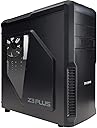


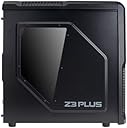
❄️ Stay Cool, Stay Ahead: The Ultimate Case for the Modern Power User
The ZALMAN Z3 Plus is a sleek black ATX/M-ATX tower case designed for superior cooling with a 5-fan system and wide mesh ventilation. It features bottom PSU installation for enhanced stability and quiet operation, front-panel USB and fan controls for convenience, and a dust filter to protect your components. Perfect for professionals seeking a high-performance, low-maintenance PC build.
| ASIN | B00DDC214K |
| Antenna Location | Spielen |
| Brand Name | Zalman |
| Case Type | Midi Tower |
| Colour | Black |
| Compatible Devices | ATX/M-ATX motherboards, ATX power supplies, 3.5-inch hard drives, 5.25-inch optical drives, multiple cooling fans |
| Cooling Method | Air |
| Customer Reviews | 4.3 4.3 out of 5 stars (299) |
| Enclosure Material | Metal |
| Fan Size | 120 Millimetres |
| Global Trade Identification Number | 05053959638775, 08809213765407 |
| Hard Disk Form Factor | 3.5 Inches |
| Internal Bays Quantity | 4 |
| Item Weight | 5.5 Kilograms |
| Light Color | RGB |
| Manufacturer | Zalman |
| Model Name | Z3 Plus |
| Number of Fans | 5 |
| Other Special Features of the Product | Dust Filter |
| Power Supply Mounting Type | Bottom Mount |
| Supported Motherboard | Micro ATX |
| Total USB 2.0 Ports | 2 |
| Total USB 3.0 Ports | 2 |
| Total USB Ports | 3 |
C**D
Really enjoyed this case
Recently built a budget, but quality pc for my brother using this case I have an Antec 300, which I recently tried to upgrade to a Thermaltake Armor Revo which cost £120. After endless quality problems with the Thermal take it went back and everything went back in my Antec. It is high praise to say that I would rather have this Zalman case than either my Antec or the TT Good quality build, painted inside also, fairly light and small case (but not flimsy), but my ATX build went in like a dream Its pretty much toolless, the 3 x 5.25" and (3 or 4?) 3.5" bays included ... it has 4 fans, 1 front, 1 back and 2 top. Front is a lovely blue LED lit, and all but the back have mobo connections. There is a fan controller for 2 fans, with a simple hi/low switch. I attached the 2 top fans to the controller It has a front/top USB 3.0 connection and the relevant mobo connection, which is quite rare at the moment All the front buttons and connections are on top, so your USB cables etc wont get in the way of any dvd drive drawer. All buttons feel solid and well made Maybe the cable management is not perfect, but I had no problems at all with space and making the internals look tidy by routing cables behind the mobo. Although the CPU power cable was not long enough to go behind, but maybe this is a power supply issue rather than the case (Corsair 430w builder series - one of the few components i was a bit disappointed with, but that is probably down to my bad research rather than the product itself) Hard drives are mounted so that access to their sockets is gained by removing the non-window side, (ie 90 degrees right of the old standard, where their sockets would be facing the mobo and get in the way of graphics cards etc) this also helps cable management. There is also an internal slot for a 2.5" SSD/HDD etc, and an external slot for a 2.5" floppy or card reader etc Clips included with the case attach to the side of Hard drives, which then simply slot in and out of the case toollessly There is good space between the 5.25" and 3.5" bays for a massive graphics card to fit in between The power supply is mounted at the bottom, with the fan pointing down, guarded by a removable air filter, and held off the ground by 4 rubber feet. The only negative for me, and I take on board what others say about space and cable management, was that the metal backplates that you remove when adding a PCI/PCIe card etc, are not re-usable - you snap them out and then cannot use them again. Fine if you are careful which ones you remove or have spare plates to hand. For me, and i dont buy alot of cases, but this was amazing value for money, and can be found cheaper. The Z3 plus, i believe is the same as the cheaper Z3, only it has a side window and a bracket for holding up heavy graphics cards or mounting an additional fan There is space at the front for an additional fan, but I cannot comment in the slightest about this cases suitability for water cooling. The front fan sits behind the main front bezel of the case, which comes off easily once you have done it once (good tug from the bottom), which is fully air filter lined and has nice removable covers for the 5.25" bays Plenty of screws, cable ties etc ... cant remember if the mobo speaker came with the case or the mobo sorry I love companies that provide quality at value for money and don't hesitate to give this case 5 stars I will be buying Zalman from now on
P**T
99) including free delivery – Well packaged & quick dispatch - A normal looking ATX case without looking like Megatrons left/rig
Bought to be used as a backup system Pros - The price (£26.99) including free delivery – Well packaged & quick dispatch - A normal looking ATX case without looking like Megatrons left/right buttock. - It has a side window that most cases within this price range don’t have. - Build quality in pretty reasonable, and you can’t really gripe too much. - Great for people who just want to build a system on a budget, or just don’t want to fork out for a really expensive case. - I believe it may even be able to accommodate the H100i liquid cooler system by Corsair – If it can then kudos there. - Power box location sits safe at the bottom. - Good location for power button, reset and USB ports (Which I personally prefer instead of having bits sticking out on the front, asking to be knocked e.g. USB memory stick). - For the price, it even comes with 3 fans, including 1 LED fan on the front. - It has a nice mesh front that doesn’t look like cheap tat. - I would say the case is pretty rigid overall, and not how some people might describe it - I would imagine even more rigid once components are installed. - Exposed motherboard panel to allow greater heat ventilation from CPU etc, facilitating the installation of CPU back plates for certain coolers, without having to remove the entire motherboard. - The Zalman Z3 does well to eliminate as many sharp edges as possible. Cons - Cable management may concern some, so if your looking to build a super computer with lots of wires going everywhere then this case might not suit you. Conclusion For the price you’re getting this for, including free delivery from Amazon, there is very little to complain about. It’s a simple case that offers pretty good quality. It’s not a big case, but big enough to accommodate a full size ATX motherboard, and has enough drive bays for the average computer builder, and has good component location. Bottom line though, it’s just a normal mature looking case without being designed to look over-the-top, with kind of a MATT finish. People disappointed in this case are just nit-picking, didn’t research enough for their particular needs, and probably expect a case made from gold for such a low price.
J**.
Good case for the price.
This is a nice case, and is very roomy. It comes with four fans which work nicely, and the two top fans work with the fan control button (maybe the front one as well). The case has a USB 3.0 port and to other USB ports on the top, along with microphone and headphone jacks. The only problem with these is they seem slightly flimsy. Another slight problem I found with case is that the motherboard won't line up perfectly with the I/O plate at the back. This means I can't use the PS2 port or another one which I don't even know what it is. This isn't too much of a problem for me since I don't use these, but USBs scrape along the metal plate for some of the USB ports. Another very very slight problem I the fans make a quiet, high-pitched humming noise, but this cannot be heard if you are playing something through speakers. All in all this is a decent, but not perfect, case. This is also good for only £33, and definitely useful for people on a budget.
J**.
Good overall, but has some big flaws
One of the fans does not work. The front panel audio connections are broken, the jack cannot be fully inserted. Apart from that is a really good case for the price.
1**1
Despues de 2 meses buscando este modelo, lo encontré en Amazon y a un buen precio. LLegó en dos días y la caja es todo lo que esperaba: espaciosa sin ser aparatosa, diseño discreto y a la vez atípico. Facilidad de montaje(tanto por la estructura como por los tornillos y accesorios incluidos,y las unidades sin tornillos) de los componentes, materiales de buena calidad y unos cuantos ventiladores incluidos. Aunque incluye 4, estos ventiladores son de gama muy básica y un poco ruidosos si están todos activados. En mi caso, he aprovechado sólo el del frontal (el único con led azul) para cambiarlo a la parte trasera, con un sólo ventilador que saque el aire me es suficiente con mi configuración, y le da un toque distinto.
A**N
Bu kasayı çok beğendim. Ön tarafında mavi ışıklı fan olmak üzere toplam 4 fan mevcut. Fan hava da alıyor. Teşekkürler amazon.com.tr.
A**F
Si tratta di un prodotto esteticamente piacevole e grintoso, ben progettato con uno spazio ben ripartito. Qualche cura in più poteva essere rivolta ai dettagli: un foro spannato vicino all'alloggiamento della scheda video, e le piastrine di blocco delle unità cd/dvd che si sganciano, ma che sostanzialmente non servono, visto che preferisco le viti per fissare meglio queste unità al case. Le ventole sono silenziose, almeno per il momento. Il case è leggero ma robusto nella sua struttura. Nel complesso un prodotto ottimo in rapporto al prezzo pagato, circa 68 euro.
D**.
Nach dem ich nun bereits ca. 5 Jahre mein uralt gehäuse im Prinzip als Backofen für meine Hardware nutzte, wollte ich jetzt endlich den schritt wagen mein System mit einem besseren Gehäuse aufzupäppeln. Würde ich auch jedem der noch ein altes Gehäuse hat empfehlen, da heutige moderne Hardware definitiv von besseren Eigenschaften als auch Luftstrom profitiert! Vom Preis her ist das Zalman auch sehr günstig mit knapp 50 Euro (ggf. von marketplace händlern etwas billiger) und wirkt relativ wertig für diese Summe. Der versand erfolgt scheinbar nicht mit DHL, sondern (in meinem Falle) mit DPD da das Gehäuse wohl zu groß ist für übliche DHL Pakete schätze ich, war aufjedenfall das erste mal das Amazon mir etwas NICHT mit DHL schickte (außer 1 oder 2 Bestellungen mit Overnight Express, die kamen dann mit UPS). Der Umbau der ganzen Komponenten ist eigentlich auch garnicht so kompliziert wie selbst ich trotz gewisser Hardware Erfahrung erst dachte. Die Bedienungsanleitung des Mainboards kann ggf. hilfreich sein für z.b. das richtige Platzieren der Power/Reset Connectors etc. Ganze 4(!) 120mm Lüfter wurden hier verbaut! Einer mittig vorne, einer hinten oben und zwei direkt unter der Oberwand des Konstruktes. Der vordere mittige treibt den Luftstrom an und dann wird alles von den anderen Lüftern nach hinten hin sowie oben ausgestoßen. Somit ist also ein super Airflow in diesem Gehäuse direkt ab Verpackungsstatus geboten, ohne notwendigkeit zusätzliche Lüfter zu kaufen. Jedoch sei gesagt wer Wert auf ein System legt das wirklich total "Silent" ist, den könnte die Lautstärke etwas stören. Sie sind nicht wirklich Laut, aber bei Stille definitiv zu hören. Über einen Knopf neben dem Power Button kann man (betrifft glaube ich nur die oberen Lüfter, aber bin mir nicht sicher) zwischen "Low" und "High" Geschwindigkeit wechseln. Ich persönlich lasse es immer auf High, da es wie gesagt so oder so nicht silent ist und der unterschied dann nur marginal ist. Wenn ich aber meinen Ventilator gegen die Sommerlichen Temperaturen anschalte ist der auf niedrigster Stufe etwa 3mal lauter als die Lüfter des Zalman Z3 Plus, nur so als vergleich... Es befinden sich viele öffnungen auf der rechten seite die einige möglichkeiten zum Kabelmanagment bieten um den Airflow nicht so sehr zu stören mit dem Gestrüp. Jedoch sah ich keine möglichkeit das dicke, verkleidete Hauptkabel vom Netzteil welches in den 24 Pin Stecker Hauptanschluss geführt wird da durch zu schleusen. Dasselbe gilt auch für die 6 pin stecker die meine Grafikkarte speißen. Da jedoch das netzteil am unteren ende platziert ist, sollte das eher kein Problem sein. Alle anderen Kabel ließen sich "relativ" gut hinter der Wand entlang führen um im Gehäuse mehr platz zu lassen. Sehr interessant ist auch das Stecksystem für die 3,5 Zoll Festplatten. Dafür liegen einige Halterungen bei welche beidseitig einfach an der Festplatte in den Schrauböffnungen per hand festgesteckt werden und dann auf einem schienen ähnlichen System sicher eingesteckt werden können. Es besteht die möglichkeit dann an der seite das ganze noch mit einer Schraube festzudrehen, ist aber laut Anleitung nur für einen evtl. Transport notwendig. Auch ohne die Schraube sitzen meine beiden Festplatten gut und können ohne gewolltes entfernen nicht herausrutschen. Das heißt wenn man in dieses gehäuse mal eine Festplatte installieren möchte, benötigt man nicht mal einen Schraubenzieher, den selbst die "Schrauben" der Seitenabdeckungen haben eine Art... naja ich nenne es mal runden "Griff" wodurch man sie ohne viel Kraftaufwand per Hand Ein- und Ausschrauben kann. Die Oberseite des Gehäuses verfügt neben dem Power-Button, Reset-Button sowie dem Low-High Button für die Lüfter über 2xUSB 2.0, 1xUSB 3.0 sowie einen Audio, Mikrofon Eingang bzw. Ausgang um ein Klinken Headset einzustecken. Über die Montage von laufwerken kann ich leider nichts sagen, da ich hier nur ein altes Rom Laufwerk rumliegen habe welches ich schon seit Jahren nicht mehr benutzt habe. Somit verwende ich keinerlei DVD, Blueray oder... Disketten (Naja <.<*) Laufwerke. Falls sich jemand (so wie ich zuerst) sorgen machen sollte wegen der Lüfter Anschlüsse, ist diese wahrscheinlich unbegründet. Ich nutze derzeit das etwas kleiner ASUS B85M-G Motherboard welches nur einen Anschluss für einen Gehäuse-Lüfter hat. An diesem hängt dann auch direkt der hintere Lüfter. Die beiden lüfter an der Oberseite können anstelle von 3 Pin anschlüssen einfach in die direkt mit dranhängenden 3 Pin stecker eingeführt werden und dann kann das ganze über den damit verbundenen 2-Seitigen 4 Pin Molex Stecker mit dem Netzteil verbunden werden. Dasselbe gilt auch für den Front-Lüfter. So braucht man nur ein passendes Netzteil Kabel mit 2 4 Pin-Molex steckern dran und dann laufen alle Lüfter wie gewollt :) Meine MSI GTX 970 Gaming 4G liegt nun im IDLE bei unter 40 C (Dieses Modell aktiviert die eigenen Lüfter erst ab 60 C und kühlt sich darunter passiv!) auch beim heutigen Spielen von GTA V stieg die Temperatur dann nicht über 65 C an. Es sei erwähnt das ich generell immer leich erhöhte Temperaturen in meiner Wohnung habe, somit kann unter besseren Umweltbedingungen das ganze vielleicht sogar noch ein paar Grad kühler laufen. Finde das ganze bisher Super, sieht recht nett aus (Hat auch ein Seitenfenster, falls man wert darauf legt das die schicke Hardware sichtbar sein soll ;D ) und die Schalter sowie Klinken und USB-Eingänge sind sehr Komfortable platziert. Also alle die wie ich nicht die totalen Luxus-Ansprüche an ihr Gehäuse haben und von ihrem alten Backofen umsteigen möchten ist dieses Gehäuse meines erachtens defintiv eine Kaufempfehlung und mit ca. 50 Euro relativ günstig.
H**O
J'ai acheté cet article il y a plusieurs mois. Je peux dire que ce boitier est au top ! J'aime : - Le nombre de ventilateurs qui permet de garder une bonne température interne - Le poids du boitier qui permet de le déplacer facilement - L'alimentation en bas - Le double fond qui permet d'y mettre les cables - Le design et la vitre sur le coté - Le rhéobus intégré - Les leds bleus J'aime moins : - Le rhéobus ne permet que 2 positions, ce qui est dommage... Je recommande très fortement cet article pour ceux qui ne souhaitent pas se ruiner et avoir tout de même du matériel de qualité ! Encore une fois, merci Zalman !
Trustpilot
Hace 2 meses
Hace 4 días