We remain fully operational. Our teams are working around the clock to ensure your deliveries continue safely.

Descargar la aplicación


Servicios al cliente
Sobre nosotros
Copyright © 2025 Desertcart Holdings Limited
Descargar la aplicación

Buy anything from 5,000+ international stores. One checkout price. No surprise fees. Join 2M+ shoppers on Desertcart.
Desertcart purchases this item on your behalf and handles shipping, customs, and support to Argentina.
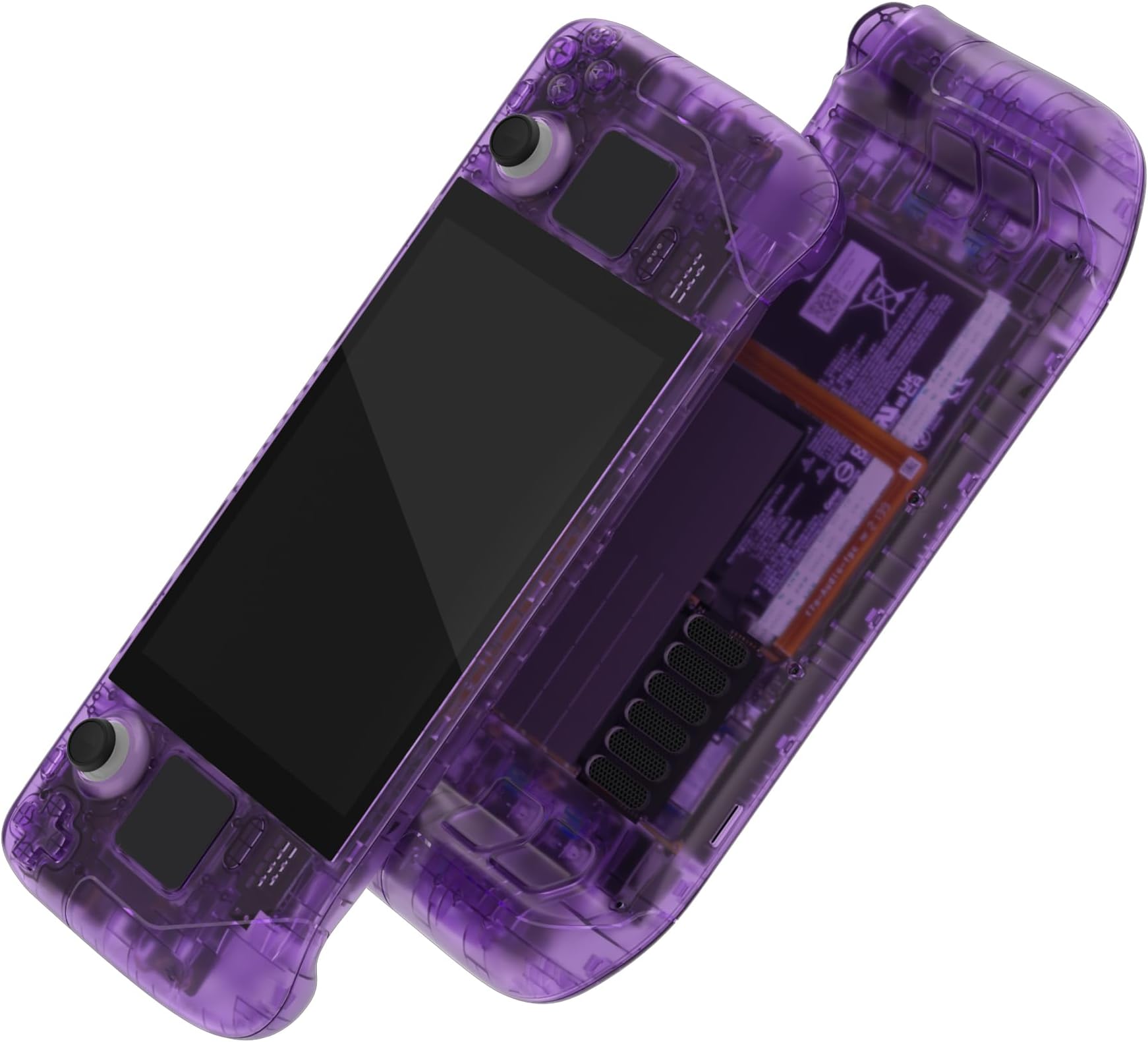
🎮 Level up your Steam Deck’s look with the ultimate custom shell—because your console deserves to be as bold as you are!
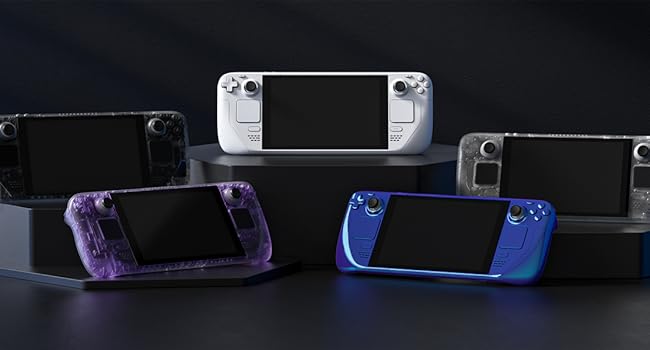
The eXtremeRate Custom Faceplate Back Plate is a premium replacement housing kit designed exclusively for the Steam Deck LCD (2022). Featuring a striking Clear Atomic Purple ABS shell, it includes a full set of buttons and all necessary tools for a complete DIY upgrade. Precision-cut for a flawless fit, this durable matte-finish case elevates your console’s style and feel, backed by comprehensive video installation guides for a confident, professional-level swap. Console not included.



| ASIN | B0C7818FWB |
| Best Sellers Rank | 4,518 in PC & Video Games ( See Top 100 in PC & Video Games ) 35 in Steam Machines Accessories |
| Brand Name | eXtremeRate |
| Colour | Clear Atomic Purple |
| Country of Origin | China |
| Customer Reviews | 4.4 4.4 out of 5 stars (447) |
| Enclosure Material | Acrylonitrile Butadiene Styrene (ABS) |
| Hardware Platform | Steam Deck |
| Item Dimensions W x H | 20W x 10H millimetres |
| Item Weight | 10 Grams |
| Manufacturer | Extremerate |
| Product Finish Type | Matte |
B**E
10/10 isn't good enough for this shell
Honestly this is one of the best shells I've come across, let alone for the Steam Deck. It feels great, looks fantastic and fit together arguably better than the stock shell. Mine creaked when the shell was pressed below the screen and this one didn't, so clearly done something better than Valve to sort that out! I did keep the original buttons though as it looks quite cheap going with all purple - but that's just me. The kit had everything you need to swap and Extreme Rate have a YouTube video that was really well done and easy to follow, so I'd recommend watching that like I did. I can't fault it and whilst this isn't a reflection on the shell, it's definitely not for the feint of heart. You take everything apart, including the screen (which I'd never done before) so I wouldnt do it as your first ever shell swap. If you do though, watch their video, take it slow and keep track of which screws go where so you don't ruin any of the posts with the wrong screws. My tip: I used several egg pots and scrap paper to say what they were - worked well!
S**T
Patience is key!
After having a vinyl skin on my deck for a little while, I decided to take the plunge and buy the extremerate shell. I have zero experience with tear downs but I followed the tutorial on YouTube, pausing where necessary, which made the whole process a lot smoother. The screen removal was the most stubborn element to take out of the original shell but I would strongly advise purchasing the iOpener kit from iFixit. Stick it in the microwave for a minute and then place it on each side for about 5 minutes - I did this whilst watching a 30 minute show on Netflix to pass the time! Using the iFixit suction tool, I was able to prise the screen off without using the pics. Make sure to use isopropyl to safely remove the adhesive left behind. After the screen removal it’s pretty much plain sailing from there. I chose to keep the original buttons as a nice contrast to the translucent green; I will be putting some black extremerate back paddles on the rear too as I think that would look much slicker. The whole process probably took around 2.5 - 3 hours…if you like tinkering and enjoy projects that test your patience, the time will fly by as it did for me. I’m really pleased with the end result, it feels nice to hold and the quality is fantastic. The fit is absolutely perfect and for the price of the kit, the value for money is second to none. My main problem was actually choosing the shell colour! I would definitely recommend this if you have the patience for such things…I love a challenge so this was right up my street!
A**R
Solved my issue with the original backplate rubbing on the right trigger
Disclaimer, This review is from someone who has only used the backplate and back buttons! I have seen the full tutorial on YouTube and note that to do the full kit looks like a process, so check it out before buying it. My right trigger on my steam deck felt a bit funny when I pushed it all the way in, so I did a bit of research and found it’s a common thing for the triggers to rub. I saw an easy fix for this was to buy a backplate, so I got this kit for the backplate as I liked the look of the blue. I can confirm it has fixed my issue with the trigger rubbing. The only negative I have found with it is that when I put it all back together and tested, the L4 back button wasn’t pressing as well as the rest. I took it apart and had a look and after a bit of a head scratch found that the issue was a burr which was reducing the range of motion, took the burr off with a knife and it works perfectly now. This is the only reason for the 4 star as it caused me a temporary headache.
M**E
Tough to fit but very much worth it
Brilliant, the better half loves this. My only criticism is it's slightly harder to hold due to the slippery texture on the grips, especially if your hands sweat. Otherwise it's awesome. *Do not attempt this if you are not experienced disassembling and reassembling electronics. Even with the video guide, it's far harder and longer than you would assume*
M**I
Very good
Transformed my steam deck to the limited edition look - without the hefty price tag scalpers or re sellers are asking for. Good quality
F**T
Computer engineer skills needed
I bought this as a present for my adult son. I had thought that replacing the original shell for this one would just be a snap and click type of job. I was very, very wrong. The Steam deck has to be dismantled to remove the case and controllers and then of course it all has to be reassembled. It took three attempts for everything to work again. Watching videos of the process helped but there are still many ways for it to go wrong. Unless you are competent computer engineer, with a lot of patience and suitable tools I would not recommend this product. It does look good but was it worth all the stress?
D**Y
Amazing Results
Firstly, don't be put off having a go! I don't think it is hard as people say, as long as you give yourself time. Mine turned out fantastic, I am very happy. I recommend the following considerations before you buy 1. Get yourself your own toolkit. The suction cup is rubbish and the metal pick should not be used, use plastic instead. 2. Use a heat gun and keep moving, medium heat, for around 2 minutes. 3. Use isopropyl rubbing alcohol to get rid of remaining residue. Important to get rid of all glue!. My only complaint is the screws are confusing, should be labelled up. Really happy with results.
J**N
Looks fantastic
Came with all of the tools and links to in-depth videos for installation. This was my first time doing such an extensive shell swap, and all the replacement parts screws and adhesives fit perfectly. The only thing missing would be replacement thermal paste for the CPU heatsink but I had some on-hand anyway. I love the new look of my steam deck and will definitely order from this brand again
J**S
My friend and I both bought shells, he got one with a hazy purple and I the gradient (see last photo). The hazy has a better texture but is harder to see the internals, while the gradient is very slippery and smooth plastic but can see though it better. They both look great on, I didn't consider the texture when buying but you might want to if you want to match your glossy or anti reflective screen. I didn't use any of the buttons that came with my kit and reused the originals as the kit buttons were very glossy black. The only ones I had to use from the kit were the underside ones (they aren't removable from the oiginal). To put them on, independently it took both of us 4 hours each. Maybe just a little under. Don't underestimate the complexity of these devices on the inside, I thought it might take an hour when starting but was very wrong. The kit comes with everything you need (except a hair dryer for heat) but you would do better with your own electronics dissasembly kit. It's probably not suitable for absolute beginners but if you have ever pulled a laptop apart you can probably do this. There are video instructions for every step if you need them so it's pretty hard to go wrong until you start doing the anxious stuff like pulling off the screen (be super careful and use a lot of heat).
K**P
Absolutely fantastic, the pictures make it look much darker than it is, but the quality is unquestionably fantastic. However, and, this is a fault on my end so im leaving this as 5 stars. You need a heat gun to do a full shell replacement. It was my fault for not researching. And the tutorial for the full swap was absolutely fantastic, step by step, screw by screw. In terms of recommendations, I would say, the devs did great, my only gripe is something I'm pretty sure is an issue with valve, not this product. I really wish i could have replaced all the glued bits inside, instead of reusing them. But from personal experience with valve, there are some things they won't distribute, and im sure those glued bits are examples of that. (Seriously, id love to replace my trackpads, but they don't sell replacements, and im not using ebay) To any potential buyers. This is honestly worth it, if youve got the ability to follow step by step instructions, and, a steady hand. Do it, full send. If you're gonna do this mod, i recommend also getting the hall effect joysticks and the clicky kit, As well as some buttons, just to really make all the work worth it. To do this swap, you gotta completely dismantle your steamdeck, may as well upgrade it while your there. Ive even seen some people doing hard drive swaps and honestly, if i had known i was gonna be in the ball park, i probably would have swapped that too lol. Either way, it took me about 2 hours (the tutorial is something like an hour long but im not skilled so i had to pause frequently) But that just goes to show how awesome this kit is, im not skilled and i could install it. Perfect score, well done devs. ❤️
J**J
Die Qualität der Plastikteile ist wirklich gut, alles passt perfekt zusammen. Der Hersteller hat auf der Webseite eine sehr gute Videoanleitung verlinkt, mit der alle Schritte erklärt sind. Das Ergebnis sieht wahnsinnig gut aus und erfüllt alle Erwartungen meiner 2000er-Nostalgie :) Der Umbau ist jedoch nichts für schwache Nerven - ich schraube viel, entwerfe selbst Platinen usw. Man darf sich auf ca. 4 Stunden Schrauberei einstellen. Das Steam Deck ist eine wirklich komplexe Konsole (hut ab an die Produktdesigner von Valve!) und man muss verdammt viele kleine Teile ausbauen - man zerlegt die Konsole hier 100% in die Einzelteile, da bleibt nichts mehr beisammen. Meine Empfehlung: Man sollte neben den gelieferten Materialien noch einen einstellbaren Föhn oder besser eine Heißluft-Lötstation mit Temperaturregelung haben, um das Display und ein paar weitere verklebte Komponenten zu entfernen. Zudem ist etwas Reinigungsalkohol (IPA o.ä.) für die Klebereste am Display hilfreich. Eine Handvoll Gitarrenplektren machen das entfernen vom Display auch nochmal einfacher als nur das einzelne mitgelieferte Metallblättchen. Unbedingt beachten: Ihr entfernt den Kühler vom SoC des Steam Deck. Ihr solltet auch ein wenig neue Wärmeleitpaste haben um diese neu aufzutragen. Meine war schon arg zerbröselt und konnte nicht wiederverwendet werden, habe aber mein Steam Deck auch schon seit Launch. Mit sehr neuen Steam Decks ist die WLP evtl. noch flüssig genug um neu verwendet zu werden. Ich bin sehr zufrieden. :)
I**R
Well-built and exactly as expected! The assembly process requires some skill, but it’s a fun challenge if you enjoy Lego and puzzles 😅
R**O
Molto accurato calza come un guanto, occorre il giusto tutorial per le operazioni di assemblaggio. Ottimo prodotto
Trustpilot
Hace 2 semanas
Hace 2 semanas