We remain fully operational. Our teams are working around the clock to ensure your deliveries continue safely.

Descargar la aplicación


Servicios al cliente
Sobre nosotros
Copyright © 2025 Desertcart Holdings Limited
Descargar la aplicación

Buy anything from 5,000+ international stores. One checkout price. No surprise fees. Join 2M+ shoppers on Desertcart.
Desertcart purchases this item on your behalf and handles shipping, customs, and support to Argentina.
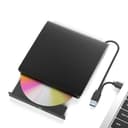
🔥 Burn, Backup, and Belong with the Ultimate Portable Blu-ray Drive!
The Wintale External Blu-ray Drive is a sleek, portable optical drive supporting 50GB Blu-ray discs with 6x read speed and USB 3.0 Type-C connectivity delivering up to 5Gbps transfer rates. Compatible across Windows, Mac, and Linux, it offers plug-and-play convenience in a compact form factor, ideal for professionals needing reliable high-capacity media reading and burning on the go.


| ASIN | B0BX93ZRLK |
| Additional Features | Plug & Play |
| Best Sellers Rank | #38 in External Blu-ray Drives |
| Brand | wintale |
| Built-In Media | external dvd burner |
| Cache Memory Installed Size | 2 |
| Compatible Devices | Laptops, Desktops, Macbook |
| Connectivity Technology | USB |
| Customer Package Type | Box |
| Customer Reviews | 3.9 3.9 out of 5 stars (839) |
| Data Transfer Rate | 5 Gigabits Per Second |
| Enclosure Material | Acrylonitrile Butadiene Styrene (ABS) |
| Form Factor | External/Slim |
| Hardware Interface | USB 3.0 Type C |
| Hardware Platform | PC |
| Item Dimensions L x W x H | 6.18"L x 5.74"W x 1"H |
| Manufacturer | wintale |
| Media Speed | 1.2 MB/s |
| Mfr Part Number | SZ_13CMKe |
| Model Number | External DVD Drive _0012 |
| Operating System | Windows 8 |
| Optical Storage Read Speed | 8x |
| Optical Storage Write Speed | 8x |
| Specific Uses For Product | Home entertainment, Office use, Travel, Multimedia playback, Data backup |
| UPC | 190726886146 190726885620 |
| Unit Count | 1.0 Count |
| Warranty Description | 2 yeras |
L**S
I use it everyday!
This external Blu-ray drive is compact, easy to carry, and worked right away on both USB-A and USB-C without extra setup. It reads and burns discs reliably, including larger 50GB Blu-ray discs, and performance has been consistent so far. It’s a convenient solution for laptops without optical drives and feels like good value for a portable burner.
Y**Z
Funciona perfecto , gran compra, excelente dispositivo
J**E
Worked with SOME difficulties... exactly one time. Helpful advice on getting the tray to open!
Had a bit of a snafu with this one at first. You know, wouldn't wanna open a bit, swapped USB ports around some, still wouldn't open. Hooked it up to an external battery bank to power it up and get it open, then no problems after that. Until the second time I wanted to use it. Plugged it in, put a disc in, and it immediately stopped working. Light would come on, some noises would be heard, and nothing. It would not open, it would not be detected by anything. I tried four different USB ports including ones directly connected to my motherboard, three different devices, a battery bank AND a battery bank with a computer connection to my motherboard, all of this accomplished nothing. So my disc was trapped inside of the device; which stopped functioning, and I couldn't get it open. Holding down the button of course, did nothing too. More noises, lights, would never open or do anything beyond making noises. I almost called Amazon customer support to ask what I could do about returning it, when I instead saw a tiny pinhole on the front. Then it struck me! GETTING THE TRAY TO OPEN MANUALLY Okay so if you're in my situation? Here's what you do! Grab yourself a Sim Card Tray Needle, if you have one lying around of course! If you've purchased a phone recently or held onto that pinhole needle that came with an old phone, you can use that pinhole needle for opening your disc tray too. If you DON'T have this, you can purchase some online for a cheap price. Shove that into the hole on the front of the disc drive by the button. You may need to go in deep or wiggle it some, but it SHOULD then open the disc drive. I recommend holding it at an angle so the tray will gently fall open while doing this. This way you won't accidentally close it shut again while using the pinhole needle, or keep it from opening and not realize it. If all goes well it'll release, and you can get your disc out of the device. Now, your mileage may vary, but please do try this before attempting drastic measures or losing a disc. Especially if you intend to return this device, like I do! In short? This drive is awful, despite the minor problems I liked it quite a bit at first; but this entire situation evaporated any goodwill I had towards it. I seldom leave reviews, but I wanted to provide assistance to anyone who may find themselves in the situation I did. If you are, I hope this helps you in some way. If you're looking to buy this? Don't.
M**T
Broke after barely using it / Customer service was fast
Used it about 3 times when I first got it, played dvds fine on my macbook air. Put it away for a few months, just plugged it in again and flashed a yellow light and clicked. Tried on a different computer and still with the clicking. Do not recommend. Waste of money. Update 10/29 Customer service reached out and refunded the product. Thank you.
O**T
Burns Blu-Rays NOT DVDs !!!!!
This device does NOT read DVDs;
S**X
Portable Blu-ray burner
Works as intended, capable of reading Blu-ray discs without issues (you will need compatible software, like PowerDVD, to play commercial discs), burned Ridata BD-R at 4x also without issues (using ImgBurn 2.5.8.0). Very portable, included cable has both USB-A and USB-C ports, so you can connect it to any laptop or desktop including Macs, no adapters needed.
A**R
This Blu-ray drives DVD player is great!
It works well on my computer,easy to set up. It's truly a plug-and-play device, connecting to my system in seconds. The blu-ray playback quality is perfectly. It plays my Blu-ray movies flawlessly, making movie nights a pure joy. I'm pleased to say that this drive meets allmy needs and performs superbly. Highly recommended!
A**E
Made me reevalute my life
Tips before you buy: - Make sure you have a free primary USB input as this product requires so much power you will likely have to plug it directly into your motherboard - Go ahead and research where and how exactly you can change the region of your device in your properties/settings as you will likely have to do this in order to get it to function at all - Pay +$100 for media playback software as this is (apparently) completely incompatible with VLC Media Player (only the most popular of the past decade). Instruction suggest you get PowerDVD (a pop-up saturated, personal information guzzling, $100 piece of garbage) or Leawo (Windows 11 incompatible outside of the $150 purchase, free version only works through Windows 10 at most reportedly doesn't handle Blu-Rays well, if at all. - don't worry if this all seems like a lot. There will be an insert called "Warm Tips" (???) that comes with this product that alludes to several of these items. Seemingly indicating that this experience is rather typical amongst their customers. - take up a new hobby like crocheting so you can have something to do while this thing tries to recognize the discs you insert and actually start up and get running You're in luck if: - you (for some ungodly reason) have already spent +$100 for a premium media playback software suite. AND - you have a free USB slot on your motherboard AND - you luckily are in the same region the product is coded for Pros: I now know how to crochet Cons: I wasted $50 on this thing Tried With: multiple PCs over several months. Hours of troubleshooting and research. Every USB slot on my computer. Prayer.
R**I
Arrivato prima del tempo previsto è dotato di cavo d uscita usb e usb c , L ‘unico appunto che il cavo è molto corto , la scrittura del lightscribe è piuttosto lenta è però apprezzabile la portabilità del prodotto merita un 8,7 su 10
M**C
The drive works okay but there's definitely no lightscribe capability, I've tested it on Windows 7 and Linux, this drive could not be recognised as lightscribe-capable despite trying different drivers. My very old Memorex is recognised and usable but because it uses USB 2.0, I was hoping to upgrade to a USB 3.0 drive. Alas, this drive can only be used as DVD reader/writer. Unlike what you see in the photos, the lightscribe mechanism is not there.
A**H
Won't read DVDs. Tried 6 different DVD and even one fresh removed from wrap. None of them are detected by the drive
P**T
The description is completely misleading. Even though the name has Blu-ray mentioned this product is just a simple DVD writer. It does not play Blu-rays. Secondly the read speed is very slow and it takes a very long time to copy from the disc to pc. Don’t buy. Waste of money.
M**C
Great drive at a great price. It works seamlessly. My laptop, using Windows 11, discovered it immediately when I first plugged it in using the USB-3 cable. As suggested by the seller, I installed PowerDVD for viewing blu-ray movies and Ashampoo Burning Studio for writing to blank blu-ray discs. It works flawlessly at doing both. Highly recommended.
Trustpilot
Hace 2 meses
Hace 1 día