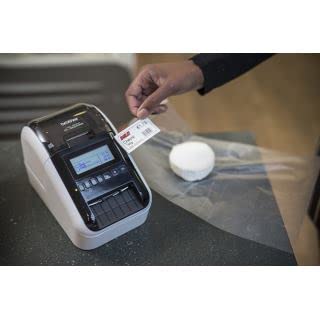


🏷️ Elevate your labeling game with precision and style!
The Brother QL-820NWBc is a compact, high-resolution (300dpi) label printer designed for versatile professional use. It supports label widths from 12mm to 62mm, including custom lengths up to 1 meter on continuous rolls. Featuring wireless, USB, and Ethernet connectivity, it enables seamless printing from multiple devices. Its unique inkless dual-color printing capability (black and red) delivers vibrant, durable labels without the need for ink or toner, making it ideal for office, retail, warehousing, and food prep environments.


| ASIN | B0BTHSHG4Y |
| Best Sellers Rank | 3,415 in Stationery & Office Supplies ( See Top 100 in Stationery & Office Supplies ) 18 in Label Makers 27 in Labels & Labelling Equipment |
| Colour depth | 1 bpp |
| Compatible devices | PC |
| Customer Reviews | 4.4 4.4 out of 5 stars (2,338) |
| Date First Available | 31 Jan. 2023 |
| Dual-sided printing | No |
| Included components | Paper |
| Ink Colour | black, red |
| Item Weight | 2.68 kg |
| Manufacturer | Brother |
| Manufacturer Part Number | QL820NWBCZU1 |
| Max input sheet capacity | 100 |
| Maximum Supported Paper Size | 3 x 5 inch |
| Maximum black and white print resolution | 300 dpi |
| Maximum colour print resolution | 300 dpi |
| Model Number | QL-820NWBc |
| Number of Items | 1 |
| Print media | Labels |
| Product dimensions | 12.5D x 14.5W x 23.4H centimetres |
| Sheet size | 62mm |
| Size | one size |
| Warranty type | limited warranty |
P**L
Brilliant machine and really good software - works well with MacOs
I was a little concerned about buying this due to talk of compatibility issues and poor software. But the QL-700 - USB only - connects fine to my MacBook Pro M4. Software downloaded from Apple app store and is very stable and user friendly. Quality of print is very high resolution and sticks well to most surfaces. More than met my expectations.
H**Y
Brother QL-800 Label Printer - Precision Labeling with a Splash of Color
The Brother QL-800 Label Printer has become an indispensable tool in my home office, offering unparalleled convenience and versatility in label printing. Its PC connectivity, desktop design, and the unique red & black printing capability make it a standout choice for anyone in need of efficient and eye-catching labeling solutions. Here's why I wholeheartedly give it a perfect 5/5 rating: Effortless PC Connectivity: ⭐⭐⭐⭐⭐ The QL-800's seamless PC connectivity has revolutionized my labeling experience. Connecting it directly to my computer allows for quick and efficient label creation, streamlining the entire process. The user-friendly software enhances customization and ease of use. Desktop Design for Convenience: ⭐⭐⭐⭐⭐ The desktop design of the QL-800 is both space-efficient and practical. It fits neatly into my workspace, and its compact size doesn't compromise on its robust capabilities. Having a dedicated label printer on my desktop has significantly improved my workflow. Red & Black Printing Innovation: ⭐⭐⭐⭐⭐ The standout feature of the QL-800 is its ability to print in red and black. This dual-color printing capability adds a level of sophistication and visual impact to my labels. It's a game-changer for creating attention-grabbing labels that stand out in a professional and creative manner. Fast and High-Quality Printing: ⭐⭐⭐⭐⭐ The QL-800 lives up to Brother's reputation for delivering high-quality prints at an impressive speed. Whether I'm printing address labels, file labels, or product labels, the sharp and clear results are consistent, saving me time without compromising quality. Versatile Labeling Options: ⭐⭐⭐⭐⭐ The QL-800 offers a wide range of labeling options, accommodating various label sizes and types. From small address labels to larger shipping labels, the printer handles diverse labeling needs effortlessly, making it a versatile solution for any situation. User-Friendly Interface: ⭐⭐⭐⭐⭐ The user-friendly design of the QL-800 makes it accessible to users of all levels of expertise. Loading labels is a straightforward process, and the control panel is intuitive, ensuring a hassle-free and efficient printing experience. Overall Satisfaction: ⭐⭐⭐⭐⭐ In conclusion, the Brother QL-800 Label Printer has exceeded my expectations in every aspect. Its seamless PC connectivity, desktop convenience, red & black printing innovation, fast printing speed, versatile labeling options, and user-friendly interface make it a top-tier choice for label printing. The QL-800 is a perfect blend of efficiency and creativity, earning it a resounding 5/5 rating. Highly recommended for anyone seeking a reliable and feature-rich label printer for both professional and personal use.
S**E
Love it!
Excellent label printer. You need to download software and a driver for your PC - somewhat quirky to install but works fine. The P-Touch program you use to layout and print labels looks dated but is functional. I use the printer much more than I thought I would. If I was buying it again, I would probably get the WiFi version.
D**O
Over Fifty Thousand labels printed and still going strong - Top Quality bit of kit!
I first purchased this printer 2 years ago to print self adhesive address labels. As some other reviews have indicated, the set up can be tricky as I found initially. A quick internet search soon pointed me to a video clip on youtube which showed me how to update the firmware on the supplied printer to enable it to communicate with my Windows 10 LapTop. From then on the printer worked with zero issues, being incredibly easy to use and reliable 100%. I use it in the simple mode, utilising its excellent built in "PtLite10.exe" program, so as not to need any software on the lap top to operate it. Since then, two years ago, this little printer has printed out over 50,000 self adhesive address labels, and it amazes me how its self cutter blades have still not yet gone blunt! Because I can not believe that this little printer can go on much longer, I just took delivery of a second one as a spare. It too required a firmware update to work with Windows 10, as previously. It will now be kept as a spare should the first one decide that it needs to retire! Just on running costs for information: Labels and consumables: With this being a thermal printer, it saves a fortune not needing any ink, so ignoring its tiny power consumption, the only running costs are the labels that are used. I have only every used the "compatible type" labels for my needs, and they have proved superb and at a fraction of the cost you might pay for original Brother ones. Final important consideration on choice of address labels: If you aim to put this printer through its paces printing lots of labels, it is tempting to use the "continuous" labels (one continuous length of label cut off as required) , as the cutter chops off the label at the end of the longest line of text (seemingly more economical as less paper used), unlike using fixed length individual labels which are always cut at the end of (in between) each label. I moved over to fixed length individual labels for this key reason: The cutter blade on fixed length labels only has to go through the thin backing sheet. On continuous length labels, when the text ends, the cutter has to chop through all of the backing paper, a film of adhesive, and the label paper itself. That combination with the continuous labels would I expect, soon cause the cutting blades of this printer to get clogged up or blades made dull if using in volume. In Conclusion, aside from the Firmware updates I needed with both purchases, this printer gets maximum points from me for pure durability and ease of operation.
F**C
Il est conseillé de télécharger le logiciel adapté, pour pouvoir utiliser l'imprimante dans son plein potentiel. Le soft automatique est rapide et suffit a imprimer simplement. Le logiciel complet permet l'usage de la couleur rouge sur une des bandes fournies, de tous les formats et options possibles! Elle est tres rapide en impression N&B et + longue en impression rouge, c'est normal. Je la trouve plus facile d'utilisation que son équivalent Dymo,a ce propos les bandes sont beaucoup plus facile a installer sur cette petite Brother. Pour le prix elle est parfaite. *Attention, les bandes générique ne permettent pas l'impression en rouge, mais pour du consommable en grande quantité, en N & B, des génériques font tout aussi bien le job.
G**S
Venendo da una leitz icon che dopo poco più di un anno inspiegabilmente si rifiutava di connettersi in wifi, ho deciso di sostituirla con questo modello. Premesso che ne faccio un uso saltuario, anche se a distanza di qualche mese un paio di cartucce bicolore (rosso/nero) le ho usate, posso tranquillamente affermare che il prodotto si è dimostrato davvero eccellente sotto ogni punto di vista. Certo le cartucce non costano poco ma la differenza dalle compatibili si vede davvero. Installazione del prodotto molto semplice, manuali e sw (pc e cell) in italiano, quest'ultimo decisamente versatile e completo. Per quanto mi riguarda promossa a pieni voti. NB: cercando i ricambi non è passata inosservata la vers. completamente a colori, ovvero Brother VC-500W che mi arriverà venerdì. Quest'ultima sarà destinata per un etichettatura più professionale dato che la pellicola è lucida e a colori, ma anche più parsimoniosa dal momento che la lunghezza della cartuccia è la metà di questo modello: 5mt contro i 10mt e naturalmente decisamente più costosa. Tuttavia insieme ritengo siano complementari. In ogni caso scriverò una recensione più approfondita nella pagina del prodotto appena mi arriverà.
P**E
La brother non si smentisce, sempre prodotti di qualità. C'è un software integrato per la gestione della stampa, per il resto bisogna scegliere solo le etichette delle dimensioni che si vuole.
S**D
Habe mir den QL-820NWB vor etlichen Wochen gekauft. Ich nutze ihn im Netzwerk (Kabel). Gedruckt werden Beschriftungen für Schubfächer, Aufbewahrungsboxen, Anschlussbezeichnungen technischer Geräte, Ordnerrücken, Service- und Wartungsaufkleber oder auch Briefmarken. Kurzes Résumé: Mit diesem Label-Drucker bin ich absolut zufrieden. Konfiguration: Bereits vor der Installation kann der Webserver des Druckers über die IP-Adresse aufgerufen und der Drucker vorab konfiguriert werden. Die Konfiguration von Sprache, Beleuchtung, Schnitt, statische IP-Adresse, Kennwort und viele weitere Einstellungen sind somit (unabhängig von irgend einer Software) möglich. Ebenso kann über dieses Web-Interface die aktuelle Firmware geladen und installiert werden. Software: Der P-Touch Editor erfordert etwas Einarbeitungszeit. Hat man sich mit den Funktionen vertraut gemacht, erfüllt er aber quasi alle professionellen Ansprüche. Die Anbindung an eine Access-Adressdatenbank (7500 Adressen) ist problemlos, ebenso werden Inhalte verknüpfter Tabellen korrekt verarbeitet. Zur korrekten Darstellung von Adress-Datensätzen können z.B. Titel, Anrede, Vorname, Name oder Firmenname in der Breite flexibel angepasste werden, so dass auch bei unterschiedlichen Längen immer eine korrekte Darstellung erfolgt. Nicht selbsterklärend ist die Möglichkeit die unterschiedlichen Zellen einer Tabelle für Dateninhalte (aus einer Datenbank) festlegen zu können. Das erleichtert das Design von Vorlagen enorm und sollte in der Bedienungsanleitung deutlicher zum Ausdruck kommen. Vorlagen: Vorkonfigurierte Etikette, die des Öfteren benötigt werden, können als Vorlagen direkt im Drucker abgespeichert werden. Die dort gespeicherten Vorlagen können somit direkt aus dem Drucker (ohne jegliche Software) ausgedruckt werden. Aktualisierungs-Felder werden korrekt verarbeitet, ein Etikett mit Aufschrift „Wartung am [Datumsfeld] durchgeführt“ zeigt somit immer das Datum am Tag des Ausdrucks an. Absolut interessant empfinde ich die Möglichkeit, selbst Informationen einer Datenbank als Vorlage abspeichern zu können. Beispiel: Die Familie besteht aus 5 Personen, das jeweilige Absender-Adressetikett unterscheidet sich somit nur im Vornamen. Die Feldinhalte können in einer Excel-Tabelle abgelegt und mit dem dazugehörenden Etikett als Vorlage im Drucker gespeichert werden. Diese Vorlage kann dann im Drucker selbst z.B. unter "Absender" aufgerufen werden, die jeweiligen Vornamen können nun aus der Gruppe "Absender" im Bildschirm des Druckers gewählt und (ohne Zuhilfenahme eines PC's oder einer Software) ausgedruckt werden. Etiketten: Das Einlegen ist einfach, der Schnitt erfolgt exakt so, wie es im P-Touch Editor eingestellt wird. Nachdem man die Etiketten sowohl vertikal als auch horizontal beschriften kann, kommt bei mir in der Hauptsache das Endlospapier mit 62mm Breite zur Anwendung. Das Schriftbild im Standard-Druck ist gut und kann, falls erforderlich, in der Druckqualität mit den Stufen "Druckqualität Vorrang geben" und "Hohe Auflösung" an die eigenen Bedürfnisse angepasst werden. Beim Briefmarkendruck ist darauf zu achten, dass man vor der Erstellung des PDF-Dokuments (Deutsche Post - Internetmarke) diesen Drucker in den Voreinstellungen festlegt. Mich hat der "QL-820NWB" mit seinen professionellen Möglichkeiten überzeugt. Wer diese nicht benötigt oder sich nicht etwas intensiver einarbeiten möchte, wird mit einem simpleren Label-Drucker der Konkurrenz (z.B. einem Dymo 450 – besitze ich ebenfalls) vielleicht glücklicher. Allerdings ist dessen Funktionsumfang deutlich geringer, so dass beide Geräte in einer unterschiedlichen Liga spielen. Für den, der fortgeschrittenere Funktionen benötigt und ein paar Stunden Einarbeitungszeit nicht scheut, dürfte es zum "QL-820NWB" aber wenig Alternativen geben.
D**F
Sortant d'une mauvaise expérience avec une Dymo, cette imprimante est le jour et la nuit ! Connexion réseau et impression simplissime depuis un Mac ou un iPhone avec les apps Brother sur le store. Je ne regrette vraiment pas mon achat. Par ailleurs l'utilisation d'un rouleau continu avec la découpe automatique est vraiment économique pour l'impression d'étiquette code barres. Parfait !
Trustpilot
Hace 1 mes
Hace 2 meses