We remain fully operational. Our teams are working around the clock to ensure your deliveries continue safely.

Descargar la aplicación


Servicios al cliente
Sobre nosotros
Copyright © 2025 Desertcart Holdings Limited
Descargar la aplicación
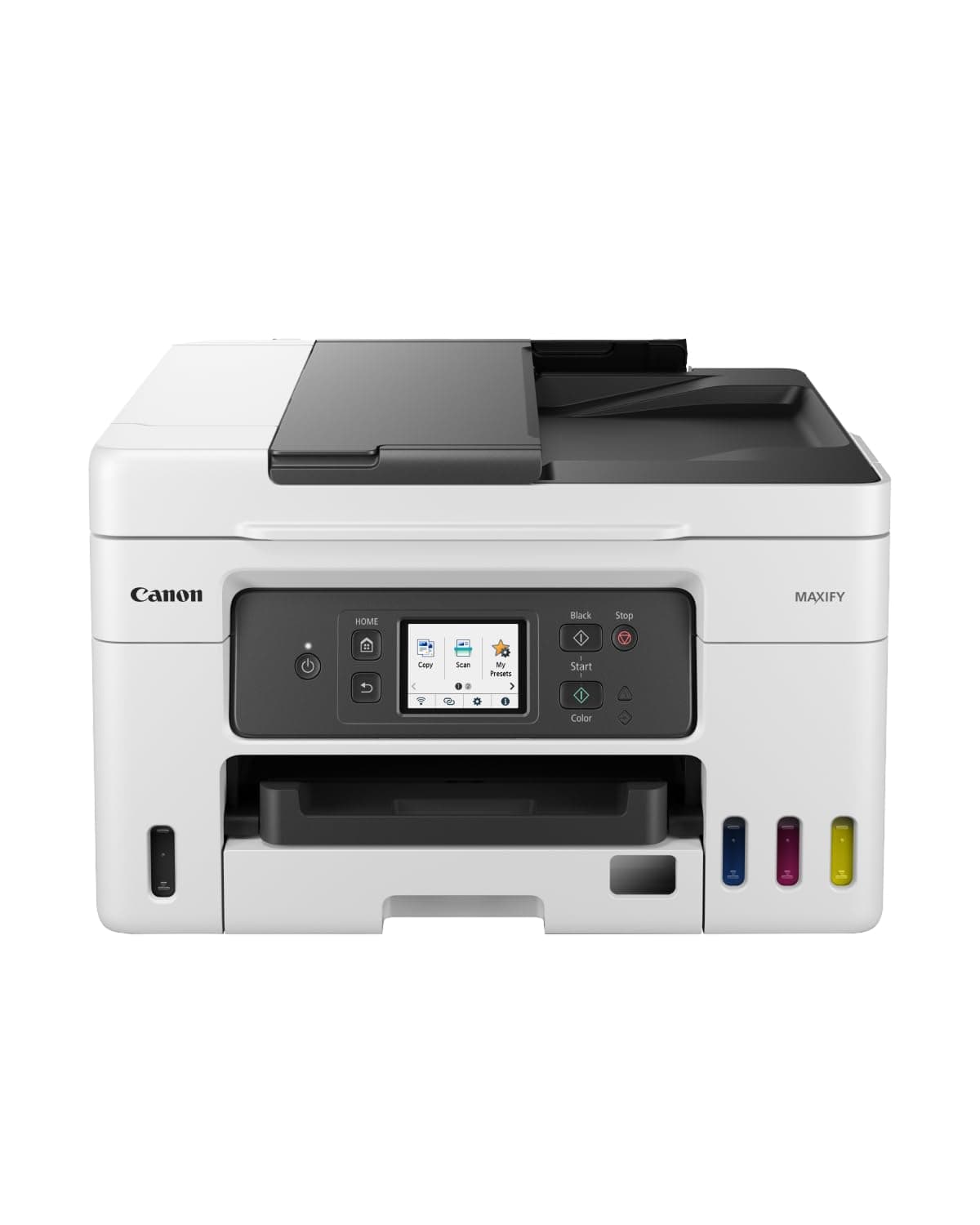
🖨️ Print smarter, save bigger, connect faster — Canon MAXIFY GX4050 is your office’s new MVP!
The Canon MAXIFY GX4050 is a compact all-in-one MegaTank inkjet printer designed for home and small office use. It delivers professional-quality prints at fast speeds (18 ppm B&W, 13 ppm color) with versatile connectivity options including WiFi, Ethernet, USB, and smart assistant compatibility. Featuring a 250-sheet capacity, auto duplex printing, a 35-sheet ADF, and refillable ink tanks, it offers cost-efficient, high-volume printing with sharp text and vivid colors. Ideal for users seeking reliable, economical, and multifunctional printing solutions.


| ASIN | B0BP8D9M6Z |
| Additional Printer Functions | Copy, Scan |
| B&W Pages per Minute | 18 ppm |
| Best Sellers Rank | 8,318 in Computers & Accessories ( See Top 100 in Computers & Accessories ) 44 in All-In-One Printers |
| Box Contents | Ink Bottles |
| Brand Name | Canon |
| Color Depth | 24 bits_per_pixel |
| Color Pages per Minute | 13 ppm |
| Colour | White |
| Compatible Cartridge | GI-56 BK, GI-56 C, GI-56 M, GI-56 Y |
| Compatible Devices | Laptops, PC, Smartphones, Tablets |
| Control Method | App, Touch |
| Controller Type | Amazon Alexa, Apple Airprint |
| Country of Origin | Vietnam |
| Customer Reviews | 4.3 4.3 out of 5 stars (42) |
| Display Type | LCD |
| Dual-sided printing | Yes |
| Duplex | Automatic |
| Global Trade Identification Number | 04549292204278 |
| Hardware Interface | Ethernet, USB |
| Initial Page Print Time | 8 Seconds |
| Ink Colour | Cyan, Magenta, Yellow, Black |
| Item Dimensions D x W x H | 41.7D x 39.9W x 25.1H centimetres |
| Item Type Name | Inkjet Printer |
| Item Weight | 9.5 Kilograms |
| Manufacturer | Canon |
| Maximum Copies Per Run | 99 |
| Maximum Copy Resolution Black and White | 3 levels (Economy, Standard, High), Economic, High, Standard |
| Maximum Copy Resolution Color | 600 dpi |
| Maximum Print Resolution Black and White | 600 x 1200 Dots Per Inch |
| Maximum Sheet Capacity | 250 |
| Maximum Supported Paper Size | Legal |
| Maximum print Resolution Color | 600 x 1200 Dots Per Inch |
| Model Name | MAXIFY |
| Model Number | GX4050 |
| Model Series | GX |
| Network Connectivity Technology | Ethernet, USB, Wi-Fi |
| Number of Trays | 2 |
| Other Special Features of the Product | Auto Document Feeder, Auto-Duplex, Email Print, Refillable Ink Tank, Scan To E-Mail |
| Output sheet capacity | 250 |
| Paper Size | Rear Tray: A4, A5, A6, B5, LTR, LGL, 4""x6"" (10 x 15 cm), 5""x7"" (13 x 18 cm), 7""x10"" (18 x 25 cm), 8""x10"" (20 x 25 cm), Square 5""x 5"", (127mm x 127mm), Envelopes (DL, COM10), Custom size (width: 89 mm - 216 mm, length: 127 mm - 1,200 mm) Cassette: A4, A5, B5, LTR [Custom size] width 148 mm - 215.9 mm, length 210 mm - 297 mm Rear Flat Tray: A4, B5, LTR [Custom size] width 89 mm - 215.9 mm,… |
| Power Consumption Size | 20 Watts |
| Print media | Envelopes, Fabric, Glossy photo paper, Labels, Paper (plain) |
| Printer Output Type | Colour |
| Printer Type | Inkjet |
| Product Warranty | 2 year manufacturer |
| Resolution | 600 x 1200 dpi |
| Scanner Type | Sheetfed |
| Specific Uses For Product | Home/Office, Photo, Label, Specialized (Flyers, Banners, Posters, Thick Materials, Magnetic, Photo Media) |
| Total USB Ports | 1 |
| Unit Count | 1.00 Count |
| Warranty Type | limited warranty |
L**A
Quality Printer
Good quality printer. Easy to set up and operate. The scanner is good quality which was important to us as we are scanning in quite a lot of old family photos. Print quality good too, recommend.
D**C
Lovely Printer
Great for my small home office use. I had issues when first recieved it and did the deep clean from the menu. Solved but then it stopped printing 1 of the colours. I called up Canon amd they talked me through the menu options to flush through the printer head and said that this has happened as the seller must have had it sitting on the shelf for a long time. All maintenance can be done by the actual printer itself though which is great and flushing through the colours solved my issue. Canon customer support were great 👍
T**Y
Excellent Printer
Excellent printer/scanner. I wanted something with Ethernet as scanning over WiFi is often quite a bit slower. I also run Linux so this one had the right Debian etc. drivers although driver-less printing via CUPS is supported anyway. My only gripe is that the Canon IJ scanning software is not as comprehensive as it was for my previous Canon printer (MG6150). Having said that, very pleased overall so far.
T**E
Total disaster
In my opinion this machine is an UTTER, TOTAL, ONE MILLION PERCENT nightmare. No instructions provided, apart from telling you basic things in half of the world's languages. Not even a few sheets telling you about basic set up routine. I know the set up with a fairly complex(!) machine will take time, including printer head alignment....but to resolve the initial set and to try to get it operating, took me nearly five hours. Wifi set up, as someone else wrote in the one star reviews is dodgy, and as mine failed to connect it gave a lot of numerous options..so you had better be tech savvy with your router and internet connection. How did i get mine connected...heavenly intervention...as i have no idea. Then i had a constant error message of paper mismatch...it said letter size, despite me continually changing to A4. After much investigation i discovered that default message has to be overwritten! Then i got error message 2110...by this time and so many hours later, trauma was setting in. I could not get rid of it...and what was worse, was that the manual said if this message persists, consult you local Canon workshop for repairs. Somehow i did get rid of it...but by now i was delirious. I cannot fathom out the 3 printer trays...how do you select which one? I cannot find that in the manual..oh yes, it tells you how to load the stuff, but not how to select. The front load seems to be ok for plain paper, but jams every time with photo paper. The top load works for photo paper, but error messages appear saying there is no paper (i keep the front tray empty, in the hope that the software will identify the cassette which is loaded)...if the front tray has plain paper, then you will get your photo printed on ordinary paper. Days after all of this, i just pray every time i switch on the machine that it will just print and not cause more hassle.....that is not the way any printer should be. When it does print, quality looks good. They say the ink may last three years which is great...but be prepared to add on another three years resolving problems.
J**N
This printer almost sets itself up!!
I can’t believe how far we’ve come when things just work out of the box with minimal set up. I mean you don’t need a degree in computer science. My old Mac Pro won’t run the software to use this printer?! What they don’t explain is once the printer is connected to your WiFi and your iPhone and Mac Pro are also on the same WiFi it just works, fantastic. The ink fills with no mess. Have patience and the printer does it all for you. It also scans from my Mac Pro over WiFi. I’ve not got to drills with the document feeder yet. Why did l buy Canon and what is an expensive printers? Because my last canon that died, was close on 20 years old and l used it for my business printing dvd’s Pity the new printer won’t do that, but things move on.
M**.
Fast, reliable and low running costs
Bought this for my home office, replacing an older Samsung colour laser printer that had melted! A very capable printer, offering duplex printing, however the only draw back compared to my old Samsung was that this does not support duplex scanning. That being said however the software is clever enough that you can use the sheet feed to feed documents in as well as flat top for scanning. The printer was simple enough to setup and connect to wifi. I only use this to print documents and presentations but the quality and speed are good and the tank holds plenty of ink so you are not refilling it that often - and the bonus is that it is cheaper than buying expensive toner cartridges for the old laser printer. All in all a really good product - only 4 stars as I do miss the duplex scanning feature of my old printer.
J**F
Bargain buy
Delighted with this printer. Easy to set up and connect to wi fi. Very happy with purchase ... even happier as it was "used", though dont know how, and was greatly reduced.
D**E
It does the job with no drama
I used to have an HP printer. Sometimes it was fine but it frequently went "offline". The only way to recover was to restart the printer and PC. The Canon just works.
Trustpilot
Hace 5 días
Hace 1 mes