We remain fully operational. Our teams are working around the clock to ensure your deliveries continue safely.

Descargar la aplicación


Servicios al cliente
Sobre nosotros
Copyright © 2025 Desertcart Holdings Limited
Descargar la aplicación
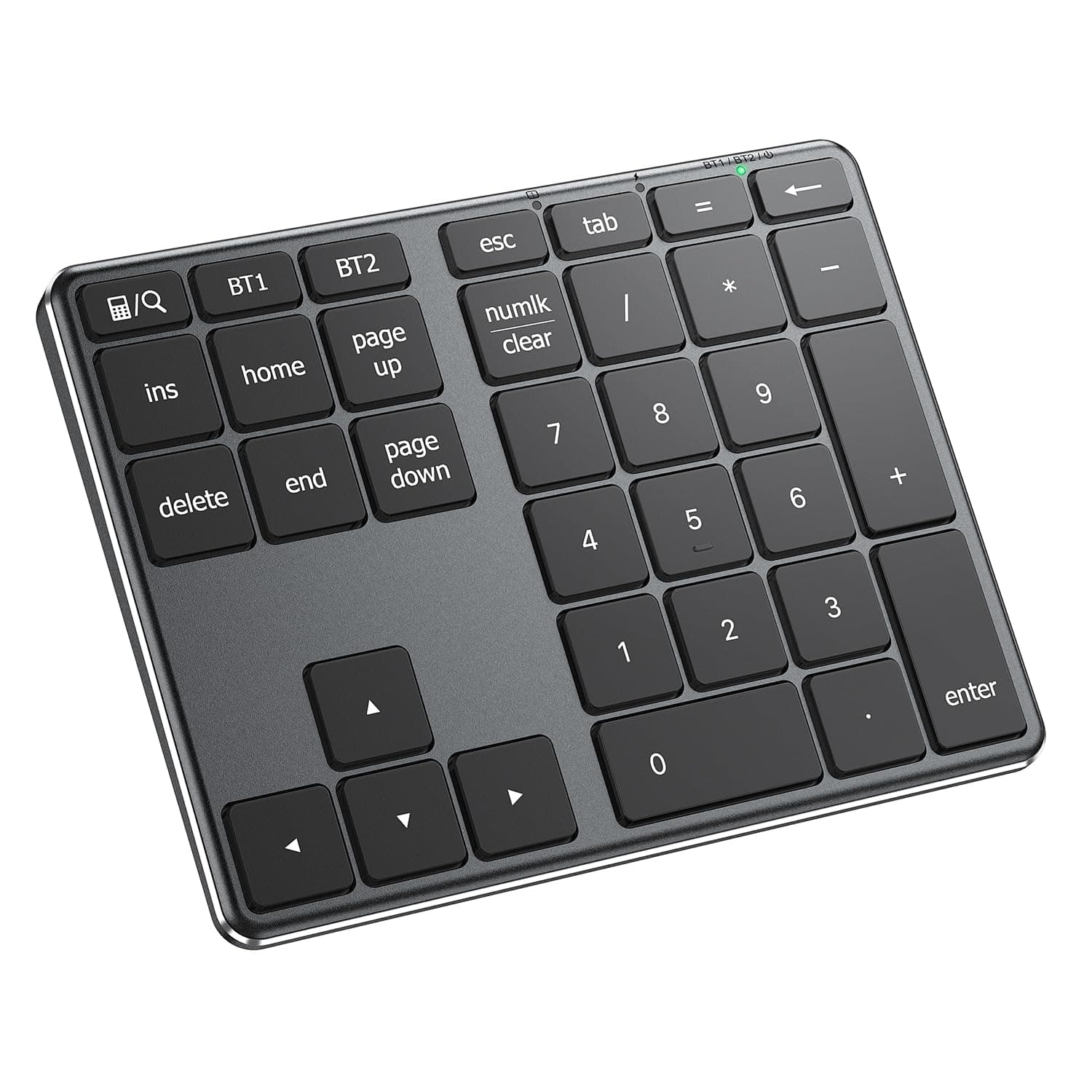
⌨️ Elevate your number crunching game with sleek speed and seamless switching!
The iClever Bluetooth Number Pad KP10 is a premium 34-key wireless numeric keypad designed for professionals who demand speed and precision. Featuring a durable aluminum build, tactile scissor switches, and wide OS compatibility, it supports dual-device Bluetooth pairing and fast USB-C charging that powers up to 100 hours. Perfect for accountants, students, and multitaskers, it combines portability with robust performance and comes with a 12-month warranty and lifetime support.




| ASIN | B0B1CWJCS5 |
| Additional Features | Laptop typing experience, USB-C Charge, Multi-OS, Aluminum soild build |
| Antenna Location | Office |
| Best Sellers Rank | #23 in Numeric Keypads |
| Brand | iClever |
| Built-In Media | USB-C Charge Cable, User Manual, iClever KP10 Number Pad |
| Button Quantity | 34 |
| Color | Black |
| Compatible Devices | PC, Laptop, iMac, Macbook, Tablet, Smartphone, iPhone, iPad |
| Connectivity Technology | Bluetooth |
| Customer Reviews | 4.5 out of 5 stars 582 Reviews |
| Enclosure Material | Acrylonitrile Butadiene Styrene, Metal |
| Hand Orientation | Ambidextrous |
| Item Dimensions L x W x H | 5.74"L x 4.44"W x 0.51"H |
| Item Weight | 146 Grams |
| Keyboard Description | Bluetooth Keyboard, Scissor Switch, Portable Size |
| Keyboard Layout | QWERTY |
| Manufacturer | iClever |
| Mechanical Keyboard Switch Model | Tactile |
| Model Name | KP10 Bluetooth Numeric Keypad |
| Model Number | KP10 |
| Number of Batteries Required | 1 |
| Number of Keys | 34 |
| Number of Sections | 1 |
| Power Source | Battery Powered |
| Recommended Uses For Product | Office |
| Special Feature | Laptop typing experience, USB-C Charge, Multi-OS, Aluminum soild build |
| Style Name | Contemporary |
| Switch Type | Tactile |
| Theme | Office Productivity |
| Unit Count | 1.0 Count |
| Warranty Description | 12-months |
T**R
Clever product worth consideration
clever product if you need a full numeric keypad solution for your traveling laptop.
T**I
Thin, light and looks good
Very easy pairing... I use it with my Mac Book and sometimes when I travel as my travel keyboard does not have a numpad. I also tend to prefer to use my dumped on the left side so I can keep the mouse closer to me. This feels more ergonomic as I don't have to reach as far for the mouse. So far so good!!! Everything is working great. A good quality product no doubt.
A**H
Makes work so much nicer!
This number pad has made my work life easier. Typing numbers on a laptop is inconvenient and impractical. The product was easy to set up with directions.
J**G
Would buy again.
Connects easily, love that it's wireless. Would buy again.
A**Y
Suited for purpose
This keypad works well. The aluminum body does feel nice (maybe a bit cold in the winter, though...) The keys feel like decent enough quality scissor keys and I haven't experienced anything like keys not actuating or anything like that. I have a couple of gripes. 1.) The power switch is both rigid/hard to move and SHARP. It hurts my fingers. 2.) The sleep mode can be frustrating and seems overly aggressive. I frequently am losing my first keypress many times because it is waking up. I don't feel this is worth the minimal charge gain at all. The sleep timer should be much longer. It won't kill me to have to charge this thing occasionally. 3.) It's a little hard to grab without mashing keys. Recommend besides, however.
E**A
Remote work gamechanger
This keypad has been incredibly helpful for remote work while on the go. I also have their keyboard but this is much better when on the go to help conserve space and has really helped me work more efficiently. It has a good weight, the rubber pads on the bottom are mostly effective for most surfaces, but you can easily add cabinet bumper stickers or something if you want more grip. Seems to work well enough for daily use. Reliable, no issues connecting, and has everything I need. I bought a few different options and this was by far my favorite.
G**.
Mine didn’t sit flat on a table and wobbles with each keystroke.
Definitely expected more from this product. May be returning it. When I use it to enter numbers I can feel it wobbling back and forth while using it. The rubber feet on opposite corners must be sitting at different heights. Note, seller was very prompt to resolve the issue.
R**Y
Neat Little Device
I like this little device. It's attractive, well-designed, light, and thin. It can be easily transported by slipping it into a pocket of your laptop case. Connecting it to my laptop using Bluetooth was effortless. At first, I was confused by the fact that the NumLk indicator light is deactivated after 6 seconds of non-use. This is by design, and is disclosed in the instructions. Apparently, this is a battery saving feature. The instructions seem to indicate that Numlk itself is deactivated when the indicator turns off, but that's not the case. Numlk remains active until you press it again. The indicator light goes back on when you press any key on the pad. In any case, this is a handy little keyboard, especially if you have a laptop without a keypad. Anyone who is left-handed (like me) will also appreciate being able to position a keypad on the left side of the keyboard.
Trustpilot
Hace 1 semana
Hace 2 semanas