We remain fully operational. Our teams are working around the clock to ensure your deliveries continue safely.

Descargar la aplicación


Servicios al cliente
Sobre nosotros
Copyright © 2025 Desertcart Holdings Limited
Descargar la aplicación

Buy anything from 5,000+ international stores. One checkout price. No surprise fees. Join 2M+ shoppers on Desertcart.
Desertcart purchases this item on your behalf and handles shipping, customs, and support to Argentina.
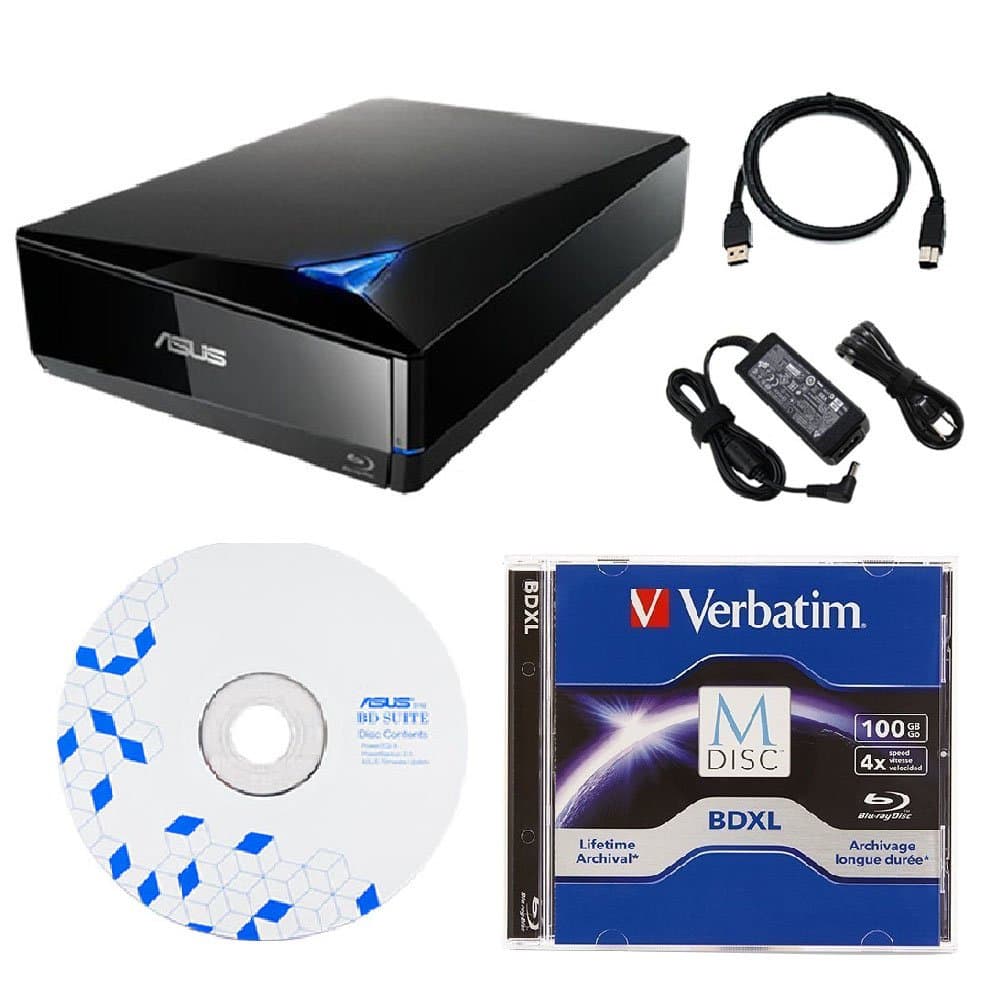
💿 Burn Bright, Store Forever — The Ultimate Blu-ray Backup Bundle
The Produplicator Asus 16x External Blu-ray Drive bundle combines cutting-edge 100GB Verbatim M-DISC archival discs with a high-speed USB 3.0 Blu-ray burner capable of 16x write speeds. Compatible with multiple Windows and Mac OS versions, it supports a wide array of disc formats and includes BD Suite software for easy, encrypted backups. Designed for professionals who value data longevity and speed, this portable drive ensures your most important files are preserved for up to 1000 years.
| ASIN | B071ZR7VJZ |
| Additional Features | Blu-Ray Disc, Portable |
| Best Sellers Rank | #134 in External Blu-ray Drives |
| Brand | Produplicator |
| Built-In Media | 100GB Verbatim M-Disc BDXL, BD Suite Disc, USB Cable, Power Adapter, External Blu-ray Burner |
| Cache Memory Installed Size | 100 |
| Compatible Devices | Windows PCs, Mac computers, and other devices with USB ports and compatible disc formats |
| Connectivity Technology | USB |
| Customer Reviews | 4.4 4.4 out of 5 stars (89) |
| Form Factor | External |
| Global Trade Identification Number | 00679113432642 |
| Hard Disk Form Factor | 3.5 Inches |
| Hardware Interface | USB |
| Hardware Platform | PC |
| Item Type Name | Asus 16x External Blu-ray Drive with 100GB Verbatim M-DISC BDXL, BD Suite Disc, USB 3.0, Power Adapter Bundle |
| Manufacturer | Produplicator |
| Mfr Part Number | FBA-ASUS-BW-16D1X-U-100GB |
| Model Number | FBA-ASUS-BW-16D1X-U-100GB |
| Operating System | Windows |
| Optical Storage Read Speed | 8x |
| Optical Storage Write Speed | 16x |
| Specific Uses For Product | business, personal |
| UPC | 679113432642 |
| Warranty Description | 3 years labor, 1 year parts warranty and lifetime technical support. |
Y**A
INCLUDED SOFTWARE BURNS W/NO PROBLEMS, DRIVE BURNS PERFECTLY
First of all, when I received this, I tried to burn disks using Nero, and got nothing but errors. I tried the included software, and it burned the disk perfectly with no problems. Some reviews said that the software does not work, and has to be updated for $60. They also said that the update should be free. Well, I think the people who wrote that are wrong. They are talking about upgrading, not updating. I was never asked to update the software. You UPGRADE for extra money. Upgrade means to pay for more features. UPDATE means to modify the software to the latest version, but I was never asked to update. The burner itself is fantastic. Very quiet. Very reliable. Sometimes I had to look at the blinking light to make sure it was working. It was that quiet. I have had NO problems with the drive or the included software, and would buy it again.
M**I
High Quality and Excellent Service
ill very satisfied after using it for a while! The quality remains excellent, and it’s proven to be exactly what I needed. Highly recommended – great value and reliable seller! 🌟👍🏼
V**R
Excellent Blu-ray Burner
Asus 16x External Blu-ray Drive works perfectly. My old one finally died after ten years of use. I figured that ten years of use is good enough for me so I bought the same brand as my old one. I have no problem with bad batches or incomplete burns. I use Nero to burn with.
J**I
It worked but I made a few 100gb coasters first!
So my goal. I have about 90 gigs of data (files like word, excel, pdf etc) for my business that I wanted to backup to a single disc and then store the disc offsite in case of fire. I wanted to be able to stick the disc into any computer and read the files with out having to load software to read the disc. I have the LG BD-RE BU20N slim drive in my HP i7 sff desktop. I also wanted the disc to be permanent meaning you couldn't change it after it was burnt. I put all my files into a single directory on my pc which has an SSD for storage. I then put the disc in the drive (Windows 10 OS) and chose "With a CD/DVD player" (Mastered) as opposed to "Like a USB Drive" which allows changes after the files are burnt. I then copied all the files onto the disc. It had to fix a few names because they weren't compatible with the CD burning standard. After about 10 mins I was ready to click the burn button. I clicked it and after about 5 seconds I get an error saying it didn't work and the disc is probably not usable. $17 coaster. Now I have been burning discs since the original single layer CD media came out and back then we made a lot of coasters with buffer under-runs etc. So the first thing I did was check the firmware of my drive. It was 1.00 but there has never been any newer firmware. I happened to have 25gb Verbatum M-Discs also so I broke my 90 gb into 4 25gb chunks and those 4 discs burnt just fine. So I went back and tried it again.....5 seconds another $17 coaster. I figured maybe it was the drive which they don't make this model anymore. LG and Pioneer seem to be the two types of drives you can get so I ordered a full height Asus BW-16D1X-U external drive which has the Pioneer mechanism in it. Tried to burn with that drive...5 seconds later $17 coaster. The Asus drive came with software so I loaded that software. Now that software made it's own proprietary 90gb image which means I would have to use that software to read the disc but at this point I wanted to see if I could get anything burnt on a 100gb disc. After about 30 mins of processing the file and about 10 mins of actual write time...another $17 coaster. Now I only had one disc left at this point. I figured what the heck. I put it in and this time I chose "Like a USB Drive". It prepped the disc. I then started to copy files to the disc and about 6 hours later I had a fully loaded disc. I could then read that disc in any computer that is Windows XP or newer. Only downside is you can change the disc. Someone could delete all the files. Ofcourse this is BD-R so you don't get the space back and technically all the files are still there just the FAT table has been modified but still it's annoying. For now I can live with the Life File System version of the disc. I was able to add files to the disc using either the LG BD-RE BU20N drive or the Asus BW-16D1X-U 16x External Blu-ray so both drives will work with the 100GB Verbatum M-Disc media. So if your doing what I was doing....choose "Like a USB Drive" not "With a CD/DVD player" and you will probably be successful also. I had one other problem with the Asus BW-16D1X-U. I plugged it in a USB 3.0 port and after that my mouse (logitec wireless mouse) started skipping around the screen like it's data stream was being interrupted. I changed the batteries just to make sure the battery wasn't going out, no luck. As soon as I unplugged the ASUS drive my computer went back to normal. Now it could have been the logitec mouse but I have plugged lots of other USB devices into my computer and the mouse has never had that issue. I gave it 4 stars because of this.
J**Y
Works perfectly Installed easily
I purchased and installed this in December and it works fine for me. I haven't any difficulties with the mechanical workings or the software. I can use multiple software choices for this drive. I am very happy with this purchase and would recommend it to other people. I would buy it again.
J**.
Won’t play my movies
Purchase this unit on 3-31-21 the on /off switch is on the back of the unit which is very large to begin with. USB hook up is great . Used the unit to install a program on my computer worked fine. Decided to try a movie get a message software out of date and for $64 I can upgrade so movies will play. My computer is one week old 32” hp loaded. I don’t see how Asus product could be sold out of date, paid $159 Blu-ray writer and went to web sight and got a message sight down for repair try again later.mean while can’t play any movies from my collection. Don’t want to spend another $64 should be free download.
M**D
Great Drive.
My son has no DVD or Blu-ray burner so bought this one for his computer since one can't go inside it. We don't trust the Cloud for backup so this works well. We use Nero and to use blu-ray for backup it needs to be connected to the internet, but don't know why. We also back up to external drives. Can't stand to redo computers, especially with limited broadband in our rural area.
P**N
Does its job but a bit stubbornly
First, I must say it does the read/write thing fine. I had to transfer 60 25GB discs to a HD and it read every one of them, even through scratches and fingerprints. Clean discs transferred at 50 MB/sec and really bad ones around 1.4 MB/sec but it got everything so the error correction works. The annoying thing is the switches. The power switch is a low triangular thing on the back that has no feel to it. At least there is a light (a really big, bright, blue one) to let you know the unit is on. Even weirder, the eject button is a narrow vertical bar to the right of the drawer that does not stick up. It is hard to tell if that has been activated and it is so narrow that half the time a finger will press it and simultaneously prevent the drawer from opening. The styling of the box is nice but the human factors people failed.
C**X
Ce graveur en vaux la peine il nous donne confience et fidèle à ce qu'on veux. Merci.
Trustpilot
Hace 1 mes
Hace 2 días