We remain fully operational. Our teams are working around the clock to ensure your deliveries continue safely.

Descargar la aplicación


Servicios al cliente
Sobre nosotros
Copyright © 2025 Desertcart Holdings Limited
Descargar la aplicación
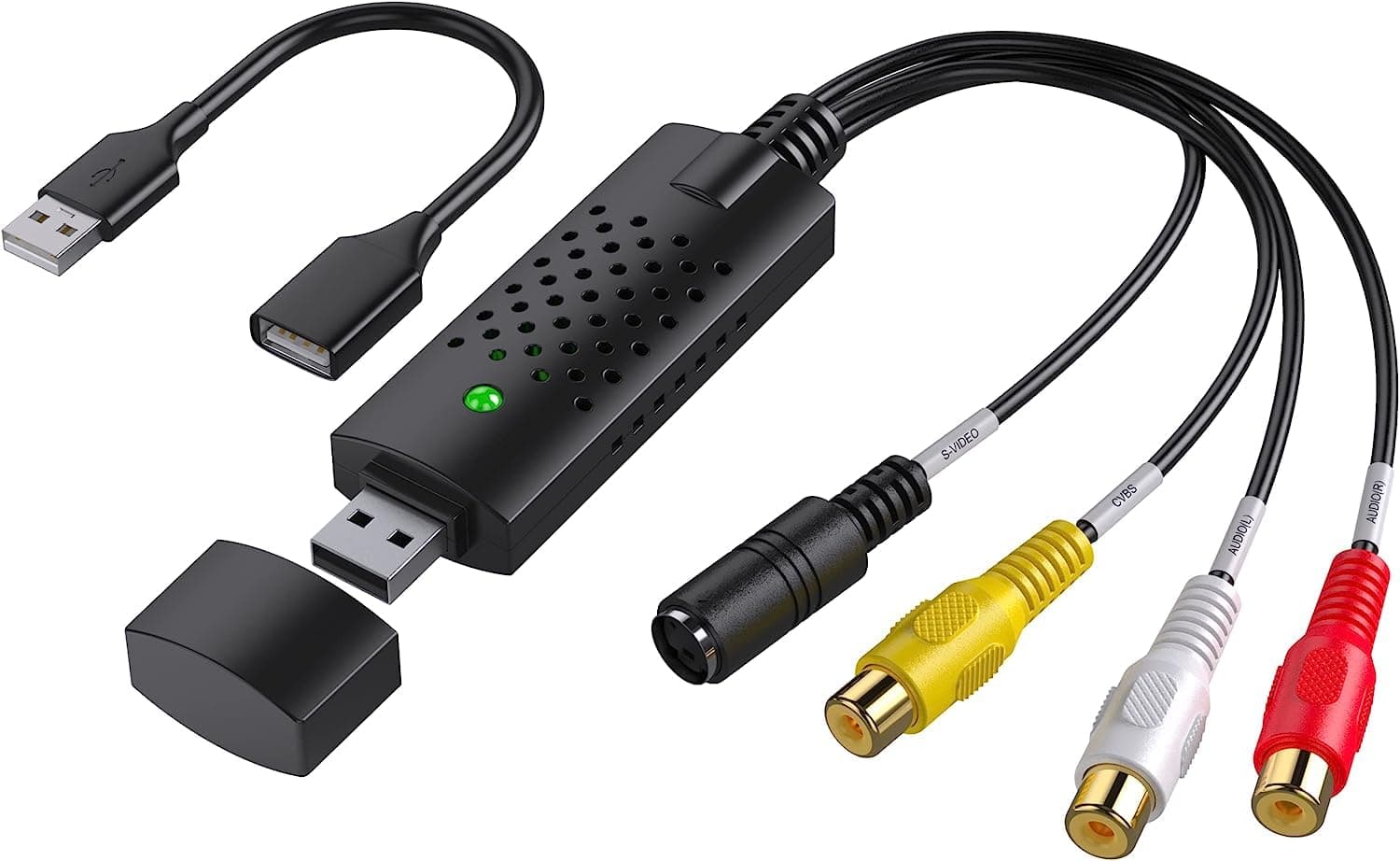
🎞️ Digitize your past, own your future—capture memories in HD today!
The VIXLW Video Capture Card is a compact USB 2.0 device that converts analog RCA and S-Video inputs from VHS, VCR, Hi8, Mini DV, and camcorders into HD 720P digital files. Compatible with Windows and Mac OS, it supports NTSC and PAL formats and requires no external power or complex setup. Ideal for professionals and nostalgia enthusiasts alike, it offers a cost-effective, plug-and-play solution to preserve and future-proof your treasured video archives.


| ASIN | B0BLNPCK82 |
| Best Sellers Rank | #44 in Internal TV Tuner & Video Capture Cards #120 in Video Converters |
| Brand | VIXLW |
| Built-In Media | USB Extension Cable, USB Video Converter, User Manual |
| Compatible Devices | Television, Laptop, Desktop, Monitor, VHS player, VCR, DVD Camcorder, Projector, Digital Camera |
| Customer Reviews | 4.3 4.3 out of 5 stars (702) |
| Hardware Interface | USB |
| Item Dimensions | 3.5 x 0.98 x 0.59 inches |
| Item Type Name | USB Video Converter |
| Manufacturer | VIXLW |
| Mfr Part Number | 116 |
| Model Name | Video Capture Card |
| Model Number | USB2.0 |
| Operating System | Windows |
| Platform | Windows |
| UPC | 768459719958 |
| Unit Count | 1.0 Count |
N**Y
Worked flawlessly with my MacBook Pro
The VHS to Digital Converter (RCA to USB Capture Device) is an incredible tool for anyone looking to preserve their cherished memories stored on VHS tapes. I was able to digitize my old home videos with ease, and the results were fantastic! Pros: 1. User-Friendly Setup: The device was incredibly easy to set up. It came with clear instructions, and I was able to connect my VCR to my computer in just a few minutes. 2. High-Quality Transfers: The converted digital files retained great video and audio quality. It brought back my old recordings in a new, accessible format. 3. Versatile Compatibility: It works seamlessly with different operating systems and various media formats, making it versatile for all kinds of projects. 4. Compact and Portable: The device is small and lightweight, which makes it easy to store or take with you if needed. 5. Affordable Solution: For the price, this is an amazing value. I saved so much money compared to professional digitization services. Cons: None worth mentioning—it worked perfectly for my needs! Overall, the VHS to Digital Converter is a fantastic product for preserving priceless memories. It’s easy to use, works as advertised, and delivers high-quality results. Highly recommended for anyone looking to future-proof their old videos!
G**E
It Worked!
Okay, now I had my doubts about this do-hicky, but it worked! I had many VHS " posterity" videos transferred to DVD; there was one I missed. I didn't want pay the high cost of shipping for just one. Thought I'd give this a go. These are the cons, but it was due to my inexperience with this product and probably some user error: The software takes a bit of time to download. Be certain that you have recording volume all the way up ( I had it set a 50%) Adjust the size of the picture. These may seem like stupid things to mention, but just in case... Pros This product was way inexpensive. Super easy to use. I am going to make another copy. This was well worth the time and you can't miss with the cost.
C**N
Does the job, but there are better options
Converting video to digital is not as easy as it seems and there are many options. This one does the trick but if you do a little research, you’ll see that you need to be a little more involved with it and probably spend a bit more money if you want a cheap quick way to do a conversion that will do it just fine.
A**I
Works great for digitizing old video tapes
I have an old video camera I borrowed from my parents. They had video tapes of my grandparents I wanted to digitize from the old video tapes. This product worked perfectly for me to plug into my computer and save the tapes! It was very easy to just plug into my computer, set it up with OBS and start recording. Color and picture was as good as you can hope for from video tapes, but I am very happy with the product!
W**L
Did exactly what I needed it to!
After finally being given the “keys to the kingdom” of my childhood, consisting of a board of Hi8 tapes, DV tapes and VHS tapes, I had my work cut out for me when it came to digitizing everything. After being quoted over $2000 for them to be converted by a local shop (please for the love of god, do your research as some of these places suck. Check YouTube for proof if you need it), I decided to purchase a Hi8 tape player, a DV one, and VCR from eBay and Facebook marketplace. This little gadget was the only missing piece of the puzzle. The picture quality, connectivity and quality of the cable itself seemed outstanding given its small and convenient size. In terms of “ease of setup”, I would say that it really depends on your operating system, tech skills, common sense, and willingness to possibly run to the store for an additional cable when needed. I was able to watch a helpful YouTube video that outlined exactly what cables I SHOULD have needed. But, this little guy eliminated the need for 2-3 of them. If you are planning to digitize your repertoire of old tapes and go the route I did of buying your own cameras, I CANNOT stress enough the importance of not only purchasing a working camera, but one with a clean “Head” to it. A tape used to clean the head of a Hi8 camera can run up to $100. Look it up if you’re unfamiliar and do your research. These are your memories and likely most treasured possessions and I was very pleased with this cable and its ease of use. In total I spent MAYBE $250, a far cry from the couple grand a local shop wanted to charge (with no guarantees they’d actually be able to successfully get everything from each tape.)
C**1
DONT BUY
I am so angry with this order. It doesn't work when you plug it in. Their website is scam as they give you a bogus phone number to call and a fake email that wont even go through. I so wish I could return it. Piece of junk from a junk company
T**.
Old is new
Worked perfectly once i got the right software to use it. Was able to convert vhs to digital because of this and a found vcr.
T**E
Great device for capturing old videotapes (including interlaced footage!)
I couldn't be happier! After Windows and macOS both abandoned Firewire, I've been looking for a modern USB device to capture old SD videotapes. This works brilliantly. I've seen some YouTube videos that disparage this device by saying it only captures at 30p… and that's nonsense! On my Mac, I downloaded the free recommended OBS capture software and tweaked its settings to 640x480 and 59.94fps. This device successfully captured both fields of every frame and generated a true 59.94p video file, preserving that "analog video" motion from my old VHS or 8/Hi8/Digi8 tapes (you can use any old deck or camcorder with composite video/audio RCA outputs). You can then re-interlace the video to 29.97i in Media Composer, etc. if you wanna burn a DVD, or leave it at 59.94p for computer playback. Either way, this just works.
J**L
As per my expectations
T**L
Great piece of kit. Great price. Works straight out of the box with Windows 11 and OBS Studio capture software (free)
P**C
Not working
Trustpilot
Hace 2 meses
Hace 2 días