🎮 Elevate your game with precision and speed—because winning waits for no one!
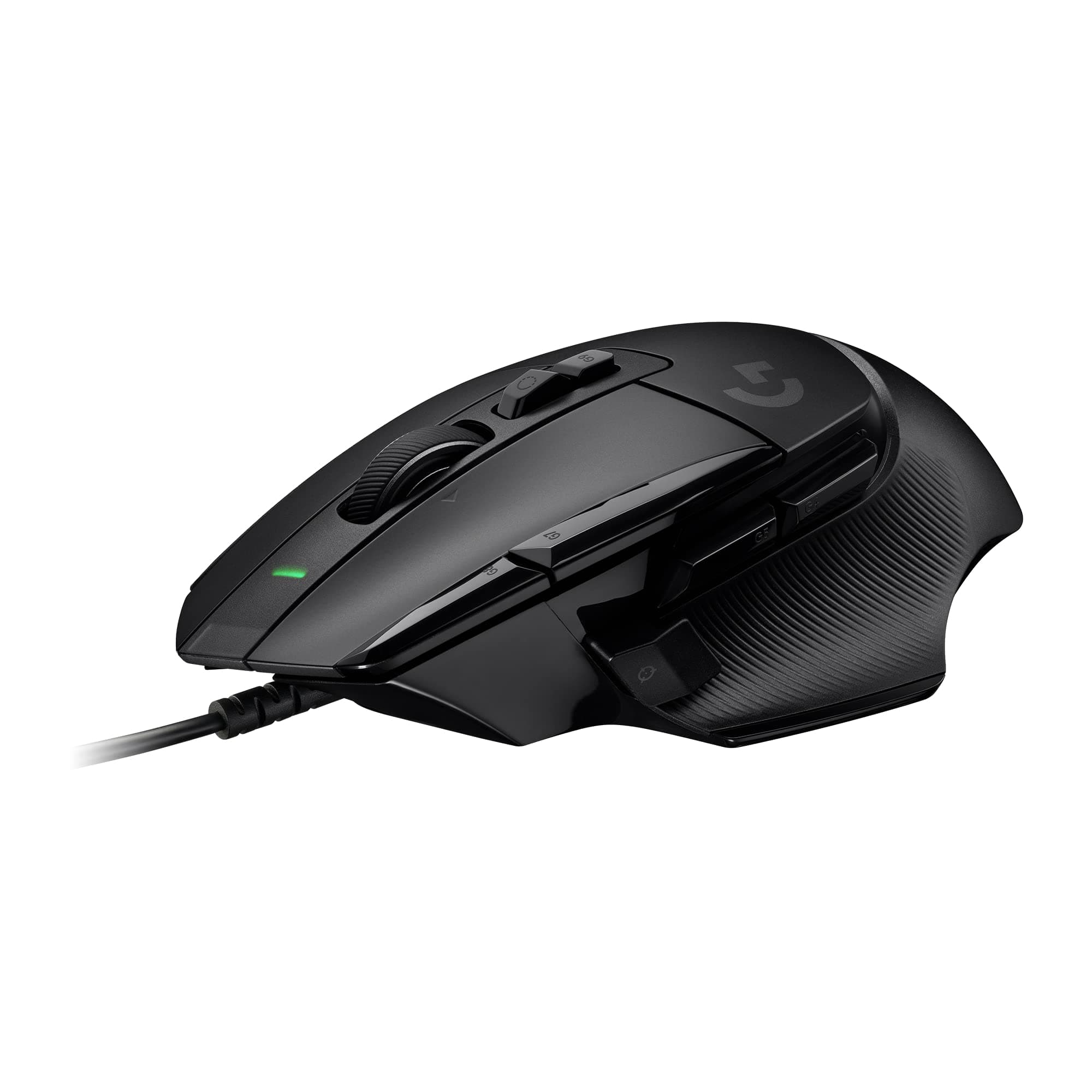
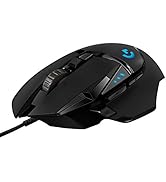
The Logitech G502 X Wired Gaming Mouse redefines performance with its hybrid optical-mechanical LIGHTFORCE switches, HERO 25K sensor offering sub-micron accuracy, and a redesigned hyper-fast scroll wheel featuring dual modes. Weighing just 89 grams thanks to a thin-wall exoskeleton, it combines ergonomic legacy with cutting-edge customization, making it the ultimate wired mouse for professional gamers and power users on PC and macOS.


| ASIN | B0943HXDVM |
| Batteries | 1 Nonstandard Battery batteries required. |
| Best Sellers Rank | #114 in Video Games ( See Top 100 in Video Games ) #3 in Mac Gaming Mice #11 in PC Gaming Mice |
| Brand Name | Logitech G |
| Color Name | Black |
| Customer Reviews | 4.4 4.4 out of 5 stars (5,683) |
| Date First Available | August 30, 2022 |
| Item Weight | 5.6 ounces |
| Item model number | 910-006136 |
| Product Dimensions | 6.3 x 4 x 2 inches |
| Special Features | Lightweight |
P**K
Great and noisy mouse
I’ve been using the G903 since 2016, bought both the original and the hero version and they still work pretty well, the reason I’m getting this one is that, I’m getting tired of the 903’s symmetric design atm. The 502x plus feels great in hand and the build quality is very decent. The only thing I noticed is the clicky sound it makes when pressing the primary buttons, it involves a bit more “metal click” sound, almost like a clicky mechanical keyboard and is definitely louder than the 903s. This can be annoying to people who prefer silent setup, but I’m totally fine with it.
P**E
Excellent mouse, impressive battery life
I have a G502 Hero wired for my desktop computer, and was using another Logitech mouse for my laptop. The one for my laptop started to show its age and I wanted to replace it, so getting a wireless 502 option made sense. The only thing I was hesitant about was battery life - I have never really been a fan of mice that have to be plugged in and recharged (always preferred just being able to throw in a new battery every six months or so). I needed have worried - the battery life is excellent and I have only had to charge this once so far since owning it (a little over two months, with it being used near daily for a mixture of basic web browsing, gaming, etc.) The mouse itself is, of course, very much like my G502 wired. Wheel is plastic as opposed to metal, but still scrolls freely (the free-scroll option being just about an absolute must-have for me nowadays). No issues with the mouse, except when first trying to get it to pair to my computer (took a few attempts and removing/reinserting the dongle) before I got it to pair, but has been rock-solid since. I did buy this as a "Used - Like new" and it was exactly as described, could not have told it had been used previously. Overall very happy with the purchase and would recommend to anyone wanting a mouse that is a solid performer for both work and play.
A**R
Amazing mouse! Great customization, battery life, profile options, latency, and weight!
This is amazing. I didn’t think I would like it as much as I do. The latency is extremely low, on par or even lower than a wired mouse according to rtings testing. The battery life is actually amazing. I have the RGB on the mouse turned down to 25% brightness (still plenty bright) and with that I get at least 1 week per charge with heavy daily usage. (I use the mouse for probably 4-8 hours every day, and have it set to turn off the RGB w after the mouse is idle for a few mins.) It’s cool that the app will show you the remaining hours of battery life, and as you adjust features (like RGB strength, polling rate) it will show you the power usage and how much time you’d have left. It’s fully and completely customizable. All the buttons, DPI settings, RGB colors/patterns/strength, etc can be completely changed and stored in 5 different profiles (on board the mouse, you can have even more profiles with the app). You can set it up so that it will switch to a specific profile when you launch a specific game. So you could even have a completely customized profile for every game you play. For instance I have a profile for desktop use (browsing the internet, watching TV, etc) with a low 125hz polling rate to save battery during that type of usage. And then when I boot up a game it switches to a different profile with 1000hz polling rate. (Which honestly, the 125hz polling feels fine and I don’t even think I can tell the difference besides placebo lol)
I**P
Excellent gaming mouse with great feel, easy software, and solid button feedback
This is a great mouse and an even better value for the price. The high DPI settings make it really responsive, and the overall feel in the hand is comfortable for long gaming sessions. Each button press has solid, satisfying feedback thanks to the hybrid optical-mechanical switches, so everything feels crisp and accurate. Logitech’s software is easy to use and makes customizing the buttons simple. You can set up multiple profiles and switch between them with a quick click, which is super convenient. If you don’t mind using a wired mouse, this is a fantastic purchase. The buttons are well placed and easy to access, and the performance has been consistently smooth. Overall, a reliable, customizable mouse that delivers great responsiveness and excellent tactile feedback.
M**Z
Strong Performer With One Annoying Button Placement
The G502 X Plus is a solid wireless mouse overall. One thing I really liked is the little cap that lets you replace the thumb button, such a simple detail, but it makes the grip feel cleaner if you don’t use that side button. What I didn’t love is the extra button on the left mouse button. Its placement feels awkward, and I found myself hitting it by accident more than once. For a mouse that’s usually known for great ergonomics, that choice feels strange. Aside from that, the mouse performs really well and feels fast and responsive. If you can get used to that top button, it’s a great pick.
M**N
Love it
I've been using the g502 mouse since they first release and I love how they feel because I have large hands. The issue I had with the old mice was the left button would always go bad on me I've went through four of them so far and it seemed to last me I'm about a year or so before issues arise. Come to find out it was a very common issue with the types of switches they were using so they wouldn't hold the click even though you were holding the button down. The new g502x uses an optical switch and I was concerned with how good it would feel because I've seen a couple reviewers talk about how travel there was in the left click button before it would actually actuate but either they fixed that issue before they released them to the public or I got lucky and got a good one or it's possible that it's just not as bad as the reviewers saying it had too much travel. Compared to my g502 hero it is a lot lighter and the Virgin PTFE pads really make a difference that so much smoother across my mouse pad. Back to what I was talking about before the optical switches feel great to me they feel like a very positive click and it's very fast to actuate. The general shape is great since I'm already used to the g502 because there was no adjustment. To get used to this mouse like there is sometimes when you switch from one brand to another because physically it's almost the same as far as the in hand field goes. They went with a lighter scroll wheel which I thought would be an issue whenever I would use the free Spin feature by unlocking the scroll wheel because of less rotating Mass however I can give the wheel a good flick and it spins like crazy so I'm very happy with it. The scroll wheel also has a more tactile feel when switching between weapons and games or whatever you might use your scroll wheel for in your game feels like it is a little more firm than my old mouse but that could just be the fact of the old mouse was born in but it is by no means hard to turn in fact due to the new design actually find it easier to grip and spin with my fingers. My overall impressions of this mouth so far are that I think I'm going to love it it definitely seems like a winner in my book.
N**O
Fantastic mouse!
Backstory. I have been a gamer my whole life. I am currently as of writing this 34 years old. Yeah not a youngin but not an old man either.... I grew up using OG computers with ball mice. Over the years I had gotten a good feel on what makes a good mouse "in my opinion" and sadly many mice do not fit the bill. Many will SEEM to fit, only to fail later. My very last mouse was the Razer Viper V2 Pro. And what a freaking mistake that was. I swear I have the worst time with mice. I use my computer at least 8 hours a day mix gaming and non gaming. I had given up on Razer for along time, trying off brands, chinese brands, and so on. But, I wanted a wireless mouse, so I gave Razer a chance. FIVE (5) months after use, the wireless side of the V2 Pro just stopped working for no reason. Legit would not connect. Tried multiple computers, over 20 different usb ports and hubs, it was just dead. Googled the issue and sure enough its a "common" issue and everyone with said issue ends up buying a new mouse as replacement. WHAT? I am not going to buy "another" Razer of the same model when it freaking failed. Why, so it can fail again in 5 months? I feel bad for people who keep giving these companies with bad practices money. Turn around and I finally ordered this Logitech. EVEN Logitech, I had sworn "to never use" because they kept failing in terms of left click. They ALL have the same issue, double click error after long use. You can google that too and find many people complaining of double clicking "but Logitech has the best wifi connection so no other brand can compare" thus "they still buy Logitech." So like Razer, I decided to give them a second chance.... This time around, Logitech has given us optical switches, which IN THEORY should never fail in terms of double clicking.... So here I am, using it. Firstly the mouse movement feel 1:1 vs what I see on screen. No I don't mean DPI wise. YES, 1200 DPI on this Logitech feels COMPLETELY different than 1200 DPI on the Razer I was using before it. But I dare say this G502 X Lightspeed is more "accurate" and "stable." No matter how fast or slow I move the mouse, the cursor tracks properly and moves the proper amount you expect. Razer was only "slightly" worse in this regards where sometimes you felt like "I didn't aim there" when moving. It didn't happen often, not as often as 3rd party cheap Chinese mice that's for sure. My go to mouse for a long time was Cooler Master brand, Spawn, Xornet 2, MM720.... I like the wider mouse as I have "bear paw" hands (wide hands with short fingers). But those mice have tracking issues. You move fast and the rate at which the mouse moves is different then when you move it slower. And its a huge variation between each speed you move the mouse. Its bad. This G502 X LS is the first to feel accurate like OG mice from back in the day, like the classic Microsoft Intellimouse which was my go to back in the 2000's.... The battery life is insane. The razer I would need to charge just about once a week. So far my Logitech seems to "last forever." I ended up buying one of those Soarking Charging Docks for the Logitech mice. Comes with the little POG bottom cover that allows for mounting/charging. And its magnetic. Every once in awhile I just toss it onto that charger while I sleep. I don't really think of it as "charging" because it charges while the PC is literally turned off. Which is a huge plus. You could argue "that's why its lasting longer" but "out of the box" the initial charge lasted me TWO WEEKS before the mouse shut off on me. THAT was when I bought the charging dock.... still two weeks vs one week on the razer is double the time.... The only downside is that the left and right click feel, mushy? its a short distance and the click feels, well it feels weird. It doesn't feel like a click, more like a "clock" feel. Its hard to explain really. Its not BAD per say, but I like the feedback of other mice where the click feels like an actual click. Mushy is the only way I can explain it. Its still a sharp feeling but mushy at the same time. I'm not good at explaining it.... again its not bad. The scroll wheel also feels janky. I don't understand the "free wheel" scroll feature. Why? And when its in the click style turn mode, the "notchy" feel, it feels, mushy. I have to say my favorite mouse wheel has been Cooler Master mice. MM720 for example. Best mouse wheel on the market in my opinion. IF I HAVE TO, I will come back an edit my review if something goes wrong. For now ive been using this mouse for over a months, 8 hours a day minimum, and its been flawless for now. On an off note, my DREAM mouse would be Cooler Master optical buttons, Cooler Master scroll wheel, Logitech Wireless technology, Logitech Sensor, and shape can just have multiple shapes to please everyone, a normal one, an ergonomic one that has a high hump, a wide one like my fav CM mice. That mouse would be the mouse to end all mice in my opinion.
A**E
<1 year of owning and has been glitchy and just broke
Prior to this mouse, I had a Razer Basilisk V2 wired. I loved that mouse, and it was reliable for 3 years until the scroll wheel started glitching and would constantly scroll down. I loved the layout and feel of that mouse, and I LOVED the DPI clutch button on it. I use that button constantly browsing the web and when gaming (once you get used to it its wild how good you can get at sniping and aiming in general. I don't think I can game without it now lol it's just an instinct / reflex I don't even have to think about now). I got this mouse as a replacement in OCT 2023. only a few months after owning this mouse did I start to see some glitchy behavior, and then yesterday the mouse finally broke which was the last straw leading to this review. Here are the issues I've encountered since owning it: 1. Randomly in games my character's aim will randomly dart instantaneously in some random direction. I'll just be running, not really turning or using it much and it will just dart my character off in another aiming direction. I've tried gaming without and with a mousepad, I've tried cleaning the bottom of the mouse and the mousepad, etc. nothing has stopped it from happening. 2. every now and then the DPI button just stops working for 10-15s or so so im stuck moving at the high DPI I have set for general looking around fast, but I can't use the DPI button to go to my normal aiming speed for precision. That has screwed me over a LOT of times in FPS games. 3. When I turn my PC on sometimes the mouse starts with the onboard profile mode instead of my computer profile mode (and with the onboard profiles the DPI button does nothing and pressing the change profile button doesn't change anything despite logitech software saying I ahve 2 onboard profiles?) So I have to open the logitech software to change it back to my PC stored profiles, not a huge issue overall and I could just set it to be onboard profiles but I prefer having it on my PC isntead. 4. very rarely ive had the mouse randomly change profiles. 5. Yesterday the DPI button broke off of the mouse. it is a removable button but the magnet it connects to is connected using a thin plastic piece that flexes when you press the button (to give it the springiness) and then the button presses down on a switch in the mouse. This design just seems bad since its only held in with a thin flexing plastic tab, and after constant use it broke on me. My Razer Basilisk had a removable button for the DPI and it was just a magnetized metal tab that HOOKED into the body to make the hinge that then lets that tab press down on a switch. Way more reliable and consistent in design compared to the Logitech's AND it lets you remove the DPI button if you wanted to (plus it feels nicer having the DPI clutch button be metal and more like a flap / tab that's hinged you press rather than a button). I don't rage or abuse my gear, I don't press down with all my force on the DPI button, I simply used it a LOT I guess, but you'd think they would design a button that gets used to be more structurally sound. This mouse has just been frustrating to own. I always hear this mouse getting praise as a super reliable decent / budget but good gaming mouse and people always say its better than the Razer Basilisk, but that has not been my experience. The quality FEELS and looks like it should be better but the Razer Basilisk V2 was far better, more reliable, there were things they did with their software and some of the buttons I liked better, AND it had lighting on it so I could make it match my setup. It baffles me that the G502X wired doesn't have any lighting, but the Bluetooth version does (despite it using batteries, idk it just seems like backwards logic to me). Unless I get a warranted replacement or something I will NOT be buying another Logitech mouse. I'm very disappointed in my purchase and it has been a big letdown and waste of money to say the least.
Trustpilot
Hace 2 semanas
Hace 4 días