We remain fully operational. Our teams are working around the clock to ensure your deliveries continue safely.

Descargar la aplicación


Servicios al cliente
Sobre nosotros
Copyright © 2025 Desertcart Holdings Limited
Descargar la aplicación

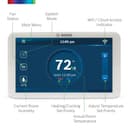
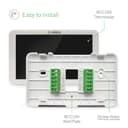
🔥 Stay cool, save green, and control your comfort like a pro! 📲
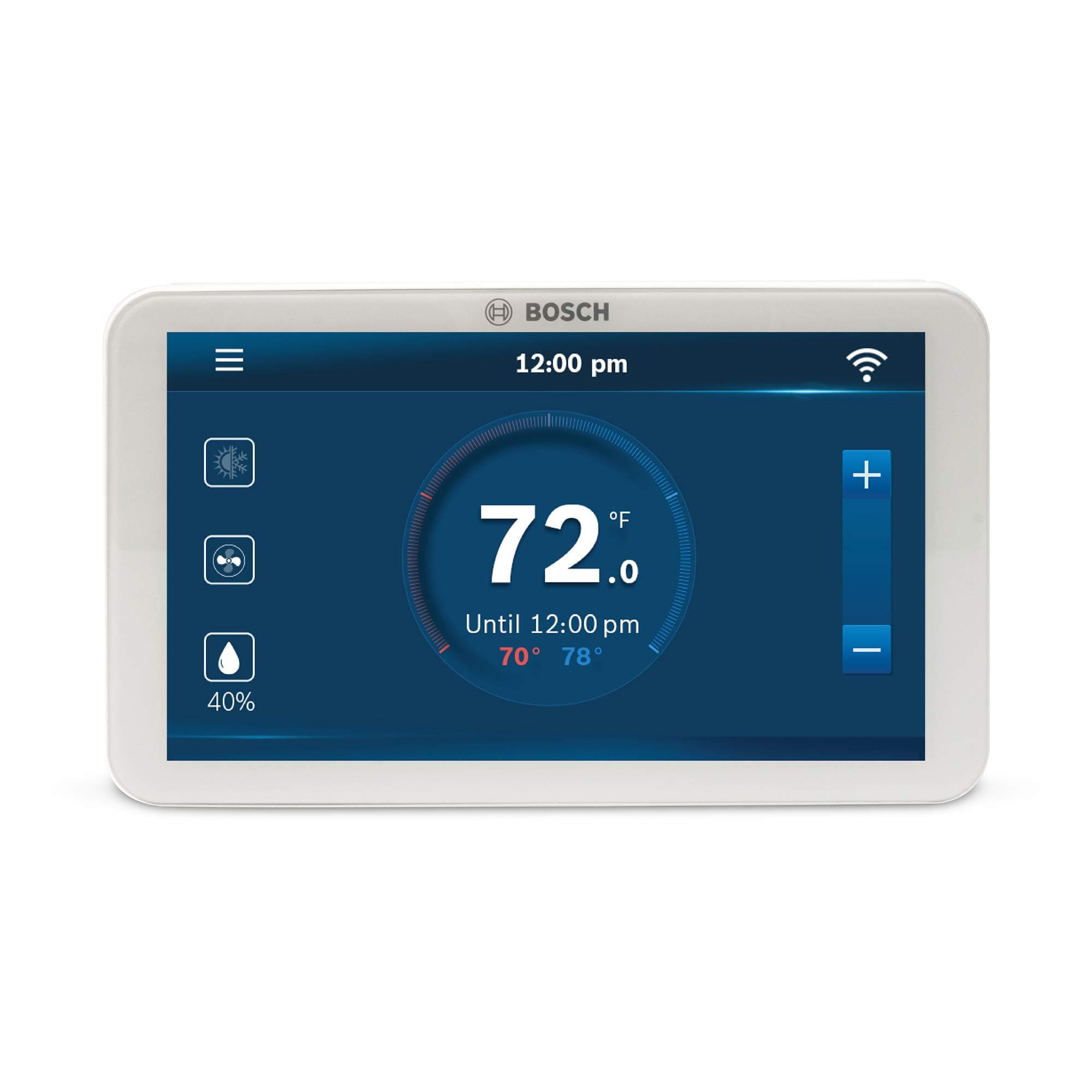
The Bosch BCC100 is a sleek, Alexa-enabled Wi-Fi thermostat featuring a vibrant 5-inch full-color touchscreen. Designed for professional-grade control, it supports most 24V HVAC systems with C-wire power, including heat pumps and humidifiers. Its programmable scheduling and advanced humidity algorithms help optimize energy use and indoor comfort, all manageable remotely via smartphone or voice commands.


| ASIN | B073XHD8BB |
| Additional Features | Programmable |
| Backlight | Yes |
| Best Sellers Rank | #188,666 in Tools & Home Improvement ( See Top 100 in Tools & Home Improvement ) #212 in Home Programmable Thermostats |
| Brand | Bosch Thermotechnology |
| Brand Name | Bosch Thermotechnology |
| Color | White |
| Connectivity Protocol | Wi-Fi |
| Connectivity Technology | Wi-Fi |
| Control Method | Voice |
| Control Type | Touch |
| Controller Type | Amazon Alexa, Vera |
| Customer Reviews | 3.9 out of 5 stars 728 Reviews |
| Display Type | touchscreen |
| Finish Types | Glossy |
| Global Trade Identification Number | 00052575060019 |
| Included Components | Backplate, Jumper Cable, Manual, Screw Driver, Screws, Thermostat, Wall Anchors, Wire Labels |
| Item Dimensions D x W x H | 1"D x 5.2"W x 3.08"H |
| Item Type Name | Bosch BCC100 Connected Control Smart Phone Wi-Fi Thermostat - Works with Alexa - Touch Screen |
| Item Weight | 0.38 Pounds |
| Manufacturer | Bosch Thermotechnology |
| Manufacturer Contact Information | 800-283-3787 |
| Material Type | Plastic |
| Model Name | BCC100 |
| Model Number | BCC100 |
| Mounting Type | Wall Mount |
| Power Source | Electric |
| Product Dimensions | 1"D x 5.2"W x 3.08"H |
| Product Style | BCC100 |
| Screen Size | 5 Inches |
| Shape | Rectangular |
| Special Feature | Programmable |
| Specific Uses For Product | Indoor use only |
| Specification Met | energy |
| Temperature Control Type | programmable |
| UPC | 052575060019 |
| Unit Count | 1.0 Count |
| Voltage | 24 |
A**1
Power or No Power???
I read quite a few reviews, and in most cases customers were replacing their existing non-smart thermostats with this wifi enabled smart BCC100 unit. Some reviews will scare you that you need a power source for this. Well yes, but do not worry... My house was built in 1993 yes I repeat 1993 and when I disconnected all the wires of my existing very old thermostat that had only 4 - Green / White / Red / Yellow wires I was a bit disappointed. But all these copper leads came out from a sheathed grey cable that also had two other unstripped (unexposed copper leads) - a blue and a black. BINGO... that was the key. Yes this new BCC100 will USE all 6 leads. So here is the connectivty: Red goes into a RH and RC already jumped (connected with a U on the BCC100 - you can connect into either RH or RC because they are already connected to each other!!!). Yellow goes in to the Y marked connector (Right side of the array) Blue (previously unused) goes into O/B marked connector (Left side of the array) Green goes into the G marked connector (Left side of the array) White goes into the W marked connector (Right side of the array) Red goes into the RC (RC and RH are already connected by a jumper clip) - right side of the array - RC is for Cool and RH is for Heat. What remains? The Black (previously unused lead). This goes into the top right array marked C. This is actually the POWER cable without which the unit will not work. Now one more feature: before you put this on the wall, you can setup the entie system. How? Look on the back of the unit. There is a connector similar to the one you use for yor android phone charger. If you have any such devices, take that lead and connect it and the unit will come on. You can perform the entire initial setup, schedule for heat and cool times and slots, calendar day-date, wifi, registration of your device etc, all the features without even connecting to the A/C-Heat unit. Now your unit is fully programmed and ready to be connected. Snap in to the wall plate after making connections as described above - JUST MAKE SURE THE AC / HEAT unit is unpowered. Once the unit snaps in the wall plate, power up the AC / Heat unit and you will see the BOSCH logo and you are all set. I had already downloaded the app and as soon as my unit got registered I was able to control it from my iphone. Extremely easy and very smart!!! Both units Home Upstairs and Home Downstairs registered and fully functional... You may get a few errors while registering the unit but just ignore them and retry (mine worked on the third try) because it will register without issues. I give 5 stars to this product!!!
J**G
Continuous and documented software problems for all
I have owned this thermostat for one year and four months. I do NOT recommend this thermostat and below is my full review and the reasons why this deserves a one-star rating. A little background. I need a thermostat with two requirements: Set my schedule by time of day, and connect through my phone to make temporary adjustments. I live in an area with time of use electricity rates, so I do not need a learning thermostat -- I know when to turn it on and off. I also wanted the ability to connect through my phone to verify the current temperature and if we have a longer than expected day away from the house, we can temporarily adjust the temperature. Looks: This thermostat looks nice hanging on the wall, has a large colorful screen, and has a white bezel. User interface: The interface and menu layout are well thought out and easy to navigate. The hold and temporary function are not as intuitive as they could be, but ok once you get used to it. The advanced functions require an access code in the manual, so each time I want to check them I have to find the manual. The schedule setup is a little clunky, but works once you work through it. Technical Support: As you will read below, I have made several calls to tech support. Each time they were helpful, kind, and informative – but usually unable to solve my issues. The reason I cannot recommend this thermostat: The Software: The problems with this have been ongoing since day one -- if it’s not one thing it’s another. For the first six months the device would randomly not connect to the thermostat or allow me to make temperature changes from the app. Sometimes it would respond, but not allow us to release the temporary temperature hold. I could fix it by pressing the little reset button on the actual unit – little use when I am 50 miles away from home. Approximately 3 months ago Bosch had a major software update for the thermostat and phone. Everything worked great for 1 month, but one day the unit would not connect to my home wifi. I contacted tech support and they were having an issue since the update and to try again in a couple days. Why my issue started a month after the update, nobody knows. It took about a week, but then it magically started connecting again. It worked for about a month and then the clock started displaying the wrong time. I would try to set it manually, but that caused it to set to a different time entirely – truly bizarre. This is crucial to my time of use electric plan, if it has the wrong time and turns on my AC unit during my peak electric rates only one time during the month, it would cost me enough to pay for the thermostat. The time issue seemed to resolve itself after about 2 weeks. The latest issue that prompted this review is last week is my app now says I do not have a supported device and I need to sync it with my app. I follow the setup procedure and it gives an error, cannot sync. I thought for sure they would have fixed it after a year and a half of owning it, but new problems continue to pop up. How can Bosch sell a product that just plain doesn’t work and continues to have problems? All I need out of my thermostat is set a schedule and connect remotely. After a year and half of continuous issues I’ve decided to write this review to let people know you will be constantly fighting this thing. Update February 2021: My last update. It has been relatively stable for the past few months, still wont connect about 25% of the time when we are away from the house. Bought a Nest E thermostat installed it and have not had a single issue or hiccup in 4 months. The Bosch went in the trash, I can't even bring myself to give it away.
N**Y
Great product for the right consumer
First I'd like to acknowledge that these BCC100 t-stats got a lot of bad rep on Amazon. My personal experience is categorically different so much that I've upgraded both of my t-stats to BCC100 and have been super happy with my decision. I should also mention that I received no incentive from Bosch or Amazon and paid full price for both units purchased here on Amazon. I spent many hours researching (universal) t-stats online and landed on Bosch because I generally believe the company makes great products/tools/hardware and I didn't care so much about the 'smart' Wi-Fi features which seemed to be the source of the bulk of the negative reviews on Amazon, which were predominantely Wi-Fi connectivity complaints. We had a brand new Lennox system installed at our old house with the latest color-LED t-stat that I loved (no Wi-Fi tho). I paid $450 just for the t-stat alone (installation excl). When we moved to our new house, we inherited two old t-stats that had the standard on/auto fan function and required the user to manually switch between heat and AC, etc. I thought at $150 for a Bosch BCC100 t-stat, I'd give it a try. The reason I landed on BCC100 is a) I wanted something that's fairly universal/compatible with my HVAC system (more on that below), b) allows me to simultaneously set heating and cooling thresholds (e.g. heat up to 70F and cool down to 76F), c) allows me to run the system fan in 'CIRCULATION' mode, d) has a built-in humidistat and is able to control a humidifier accessory, e) has color LED display and is easy on the eye and f) is relatively affordable. a) My HVAC setup. I have a newer American Standard 2-stage furnace (i.e. Trane), a newer large-capacity 2-stage York AC unit, an Aprilaire 600 whole-house humidifier, an older 2-zone ECU that operates the entire system and two t-stats (one for each zone). I installed the BCC100's myself and have had the system running without any issues for 6+ months prior to posting this review. I'm extremely satisfied with my choice to go with Bosch and here's why. b) I'm able to set the low and high thresholds for AC and furnace at the same time and don't need flip a switch to go from heat to cooling or vice versa. The BC100 t-stat handles both call automatically. This is especially helpful in the Fall and Spring time here in the midwest when the temps drop below 50F at night and can easily reach above 80F during the day. BCC100 can kick in the furnace at night and the AC during the day with no action needed from me. c) We've had some major hot spots in our house (e.g. master bedroom) where the temp difference could be 3-5F degrees off compared to temp on t-stat, making it very uncomfortable. We'd faced a similar issue at our old house and found that, aside from upgrading insulation and seeking the air leaks around the house, the next best thing was to get a t-stat that has a fan 'circulation' mode. The circulation setting basically allows you to cycle the HVAC independent of furnace or AC calls. That made a huge difference in our comfort. We have fan circulation set to 20 mins ON, 30 OFF round the clock. That did the trick for us - no more hot spots! d) I'm able to set/control humidity from our BCC100 t-stat in conjunction with our whole-house humidifier accessory. You can use the H/DH and C terminals on BCC100 to trigger the humidifier. For our setup, I wanted to have BC100 turn on the humidifier whenever the fan is on vs. running the humidifier only when the furnace/heat setting is on. BCC100 interface allows you to select between 'steam' and 'evaporative' humidifier settings. I used for former to be able to run our humidifier regardless of the heating calls to the furnace. I don't have a dehumidifier installed at our house, but BCC100 also allows you to control a dehumidifier accessory. It uses the same D/HD terminal so you can only run one at a time, either a humidifier or dehumidifier. I should also mention that I used a simple relay switch to power our humidifier as I don't think that the BCC100 is able to power our Aprilaire 600 humidifier unit on its own. I used the signal from the D/HD terminal on the t-stat to energize the relay and close the power circuit from the furnace ECU to the Aprilaire unit. A couple months after the initial install I decided to try out the Wi-Fi connection. I was half-expecting to do a hard reset and then ultimately disable the Wi-Fi feature based on the negative reviews. To my surprise, I've had zero issues with my Wi-Fi setup on both BCC100 t-stats or the Bosch iOS app on my iPhone. Don't know if my Wi-Fi settings are more conducive to a flawless Wi-Fi integration with these units or if Bosch had fixed the previous software bugs with the current software release, but I'm thrilled that I'm able to use the iOS app and change my t-stat settings on the fly from anywhere on my iPhone. I honestly didn't expect the 'smart' Wi-Fi features to work at all so this was icing on the cake for me. Since I'm an iOS user I can't say if the app works as well on Android devices. I provided a few details about my setup below if you're looking to troubleshoot or replicate a stable setup at your house. Bosch iOS app version: 2.5.0 Bosch t-stat software version: 1.5.0 (the t-stat came preloaded with v.1.4.4 which I had upgraded to 1.5.0 once I had it connected to Wi-Fi) Wi-Fi connection: BCC100 will only connect on a 2.4 GHz Wi-Fi network, so that's something to be aware of. If you have dual-band Wi-Fi set up at home (5GHz and 2.4 GHz running simultaneously), you'll want to make sure you're using separate SSIDs for each band (e.g. XXX_5G and XXX_2G) and connect your BCC100 to the 2.4GHz SSID. The units are stable with 'WPA2-Personal' network encryption. I also have a very strong Wi-Fi signal to both BCC100 t-stat units which alone can make or break the entire experience. I don't know if this product is for everyone, but I personally love it. Hope this review helps you make an informed decision prior to purchasing this product. Cheers.
J**N
Smart home addition by Bosch
I was hesitant to buy this with all the poor reviews and one star ratings for it. I really wanted a plug and play upgrade for our failing non smart thermostat. I didn’t have the 5 wire setup but did find when looking at the prior box it was indeed 5 wires so I only had to attach the thermostat power wire to the furnace head panel and it was set to go. Install took about 20min total and it was on the wall powered up. I did have the exact same issues with the unit getting it to register as most others complained about. I spent about 30-45 minutes attempting to register but it kept saying cannot connect to server. WiFi connection was fine. Eventually I switched to my “guest” network 2.4ghz and it connected and registered no issues. I have no difference between my guest and standard network so not sure what’s up there. I am glad it registered and worked because I would have returned it for a nest at that point if it didn’t register on the guest network. The app also had issues logging in saying incorrect password but eventually let me login and pair with my thermostat. If you don’t use the app it auto logs you out every 5 days and then sometimes says incorrect password again but logs in. The thermostat itself is top quality. Bosch’s quality and performance shine on this product. I am happy it worked out because I know I can trust Bosch with my personal data unlike Google and Amazon. I have not linked this to my Alexa because I have the Bosch app to control it and I set a schedule. Overall 4/5 stars due to frustrations attempting to register and pair this with the app. If it would have been seamless it would be 5/5 stars. I would recommend this to others over a nest. The screen is nice and shows lots of data and is super simple to use. Update Nov 2024 The unit has failed after 2 years use and Bosch is replacing with the newer BCC110 under warranty. The new easy air app and latest firmware seems to have resolved all the initial issues experienced with original purchase and set up when I tried a factory reset on it. The device connected first try to Wi-Fi, registered first try, and seems to have no issues with initial setup. I hope the new BCC110 device is a higher quality as I would like to update my AC and Furnace to Bosch units in the future.
R**T
Excellent thermostat - best out there
Zero complaints. High quality in all aspects. Documentation was perfect, high quality paper and easy to follow instructions. Packaging very nice. Screen is clear, colorful, bright and responsive. Menu system easy. Setup is super easy, connecting to wifi with the on device setup as easy as the phones. Would buy again. I went through 3 other thermostat brand/make/models that just were painful to work and either returned or threw out. As far as thermostats go, this wifi enabled color touch screen with iphone app is all I could ask for in a thermostat, cool weather feature too. Quality shows everywhere from documentation included to the bosch website videos and docs available, usability, design, strength of screws and size of the connection panel, application on device and iphone all a great experience. Well worth the price for the all around quality for something that just works well.
J**Y
Great, Easy to connect unit WIFI is sketchy
Great non smart WiFi thermostat. I wanted WiFi but not a thermostat controlling and automatically adjusting my temperatures. This has schedules that you can set if desired, or you can keep fully manual. Everything can be controlled with the Bosch app. I can connect via WiFi maybe one out of 20 times, it’s terrible if you want to remotely control, find another unit like the nest!
S**H
USE 2.4GHZ WIFI ONLY - Device Logs Supposedly Nonexistent/Nonfunctional
11/22/2023 UPDATE: If you're interested in the device logs feature and want to know how long the thermostat was in whatever mode throughout the day, etc., then please steer clear of this thermostat. Despite there flat-out being a UI for this stuff in the app, one of Bosch's tech support agents told us that the feature never worked, that this thermostat currently tracks no such information, and that the feature is supposed to be added at a future date. Unfortunately, I was given no ETA on this being implemented. ORIGINAL START OF REVIEW: Let us start by saying that this thermostat does seem to be working properly for us, but we totally understand the confusion many users are having. We'll never understand why IoT devices don't support 5GHz Wi-Fi, but we're going to go out on a limb and assume that ~99% of the Wi-Fi issues in the reviews are caused by dual-band Wi-Fi systems. From our experience, this thermostat connects reliably to the SSID we had set up specifically for IoT devices in that we completely disabled 5GHz Wi-Fi on that SSID; you should only have 2.4GHz enabled on the SSID you're using. Also, while we had to expose our usual hidden IoT SSID we connected the thermostat to during setup, this thermostat does automatically reconnect to the now hidden IoT SSID after coming back online from a power outage. The interface is clunky, but it does seem to automatically retry to connect to Wi-Fi when turning back on, even when that SSID is hidden. That said, we can understand people's frustration with this stuff. Heaven forbid this thermostat include a real-time clock module or something to actually keep time in the event that the power is interrupted and there happens to be no Wi-Fi available. That's a really odd choice and arguably defeats the purpose of the smart functionality on the device, especially when you consider how dangerous it can be to leave a home without reliable climate control during extreme temperatures in either direction. One other gripe we have about this thermostat is that the advanced settings kind of get in the way of testing the thermostat for response and reliability, as the time thresholds for certain functions are just set way too high and are supposedly only meant for experts. Meanwhile, you're trying to force the thermostat to turn your heater on or off, but it seems to only want to do so immediately when there's a nearly 20-degree difference between what you've set the device to and what the current temperature is. We don't understand the reasoning for the thermostat selectively ignoring the advanced settings like this. Just understand that you may need to set the temperature much lower or much higher to force the thermostat to turn on or off. We'll continue to monitor this thermostat to ensure it's working correctly, but we can currently understand the issues people are having with this model and don't blame anyone who considers this thermostat to be unreliable. It seems to be working just fine for us so far, though we do think IoT device manufacturers need to make these devices more resilient by supporting more Wi-Fi bands and by including little things like a real-time clock module. In case you're curious about our network setup, we're using a Ubiquiti Dream Machine SE and have a separate SSID restricted to 2.4GHZ for use with IoT devices. IoT devices aren't always the most secure things on a network, so it's best to have them split off onto their own separate network so they're not potentially misused maliciously to target your more important productivity and entertainment devices.
N**7
Unable to load Bosch app on Android with current update
Asked the Bosch installer for my Bosch heat pump and matching air handler to move from the Honeywell Vision Pro 8000 series to go to this Bosch BCC100 Connected Control just to stay in the same family. I have been unable to get the app to properly install on my new Pixel 2 with the current Android update. The app from Bosch will not open properly. No other apps have had a problem. I have followed all of the TTD to correct the problem, and with the same result of the message "Connected Control keeps stopping" and choices of App info, Close app, and Send feedback. A number of others are having the same problem, and it appears from their comments that Bosch Support is not addressing it. Those commenters that are not having a problem may have the same issue if they uninstall their app with the current Android update and then try to install. Only trying will tell. My experience with Bosch support has been spotty, at best. When I did get to level 2 or 3 tech support, the tech listened to everything, directed me to try this and that and I did, then said that it was working on his phone so I must have something wrong with my phone and I should contact Verizon and Google Pixel support. When I mentioned others having the same problem, he said he wasn't familiar with that info. The most recent was with level 1 and she seemed very concerned with the problem and took a lot of info of what I tried and failed, but said she is not at a level to help and would have somebody call me I was surprised to find that there is no battery backup to keep the settings available in the event of a power problem. It appears that if there is an outage to either the Internet and/or power that the thermostat goes to default which may not be what the user is wanting if they aren't home. With Hurricane Michael that went through knocking out power with some frequency and our cable-based IP, the thermostat would be in default settings from what I can tell. Seems a bit shortsighted in design to not have that old tech built in. Sorry for the length of this, but I am trying to portray that I have done all that I know, and hopeful that Bosch Support will do the same. If Bosch wants to be in this market, then they must provide the support.
Trustpilot
Hace 2 semanas
Hace 1 semana