We remain fully operational. Our teams are working around the clock to ensure your deliveries continue safely.

Descargar la aplicación


Servicios al cliente
Sobre nosotros
Copyright © 2025 Desertcart Holdings Limited
Descargar la aplicación
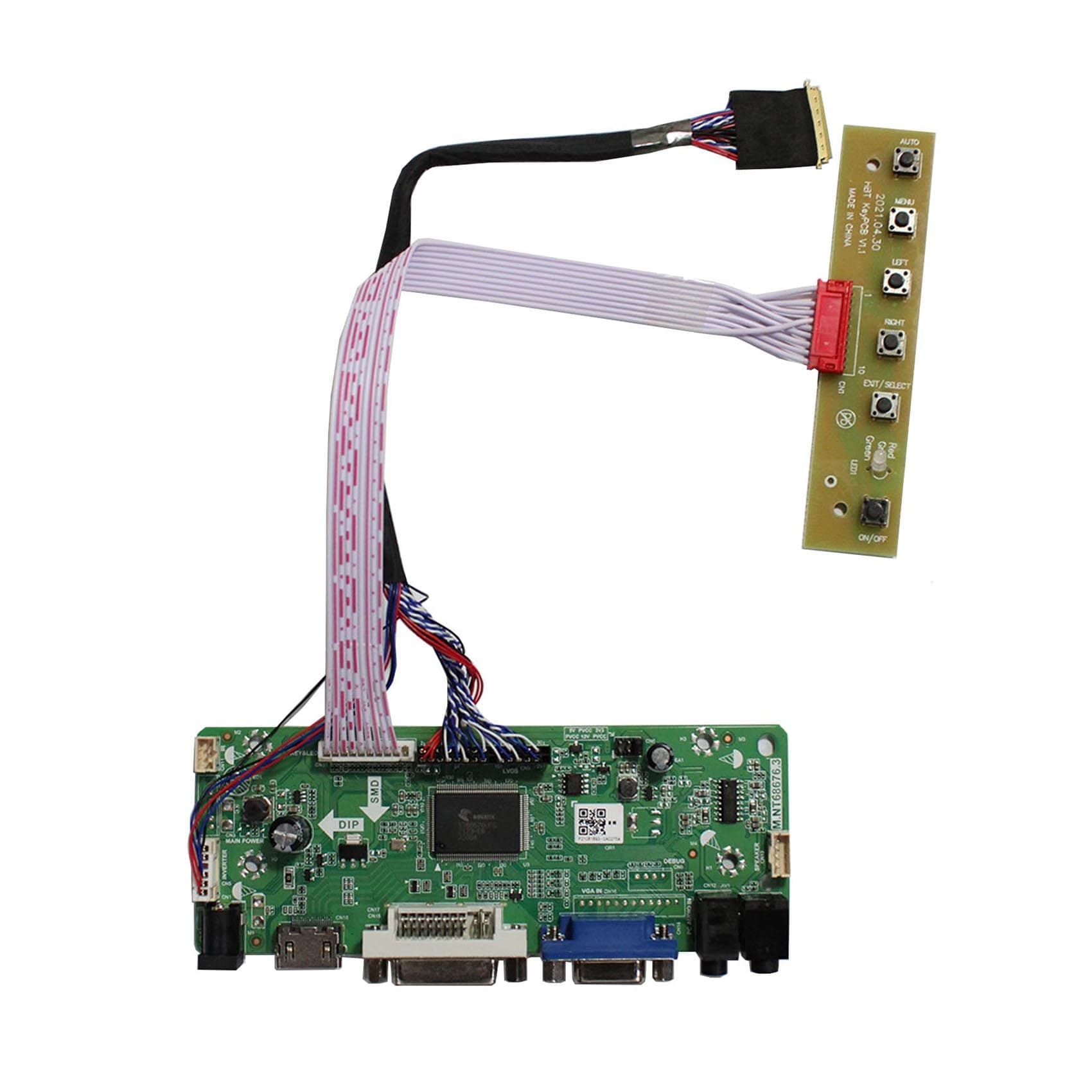
⚡ Upgrade your screen game with pro-level clarity & sound!
The VSDISPLAY VGA DVI Audio LCD Controller Board Kit is a versatile, plug-and-play solution designed to convert 15.6" and 17.3" 1920x1080 LCD panels into fully functional displays. Supporting multiple popular panel models, it features DVI and VGA video inputs, integrated audio output, and an energy-efficient standby mode. With user-friendly OSD controls and a compact form factor, it’s ideal for DIY enthusiasts and professionals repurposing laptop screens for multimedia, gaming, or business applications.
| ASIN | B01NCN2BRV |
| Additional Features | DIY/Replacement accessories |
| Aspect Ratio | 16:9 |
| Best Sellers Rank | #9,340 in Laptop Computer Replacement Parts |
| Brand | VSDISPLAY |
| Color | Resolution:1920X1080 |
| Compatible Devices | Laptop, Desktop, Gaming Console |
| Connectivity Technology | DVI, VGA |
| Contrast Ratio | 1000:1 |
| Customer Reviews | 3.7 out of 5 stars 85 Reviews |
| Display Resolution Maximum | 1920 x 1080 Pixels |
| Display Technology | LCD |
| Display Type | LCD |
| Hardware Connectivity | Unknown |
| Has Color Screen | Yes |
| Image Contrast Ratio | 1000:1 |
| Item Dimensions D x W x H | 0.67"D x 5.47"W x 2.09"H |
| Manufacturer | VSDISPLAY |
| Model Name | B156HW01 |
| Model Number | 68676.3 |
| Mounting Type | Desk Mount |
| Native Resolution | 1920x1080 |
| Pixel Pitch | 0.264 |
| Power Consumption | 24 Watts |
| Refresh Rate | 60 Hz |
| Resolution | FHD 1080p |
| Response Time | 8 Milliseconds |
| Screen Finish | Glossy |
| Screen Size | 15.6 Inches |
| Screen Surface Description | Glossy |
| Shape | rectangular |
| Specific Uses For Product | Multimedia/Business/Gaming/Personal |
| UPC | 601285610108 |
| Viewing Angle | 170 Degrees |
| Voltage | 12 Volts |
J**Y
Worked to repurpose my old 2011 Dell 17" XPS laptop LCD
In 2011, I ordered my Dell XPS L702X with the best 17" matte screen I could get for 3D drafting. It's too old to install Linux, so I'm cannibalizing the screen for a Raspberry Pi 5. This controller board worked right away when plugged in. My screen Part# is: N173HGE-L11 Rev. C1 Happy days!
F**K
does not connect to a LP156WF1 monitor
This monitors male adapter does not fit for a LP156WF1 monitor, it is too large, I believe the pins line up but since the adapter is too large it does not work for this type of monitor false adevertisement.
R**F
Works great with AUO B156HW01 V4
I have a DIY photo frame I use with a Raspberry Pi, and this drives the AUO B156HW01 V4 I use for the screen. Simple plug and flay affair, and all simply works. It's a gorgeous wide gamut screen, and this board doesn't seem to hold it back. The board arrived rapidly (US based Prime shipping), and it appears brand new. I paired with a 12v 4amp power supply (not included).
K**N
Worked perfectly
I had a Startech rack mount KVM with a bad board. These KVMs are like $900 new. I slapped this board inside and routed new cables to the back. I was even able to re-pin the startech button board to work with this board. Works without issue. Cheap and justifiable, especially since this KVM gets used almost never. One thing to note: The output to the screen says "inverter", which scared me since i'm pretty sure the LCD panel itself was LED, however it worked fine anyway.
C**H
Product works as stated. I was able to re-purpose ...
Product works as stated. I was able to re-purpose an LCD panel from an Acer laptop to use with a Raspberry Pi. Tech support is very responsive by email. Helped me fix a problem I had. Would purchase from them again.
J**E
doesn not work, no support
It did light up the LCD screen, but nohting else; no menu, no input seletction, nothing.. I contacted the seller, and they did not respond. Buyer beware on this.
S**M
Works with Samsung LTN156HT01
Despite the LTN156HT01 not being listed as a supported display, it does use the same input specification. I'm happy to report it does indeed work. One star off for some idiosyncrasies with the menus. The button labels on the keypad don't quite line up with what they actually do (Exit/Select appears to do nothing, Menu selects, Auto exits, Left is down, Right is up), and in order to switch from VGA to HDMI, I need to select DVI: If I select DVI, it will briefly display No Signal and switch to HDMI, but if I select HDMI, the screen will black out for a moment before switching back to VGA. Overall, it works decently well for what it is.
M**R
Works great!
Easy to use. Working as a Pi monitor now.
Trustpilot
Hace 1 mes
Hace 3 días