We remain fully operational. Our teams are working around the clock to ensure your deliveries continue safely.

Descargar la aplicación


Servicios al cliente
Sobre nosotros
Copyright © 2025 Desertcart Holdings Limited
Descargar la aplicación

Buy anything from 5,000+ international stores. One checkout price. No surprise fees. Join 2M+ shoppers on Desertcart.
Desertcart purchases this item on your behalf and handles shipping, customs, and support to Argentina.
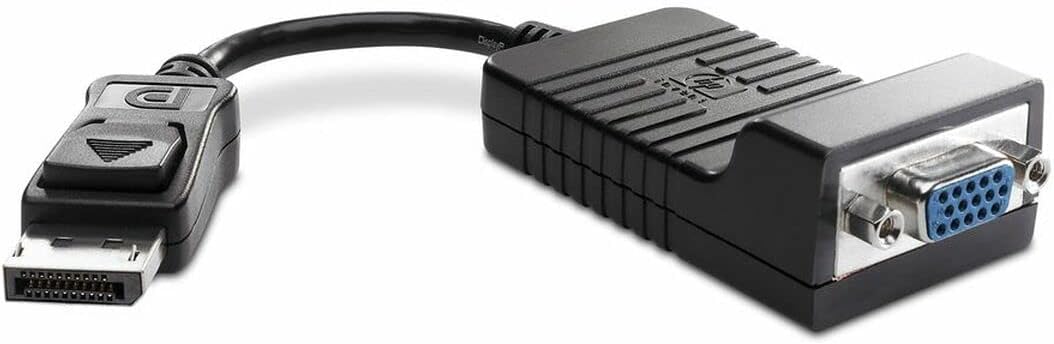
🔌 Connect with confidence — legacy meets speed in one sleek adapter!
This HP DisplayPort to VGA adapter delivers a reliable, plug-and-play solution to connect modern desktops to VGA monitors. Featuring an 8-inch latching cable and blazing 48 Gbps data transfer, it ensures stable, high-quality video output ideal for professional environments. Compact and durable, it’s the perfect bridge for seamless multi-display setups.
| ASIN | B0025ZUF8K |
| Batteries | 1 A batteries required. |
| Best Sellers Rank | #2,578 in Audio & Video Connectors & Adapters |
| Brand | HP |
| Cable Type | VGA |
| Color | Black |
| Compatible Devices | Desktop |
| Compatible Phone Models | Standard |
| Connector Gender | Male-to-Male |
| Connector Type | VGA |
| Customer Reviews | 4.6 4.6 out of 5 stars (369) |
| Data Transfer Rate | 48 Gigabits Per Second |
| Date First Available | October 21, 2017 |
| Department | accessories general |
| Global Trade Identification Number | 00787963629768, 00884420906193, 07427446499435 |
| Indoor/Outdoor Usage | Indoor |
| Is Discontinued By Manufacturer | No |
| Item Weight | 2.12 ounces |
| Item model number | AS615AA |
| Language | English |
| Manufacturer | HP |
| Model Name | AS615AA |
| National Stock Number | 5935-01-599-0053 |
| Number of Items | 1 |
| Number of Pins | 35 |
| Outer Material | Rubber |
| Product Dimensions | 11 x 1 x 9 inches |
| Recommended Uses For Product | connecting a desktop computer to a VGA monitor |
| Shape | Round |
| Special Feature | Hohe Geschwindigkeit |
| Specification Met | No |
| UPC | 112840332231 168141628702 088020585004 617407430554 163120270729 787963629768 080850479782 088022192552 763615803120 478584187217 151903012451 803982751133 521227138777 012300166768 884420906193 001910061556 021111389426 031111765960 813353912988 100177330549 060090905791 172302812732 999994449110 008844209061 |
| Unit Count | 1.0 Count |
D**B
Worked like a charm.
Worked like a charm. I'm not sure what the "HP" is in the name, but it doesn't seem to be for Hewlett-Packard, as there is no brand indicated on the device at all. Nonetheless, it appears to be of good quality and it was plug-and-play simple. It allowed me to extend the display from my laptop and the video quality appears flawless.
S**.
Great product, works well and easy to use
Great product, works well and easy to use. Of the four adapters I ordered, one was clearly a different brand (would have been nice to know this up front) but it worked so I did not lower the star rating at all. Your primary monitor needs to be plugged directly into the video card's slot, your secondary monitor must be plugged into this adapter.
J**N
Life Saver!!!
Bought this for work. Needed to rig a dual screen layout for my boss. His machine only had one VGA output and a Displayport output so this was a shot in the dark solution for me. It worked splendidly. Actually saved us a ton of money. Highly recommend.
J**Z
Works great with the HP docking station
Connecting a Displayport docking station to a DVI/VGA KVM switch. Works great.
R**Y
solid adapter
Not much to say on this other than it does exactly what I expected for what it is. I purchased it to use on my new company issued laptop so that I could continue running dual monitors. So far, no problems to report.
D**S
I bought this adapter because I had two vga monitors ...
I bought this adapter because I had two vga monitors that I wanted to use with my desktop. And I find it a whole lot cheaper to buy the adapter then to buy a display port monitor At the time of writing this review I have already used this product for many years with no incident. I have always used to monitor religiously. And never see myself going back to one monitor except for when on a laptop when necessary. Even though you can use multiple monitors on a laptop.
T**R
Works adequately
Bought this product so that I could operate a second monitor from my computer without having to install additional hardware. After a few start-up issues, I got it to work relatively well. However, I lose the use of the monitor that operates off the adapter from time to time and have to do a restart in order to bring it back into operation. That may just be a problem with operating off the display port rather than a fault of the adapter. If it weren't for the aggravation of having to do the restart from time to time, I would have given this product a solid five.
C**H
Works like a champ
Worked great - although I did have to download the latest device driver set from the HP Web site, so not 100% plug and play. Other than that, now successfully driving an external monitor from the laptop without having to spring for the docking station.
S**L
Ok
D**K
Needed this little cable to enable my 3rd display. It did the trick and now I have an additional display for graphic and web design. Thank you... Just what my computer needed.
M**S
I couldn't find anything that would allow me to see the displayport output on my new hp proliant gen9 ml10 , but I can confirm this worked straight away, and is that only adaptor I could find on my quick search around that would actually work.
L**I
pagato 10 euro e utilizzato per collegare un vecchio monitor aun computer HP. Funziona... aggiornamento a distanza di un anno: fa ancora il suo laovro senza nessun problema
M**N
Bonjour, Informaticien de métier, je ne peux que conseiller cet adaptateur. La renommé de la marque n'est plus à faire et la qualité est au rendez-vous. Détenteur de 2 bons écrans full HD sans ports HDMI, il a fallut que je trouve une solution pour les connecter via les câbles VGA à la base de mon ordinateur portable. Après branchement, je n'ai pas de perte de qualité visuelle et tout fonctionne correctement. J'ai reçu rapidement le produit et je ne suis vraiment pas déçus. A acheter les yeux fermés ! Cdt, M.A
Trustpilot
Hace 3 semanas
Hace 3 semanas