We remain fully operational. Our teams are working around the clock to ensure your deliveries continue safely.

Descargar la aplicación


Servicios al cliente
Sobre nosotros
Copyright © 2025 Desertcart Holdings Limited
Descargar la aplicación
Buy anything from 5,000+ international stores. One checkout price. No surprise fees. Join 2M+ shoppers on Desertcart.
Desertcart purchases this item on your behalf and handles shipping, customs, and support to Argentina.
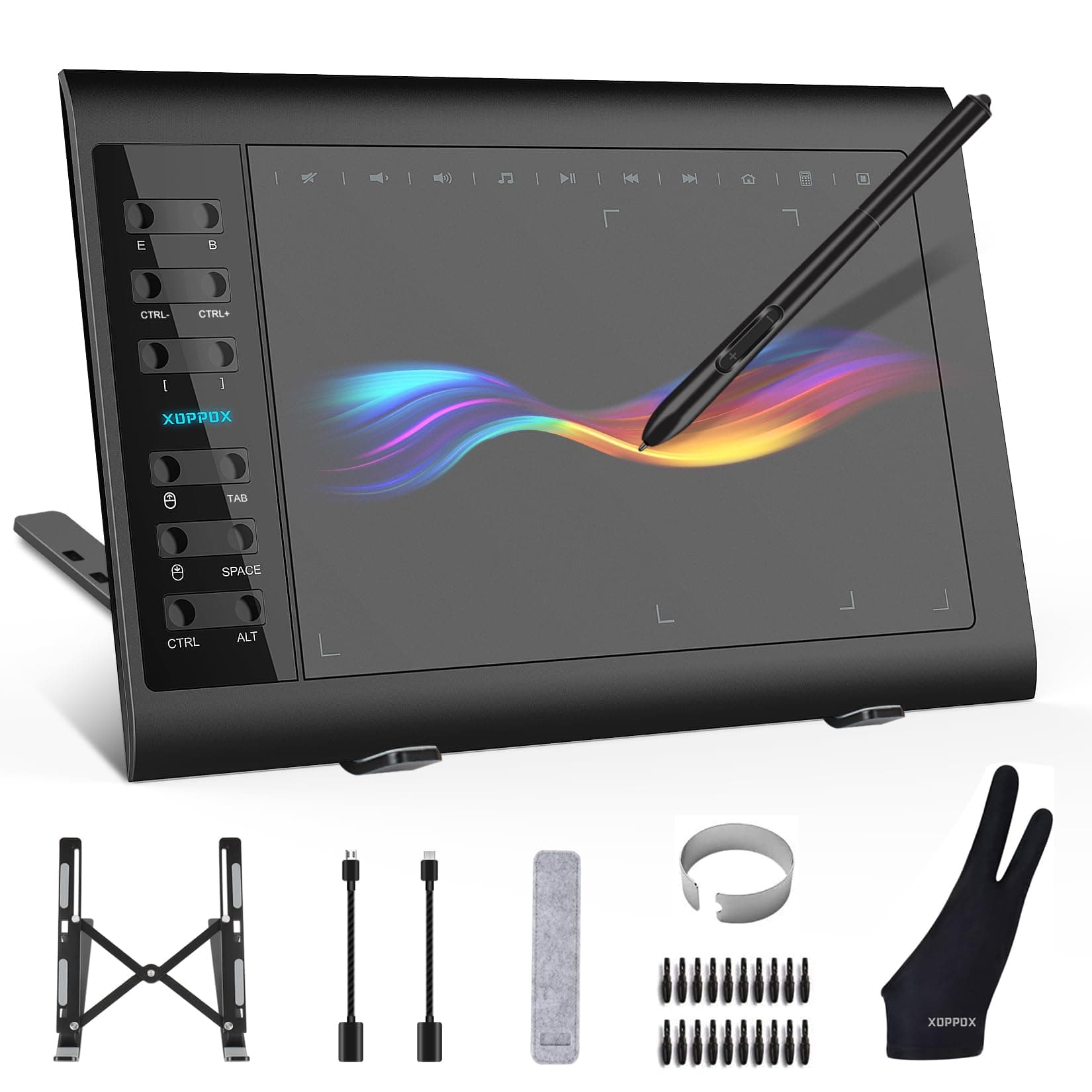
🎨 Elevate your digital canvas—create, connect, and conquer with XOPPOX!
The XOPPOX Graphics Drawing Tablet offers a large 10x6 inch active area paired with an ultra-responsive, battery-free pen featuring 8192 pressure sensitivity levels. Designed for professionals and creatives, it supports Windows, Mac, and Android OS with 12 customizable shortcut keys and 10 multimedia keys to enhance productivity. The package includes essential accessories like replacement nibs, OTG adapters, and a glove, making it a versatile tool for digital art, design, and online teaching.


| ASIN | B08TC1N6JS |
| Item model number | cbefe1d4-7323-49c7-8094-fdaf714227e8 |
| Manufacturer | VIN1060Plus |
| Product Dimensions | 36.07 x 24.13 x 0.1 cm; 1.2 kg |
J**A
These are awesome if you are a digital art person. So many great accessories and works well with tablets, phones, and computers.
H**U
It worked well for about 20 minutes. At first it was super accurate, now its super jittery, everything is clean, I disconnected my mouse and even the keyboard to make sure there were no parasite signal but to no avail. I even use a special glove and put no weight on my wrist at all. Pretty disappointed. In addition, its pretty akward and doesnt feel natural at all to use a pen on a black surface and seeing it move on the screen in front of you. Would recommend saving for a real drawing tablet.
O**K
Ok
A**R
Didn't work. Didn't look like the picture in the ad. Returned.
K**S
the images i linked is the program screenshot and a old drawing i made with it! Ive been using this for several months now, for new buyers, you might have seen a review saying the program attached to the tablet is a "virus" ... that is completley false! it just boots up every time you restart your pc, this is what the program looks like, tablets require a driver program. another thing, the hotkeys are customizable and easy to use, the only downside is it bugged out when i first got it but it fixed itself after, its really good for its sale price (it almost always goes on sale) and its perfect! even the usable tablet zone is customizable by size if the tablet is too big! and it works with lazy nezumi (stabilizer program, its really good if you have shakey lines, $30 for 4 year liscense) the product itself is sturdy (ive dropped it on carpet a few times, oops) and is well for heavy usage, good for professional use and comes with lots of nibs, screen doesnt scratch and the nibs wear rarely (even after several months i havent changed the first nib, maybe should soon) its comfortable to carry and comes with a stand if you need to use one, the glove isint important, because its not a touch screen, but its still nice if you want to glide your hand against the screen or dont want sweat on it overall out of ten i would give.. 10! way better than a wacom tablet!
Trustpilot
Hace 1 mes
Hace 2 meses