We remain fully operational. Our teams are working around the clock to ensure your deliveries continue safely.

Descargar la aplicación


Servicios al cliente
Sobre nosotros
Copyright © 2025 Desertcart Holdings Limited
Descargar la aplicación



Buy anything from 5,000+ international stores. One checkout price. No surprise fees. Join 2M+ shoppers on Desertcart.
Desertcart purchases this item on your behalf and handles shipping, customs, and support to Argentina.
🚀 Print Fast, Promote Smart, Stay Ahead!
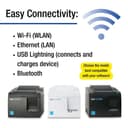
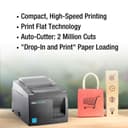
The Star Micronics TSP143IIIW is a high-speed thermal receipt printer delivering 43 receipts per minute via easy wireless Wi-Fi setup with WPS or Access Point mode. Featuring PromoPRNT software for automated promotional printing, a patented De-Curl function for flat receipts, and a compact design with embedded power supply, it’s engineered to optimize counter space and enhance customer engagement.


| ASIN | B01BJOFPNM |
| Additional Printer Functions | Print Only |
| B&W Pages per Minute | 43 ppm |
| Best Sellers Rank | #80,283 in Office Products ( See Top 100 in Office Products ) #103 in Receipt Printers |
| Brand | Star |
| Built-In Media | Labels, Paper |
| Color | blackone |
| Color Depth | 1 bits_per_pixel |
| Color Pages per Minute | 250 ppm |
| Compatible Devices | Laptops |
| Control Method | App |
| Controller Type | Push Button |
| Customer Reviews | 3.6 3.6 out of 5 stars (325) |
| Dual-sided printing | Yes |
| Duplex | Simplex |
| Global Trade Identification Number | 00088047255102 |
| Hardware Interface | Unknown |
| Item Weight | 499 g |
| Manufacturer | Star Micronics |
| Maximum Copy Resolution Color | 203 x 203 DPI |
| Maximum Copy Speed Black and White | 43 ppm |
| Maximum Media Size | 250mm |
| Maximum Sheet Capacity | 43 |
| Model Name | TSP143IIIW |
| Model Number | TSP143IIIW |
| Model Series | 143 |
| Number of Drivers | 2 |
| Number of Trays | 1 |
| Other Special Features of the Product | Network-Ready |
| Output sheet capacity | 43 |
| Paper Size | 210 Millimeters |
| Print media | Paper (plain) |
| Printer Connectivity Type | Wi-Fi |
| Printer Output Type | Monochrome |
| Printer Type | Thermal |
| Processor Count | 1 |
| Series Number | 143 |
| Specific Uses For Product | Receipt Printing, Promotional Material Printing |
| Total USB 2.0 Ports | 1 |
| Total Usb Ports | 1 |
| UPC | 088047255485 088047255492 088047255102 |
| Unit Count | 1 Count |
| Warranty Type | limited warranty |
C**S
Importante: 1.- Si se va el internet no imprime los tickets aunque este en intranet 2.- Ocacionalmente imprime unos micro tickets como si tuviera un error De ahy en mas resistente, buen material
P**O
So like many restaurants who are forced to offer as many take out and delivery services out there we've recently had to sign up for multiple delivery services. But if you're just relying on the old regular printer ink and paper (using a B/W Laser printer). Its not the cost its the time and space these things take up. Especially if you need to stock up. Since we use a wired LAN order ticketing system - the 3 1/8 thermal rolls are already in use (which this printer uses). So win win - we have the consumables - now we just need the printer that WORKS with the kiosk locked tablets supplied by <<insert your delivery service here>>. So I have 3 tablets Service Is it compatible? Seamless/Grubhub Yes DoorDash No UberEats No Setup: Its straight forward: 1. Load the thermal roll 2. Plug in power 3. Start the installation process Installation/Setup: This is the WIFI model. Standard setup is to set the printer into "connect" mode and you click the WPS button on your WiFi Router and Bam you should be connected ( this is true for MOST setups ). We installed a more robust and secure enterprise setup (Ubiquiti Access Points if anyone cares) and being enterprise doesnt have a WPS option (security and all). So to set this up manually: 1. GET your WiFi Network info. SSID (exact case sensitivity name) and Password and security type. 2. Download the printer APP to the phone (IOS and Android Avail) 3. Connect to the PRINTER as it defaults out of box as a Access Point (go to wifi settings on your phone etc etc) 4. Start up the printer specific App, select the printer you want to edit, click settings and look for WLAN settings. 5. Change printer WLAN from ADHOC access point to Infrastructure mode and fill in with details gathered in step 1 6. Save and Send commits to the printer 7. Printer should flash and if you view printers from a computer on the network you should see this printer available as a network printer if everything worked. 8. Go to Seamless tablet and click on settings 9. Add printer and a PRINTER will show up now 10. Set auto print and the # of tickets you want to print. 11. Voila when a delivery order comes in it auto prints and front end just needs to keep a ticket and 2nd copy goes to kitchen. My difficulties in setup is due in part to my pre-existing setup. But once it got it going boy was it a time money and reputation (team members kept forgetting to check the app to manually PRINT on the pc) saver. Oh what about the other two delivery services? I had to order the BLUETOOTH thermal printer... Its arriving shortly and ill update if that is compatible with all three tablets once I get it :).
M**N
This product does not integrate with Square as advertised by the seller. Initiated several return requests with no response from the seller. No "final sale" warning is given upon purchase. Scam, do not purchase.
R**J
Superb quality and ease of use. Can link to multiple devices allowing you to print from different devices/stations. Been using only for a few months, but the quality is easily appreciated. Prints very clearly, and perforates the paper as well. A must have !! Bought a 2nd one for other location.. if anyone out there is having issues with connectivity over wifi, especially using the square App and specifically In cases where you get frequent disconnects (printer doesn’t show up or respond in app) every time you reopen the app or awaken the device; you will benefit from using a quality brand router. Doesn’t have to be dual band because the WiFi version of this printer only supports 2.4 ghz. I Struggled with daily disconnects and failures to reconnect. After trying different channels and all manner of configurations I ditched the crappy modem/router provided from isp and switched back to my Motorola and viola! Running perfect ever since.
A**L
Printer didn’t worked at all
Trustpilot
Hace 3 semanas
Hace 2 semanas