Some deliveries may take a little longer than usual due to regional shipping conditions.

Descargar la aplicación


Servicios al cliente
Sobre nosotros
Copyright © 2025 Desertcart Holdings Limited
Descargar la aplicación


🚀 Elevate your visuals — don’t just watch, experience every pixel!
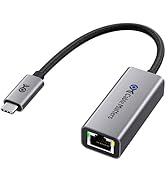
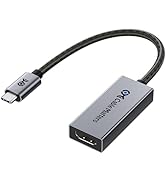
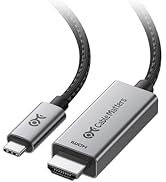
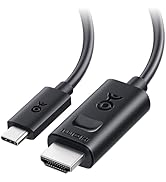
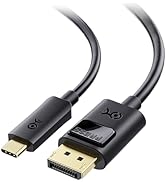
The Cable Matters USB C to HDMI 2.1 Adapter delivers ultra-high bandwidth of 48Gbps, supporting stunning 8K resolution at 60Hz and ultra-smooth 4K at 240Hz HDR. Compatible with Thunderbolt 3, 4, and 5, it ensures future-proof connectivity for professional-grade laptops and GPUs. Its premium braided cable and aluminum enclosure provide durability and style, while wide compatibility covers Intel Evo, Nvidia RTX 3000/40 series, and AMD RX 6000/7000 series. Ideal for gamers, creatives, and professionals demanding flawless, high-resolution video and audio output.



| ASIN | B08MSWMXT4 |
| Best Sellers Rank | #70 in Thunderbolt Cables |
| Customer Reviews | 4.3 4.3 out of 5 stars (829) |
| Date First Available | November 4, 2020 |
| Is Discontinued By Manufacturer | No |
| Item Weight | 0.634 ounces |
| Item model number | 201388-A |
| Manufacturer | Cable Matters |
| Package Dimensions | 7.72 x 3.35 x 0.43 inches |
C**N
4k 120hz on Mac
Works great. Gives me 4k 120hz on mac os through a thunderbolt 5 doc. I got the 201388 version and it took 2 minutes to flash the new firmware with a PC. Great it if you want 4k 120hz on mac.
R**.
The type c to hdmi 2.1 works with the lg 42c2 on 4k 120hz 12 bit RGB wtihout any issues.
This is the second time that I buy a type c/display port to HDMI 2. The first one was ULT-WIIQ-US 6.6ft, DP 1.4a to HDMI 2.1. Unfortunately, this cable had audio issues, it stutters every 30 seconds and after 4 days it stopped working on 4k 120hz RGB. I researched a lot on these adapters and I found out that my RTX 2070 support type c video out display port alt mode, so I searched these adapters too. It seems that many of these adapters suffers from overheating, signal loss when switching in and out of HDR. Also, some of them require USB power. It seems the most of these adapters use the same chipset, but, it is the firmware that cause these issues. Then I saw that Cable Matters provide firmware update for some of the display port/type c to HDMI 2.1 that mention many bugs fixes related to issues that I mentioned. I decided to buy the short adapter and buy a hdmi 2.1 cable instead of the cable type, as the adapter is more expensive than the cable and it reduce the chance for it to stop working properly. The longer the cable is, there is a higher chance for failure. As soon I got it I download the latest firmware update from Cable Matters website and saw that the cable is on older firmware, so I update it . It takes very short time, and it works without issues. I can send HDR signal without losing signal, the audio does not have any issues and as I wrote in the title, it works on 4k 120 Hz 12 bit RGB. I will update the review if the adapter will fail.
B**S
Works Great
Works Great
P**1
Worked for a bit, albeit with hiccups. Now, not really. I know I was pushing the limits though.
So I got this adapter in hopes of upgrading my 1660 Ti with a HDMI 2.1 port. Why? To run 4K @ 120Hz and Full RGB/ 444 for HDR purposes. I know, I'm stretching the bandwidth limits of the hardware. Technically the USB-C port which comes from the 1660 Ti cannot do the full 48 Gbps. A non-thunderbolt USB-C is speced to top out at 40 Gbps. I knew this before I bought the adapter. Yes, I got it to run the above. But I have now had the adapter for a couple of months and the image disconnects have just gotten worse. Now it is having difficulty even connecting at all. Perhaps something got cooked. It was getting rather warm. Not USB flash drive hot though. My biggest other complaint is that something is not translating with the audio channels. If I take the same HDMI cable and plug it into the 1660 Ti's HDMI port. I can get it to see my 4k/8k AVR at 24bit and even run Dolby Atmos no problem. But with this adapter and the mini displayport version of this adapter (which I also bought) I just cannot get the PC to run anything other than 16bit. Also, I cannot even get basic 5.1 to work properly anymore. It is intermittent and most of the time I end up getting the sub channel on the left rear and my center channel on the right rear. Sometimes it does work perfectly for a couple minutes though. And no, there isn't a mis-wired speaker, the home theater works fine with a Roku and PS3 attached. This is not an HDMI cable issue, as I am using a certified 8k cable. My conclusion is that if I want the above I need a new GPU or PS5, which is almost saying the same thing. This device will give you an additional video port at high resolution, but don't expect any multi channel sound to be reliably pulled through it or HDR.
J**M
Plug and Play
I have a Dell laptop that is hooked up to a Samsung S95F by a Silkland Ultra A certified HDMI "Ultra High Speed" cable. I was unable to get the highest resolution and refresh rate out of the TV and laptop. I researched and determined that I needed to use the USB-C lighting connection on the PC to achieve this. I purchased this adapter, plugged it into the laptop, plugged the same HDMI cable into the adapter and it worked with no issues. I adjusted various settings and could get 3840x2160 at 120HZ. That is the highest setting and rate the laptop / tv combo is capable of (at 120). The connection was easy, plug and play, No extra or external power required, the size of the adapter really didn't change anything on my setup (location of laptop and cables connected to the tv). As far as sound quality goes I could discern no difference between the before and after, still sounds great. I am using this setup to watch streaming 4K movies and OTA TV. The tv is setup as a dumb tv and just a monitor. Last thoughts. There are so many factors that will stop you from achieving the highest rates possible. The big three needed to achieve this are, 1. Is your GPU and PC hardware actually capable of providing the desired rates. 2. Is the display that you are using actually capable of the desired rates. 3. And this is the big one. Are the cables and connectivity actually rated for you tp properly connect # one and two above. It took me several days to source the correct hardware and this device was the correct hardware in my circumstance.
S**N
Works with many, but not all devices.
I tried this adapter with various devices. For some of them it worked perfectly, such as my iPad Pro and an old Dell Laptop. With those it worked perfectly. However, it did not work when connected to the rear USB-C ports on a Microsoft Surface Dock2 with a Surface Pro 8 attached. I blame Microsoft more than I blame this adapter, as it seems to work fine with everything else.
J**N
Cumple con la función de pasar señal 4K 120hz hasta 12 bit color Full Gamma. Pero se pierde compatibilidad con VRR (Gsync / Freesync) Si tienes una RTX 20XX y no quieres estar limitado al HDMI 2.0 este adaptador es la opción, pero considera que no es compatible con VRR.
P**L
I was quite mad discovering that it needs a firmware update, and then to my dismay unable to achieve the image I wanted. However, it turns out the cable was the issue!
M**S
I have the AMD RX6800 XT graphics card in my computer, it has one HDMI output, two DisplayPort and one USB-C. The HDMI was already taken by another monitor I use, so I ended up opting for USB-C -> HDMI to be able to share screen to my TV. Cheap adapters kept limiting my connection. One gave me only 24Hz, very "laggy" picture. Another would top out at 30. A third wouldn't even let me reach 4k. Then I decided to go for the recognized Cable Matters, and just out of the box I can turn up all settings without any issues. Thanks for a reliable device! Extra bonus star for the fact that firmware updates are available even after buying the product. That's was beyond expected. 6/5!
R**L
It has been quite a learning experience on how to get my MacBook running at 4k HDR 60hz and this adapter will do it for you. For me and perhaps for you too, you have to choose the full 4k resolution of either 2048x1080 (HiDPI) or 4096x2160 before you get a choice of 25, 50 or 60hz, otherwise, for me, all I get is 25hz for my very old Sony TV. Thus with my MacBook outputting at 4k 60hz HDR I had thought that I would get my netflix, disney and amazon all playing at 4k HDR, but unfortunately for me my whole chain of receiver to my old 4k HDR Sony tv is a full chain of 2.2 compliant devices so therefore all the streaming services still only plays 1080p. Yes you can get netflix, disney and amazon prime to play at 4k but you do need all your devices to be HDMI 2.2 compliant.
Y**O
Vale lo que cuesta, fabricación y acabados de calidad.
Trustpilot
Hace 2 meses
Hace 1 mes