Some deliveries may take a little longer than usual due to regional shipping conditions.

Descargar la aplicación


Servicios al cliente
Sobre nosotros
Copyright © 2025 Desertcart Holdings Limited
Descargar la aplicación


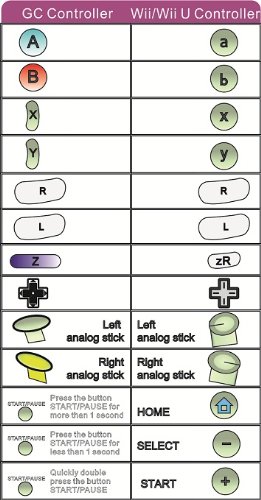
How to Customize TURBO? 1. Press and hold the button "TURBO" on the adapter 2. Then press the button that you need to customize on the GC Controller 3. Release them both, you'll find that the LED on the adapter will light up, which means the button is successfully customized with TURBO. 4. Repeat the above steps 1, 2 and 3 to customize the button you set with AUTO FIRE function. 5. Repeat the above steps 1, 2 and 3 for the third time to cancel the TURBO and AUTO FIRE function you set already. 6. All TURBO and AUTO FIRE settings will be deleted if you quickly press the button "TURBO" on the adapter twice.
| ASIN | B00BS520SG |
| Customer Reviews | 3.6 3.6 out of 5 stars (659) |
| Date First Available | March 28, 2013 |
| Is Discontinued By Manufacturer | No |
| Item Weight | 2.47 ounces |
| Item model number | 6902013012305 |
| Manufacturer | Mayflash |
| Product Dimensions | 3.54 x 0.79 x 1.57 inches; 2.47 ounces |
| Type of item | Accessory |
Trustpilot
Hace 3 semanas
Hace 2 semanas