We remain fully operational. Our teams are working around the clock to ensure your deliveries continue safely.

Descargar la aplicación


Servicios al cliente
Sobre nosotros
Copyright © 2025 Desertcart Holdings Limited
Descargar la aplicación
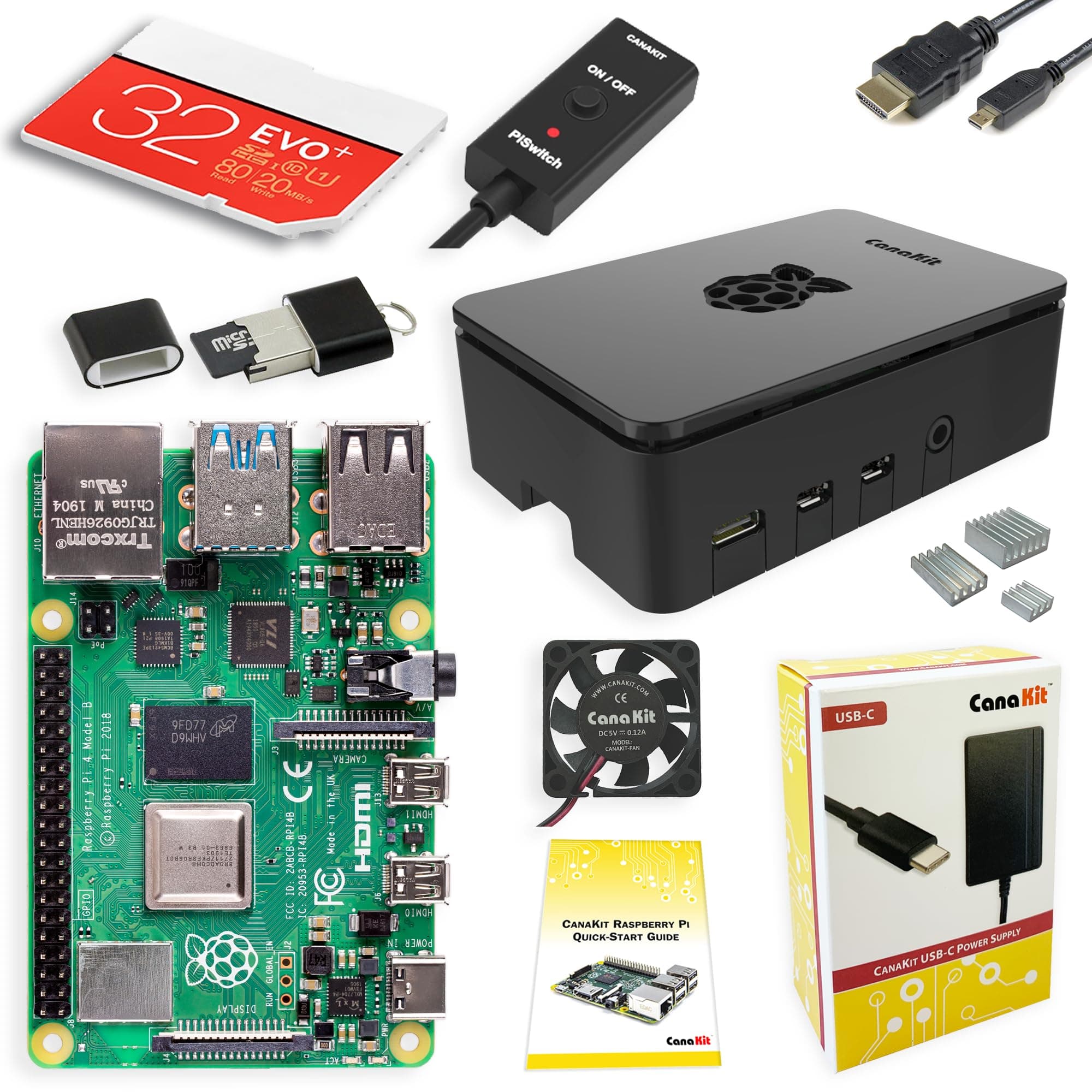
🚀 Unlock your innovation potential with the ultimate Raspberry Pi 4 Starter Kit!
The CanaKit Raspberry Pi 4 8GB Starter Kit combines a powerful 1.5GHz 64-bit quad-core CPU with 8GB LPDDR4 RAM, pre-loaded 32GB EVO+ Micro SD card, and a premium cooling system featuring an integrated fan and heat sinks. Designed for professionals and makers, this all-in-one kit includes a high-gloss case, USB-C power supply with noise filter, 6-foot 4K-capable display cable, and a convenient PiSwitch, delivering a ready-to-use, high-performance mini computer ideal for development, media, and multitasking.


| ASIN | B08956GVXN |
| Best Sellers Rank | #41,251 in Computers ( See Top 100 in Computers ) #165 in Mini Desktop Computers |
| Brand | CanaKit |
| Built-In Media | Raspberry Pi 4 8GB Model B, Pre-Loaded 32GB EVO+ Micro SD Card, USB MicroSD Card Reader, CanaKit Premium High-Gloss Raspberry Pi 4 Case with Integrated Fan Mount, CanaKit Low Noise Bearing System Fan, CanaKit 3.5A USB-C Raspberry Pi 4 Power Supply with Noise Filter, Set of Heat Sinks, Display Cable, CanaKit Quick-Start Guide, CanaKit GPIO Reference Card, CanaKit USB-C PiSwitch |
| CPU Model | ARMv7 |
| Compatible Devices | Bluetooth-enabled devices, USB devices, USB flash drives, external hard drives, USB hubs |
| Connectivity Technology | GPIO, HDMI, USB |
| Country of Origin | USA |
| Customer Reviews | 4.8 4.8 out of 5 stars (3,445) |
| Item Weight | 499 g |
| Manufacturer | CanaKit |
| Memory Storage Capacity | 32 GB |
| Model Name | Raspberry Pi 4 8GB |
| Operating System | Raspberry Pi OS, LibreELEC, Lakka, RetroPie, Ubuntu |
| Processor Brand | ARM |
| Processor Count | 4 |
| Processor Speed | 1.5 GHz |
| RAM Memory Installed | 8 GB |
| RAM Memory Technology | LPDDR4 |
| Total Usb Ports | 4 |
| UPC | 682710970110 |
| Wireless Compability | Bluetooth |
D**L
First of all, I'm brand new to Raspberry Pi. I loved the CanaKit Raspberry Pi kit. I had everything I needed to get up and running fast, except for a mouse and keyboard, which is clearly indicated in the description, so I was ready to go when the kit arrived (which it did VERY quickly!). INITAL HARDWARE SETUP The design of the included case did not even require one single screw. The top and bottom of the case "snap" off from the middle easily and the board drops into place onto the bottom plate. Be sure to attach the three heatsinks on the chips and the wire connectors for the fan before snapping it all back together if you are going to use them (which I strongly recommend). It's much easier to attach them with the full board exposed. Then you snap the top and bottom back on onto the middle and you're done. It would have been a tiny bit faster to assemble than it was but I had to search the internet for the right pins on the board to connect the fan to. The two rows of pins were not numbered on the board nor referenced in the quick guide included. It took like 10 seconds to verify the board pinout and another 10 seconds to find which pins the fan connects to. There were lots of videos and diagrams available to help, including videos specifically for this brand and model. Since the fan has two power/speed options I wanted to be sure I was connecting to the right pins. I chose the higher power/faster speed. Some review comments mention more noise with the higher speed but I found the "noise" to be almost silent, even at the higher level. I can save you a bit of time on the fan pinout bit. The row closest to the outside of the board are the even numbered pins. Since this is a computer (one's and zero's) that row starts with 0, then 2,4,6, etc. The row towards the inside starts with 1,3,5,7. The numbers go higher as you move from the outside edge to the inside along the row. For the higher fan speed, connect the red wire to pin 4. For the lower fan speed, connect the red wire to pin 3. The black wire is ground and always connects to pin 6. Easy peasy once you know! Overall this part took about 10-15 minutes. INITIAL OS SETUP The pre-loaded NOOBS (New Out Of Box Software) was fast in helping choosing which operating system and what options you wanted. Choosing other options like new password. time zone, wireless and keyboard went fast. After the OS booted up it took a while to check for and install any needed upgrades (perfectly normal and expected for any OS). If you have a 5G wireless wifi, be sure to connect to it (or use an ethernet cable) to save download times for OS and application software upgrades that may be needed. Overall this part took about 30 minutes including downloads, then it rebooted and started working perfectly. CONS The kit would be perfect if it included pin out instructions for the fan and a little more clarity on installing the heatsinks. That's the only parts that caused me any delay in putting it all together. SUMMARY Great kit and good price. It's possible that searching for the individual parts might have save a few pennies or dollars, but having almost everything from one manufacturer in one box, assured me that everything would work together and there would be only one place to go if troubles appeared. I would absolutely recommend this kit if you are getting started in the PI world, and even if you're more experienced. This kit is GREAT!
A**R
جهاز كمبيوتر مصغر جدا يخدم بشكل أساسي فئة المطورين والمبتكرين والمبرمجين ، استخدمته في مجالات عديدة وعلى عدة أنظمة وأثبت كفاءته بعد استخدامي له لأكثر من سنتين حيث يعمل 24 ساعة بدون توقف.
I**N
I recently purchased the CanaKit Raspberry Pi 4 8GB Starter Kit, and I'm thoroughly impressed with its capabilities and the comprehensive package. This kit has everything I need to dive into a wide range of projects, from setting up a home server to exploring the world of programming and even building my own retro gaming console. The heart of the kit is the Raspberry Pi 4 board, which boasts an impressive 8GB of RAM, ensuring smooth multitasking and performance. The kit also includes essential accessories like a case, power supply, heat sinks, and a fan, making the setup process a breeze. I particularly appreciate the inclusion of a pre-loaded microSD card with the Raspberry Pi OS, saving me time and effort in getting started. One of the standout features of this kit is its versatility. Whether you're a beginner or an experienced user, the Raspberry Pi 4 offers a wide range of possibilities. I've used it as a desktop computer for basic tasks, a media server for streaming content, and even as a platform for learning programming languages. The community support and available resources are vast, making it easy to find tutorials and projects to suit your interests. The performance of the Raspberry Pi 4 is impressive for its size and price point. It handles multiple browser tabs, runs various applications smoothly, and can even handle some lightweight gaming. The included heatsinks and fan keep the board cool, ensuring stable operation. While the kit itself is fantastic, there are a few minor drawbacks to consider. The provided microSD card is only 32GB, which may be limiting for some users. However, it's easy to upgrade to a larger capacity card if needed. Additionally, the Raspberry Pi 4 isn't a full-fledged desktop replacement, so keep your expectations in check for resource-intensive tasks. Pros: + Powerful 8GB RAM for smooth performance + Comprehensive kit with all necessary accessories + Versatile platform for various projects and learning + Easy setup with pre-loaded microSD card + Impressive performance for its size and price + Active community support and resources Cons: - Included 32GB microSD card may be limiting for some users - Not a complete desktop replacement for resource-intensive tasks Overall, the CanaKit Raspberry Pi 4 8GB Starter Kit is an excellent investment for anyone looking to explore the world of single-board computers. Its versatility, performance, and ease of use make it a compelling choice for a wide range of projects and skill levels. Whether you're a hobbyist, student, or developer, this kit provides a solid foundation to unleash your creativity and dive into the exciting realm of Raspberry Pi.
C**Y
This is crazy. This thing came with 3 heat sinks, a fan, a hard drive (albeit a microsd) preloaded with everything you could need, all the necessary wires, and even some extra stuff just because (a usb microsd reader). I put it together in minutes, had the software installed shortly thereafter, and was up and running in no time. I love Linux, but am used to Ubuntu - I know, I know its evil, corporate and lame, but I know that it works, so I use it, primarily the server edition. So I was thinking I needed to install Ubuntu on this, but once I fired up the terminal, all or most of the commands to install and setup, and navigate are virtually the same on Rasp Pi OS, if not exactly the same. The recommended Rasp Pi OS for install is really good, I was thinking I did not really need the desktop software, etc, but I actually really kind of like it! I configured the hardware during the build (which again, took only minutes) for the high performance fan installation, which is supposed to be noisy, but I don't hear anything at all. My plan is to use it as a linux server for the nginx/uwsgi/web applications I need to run. The extra usb microsd reader will allow me to expand the storage space, I just ordered a Silicon Power 256 gb microsd to mount it as extra drive(s). I ordered this CanaKit with the 32 gb Samsung NOOB microsd, but my recommendation for others would be to get the 128 or 256 gb version if its offered. Also, fyi the unit is pretty fast, not clunky at all. I was able to set up ssh into it from windows quickly. I probably will never buy another Windows desktop or laptop again, I have an older HP laptop that is perfectly fine that I upgraded with RAM and an SSD, so I can remote in to this Rasp Pi 4 machine to do what I need, super easy and love it so far!
S**N
Easy to assemble and get up and operating i use it for ham clock
Trustpilot
Hace 1 mes
Hace 3 días