We remain fully operational. Our teams are working around the clock to ensure your deliveries continue safely.

Descargar la aplicación


Servicios al cliente
Sobre nosotros
Copyright © 2025 Desertcart Holdings Limited
Descargar la aplicación
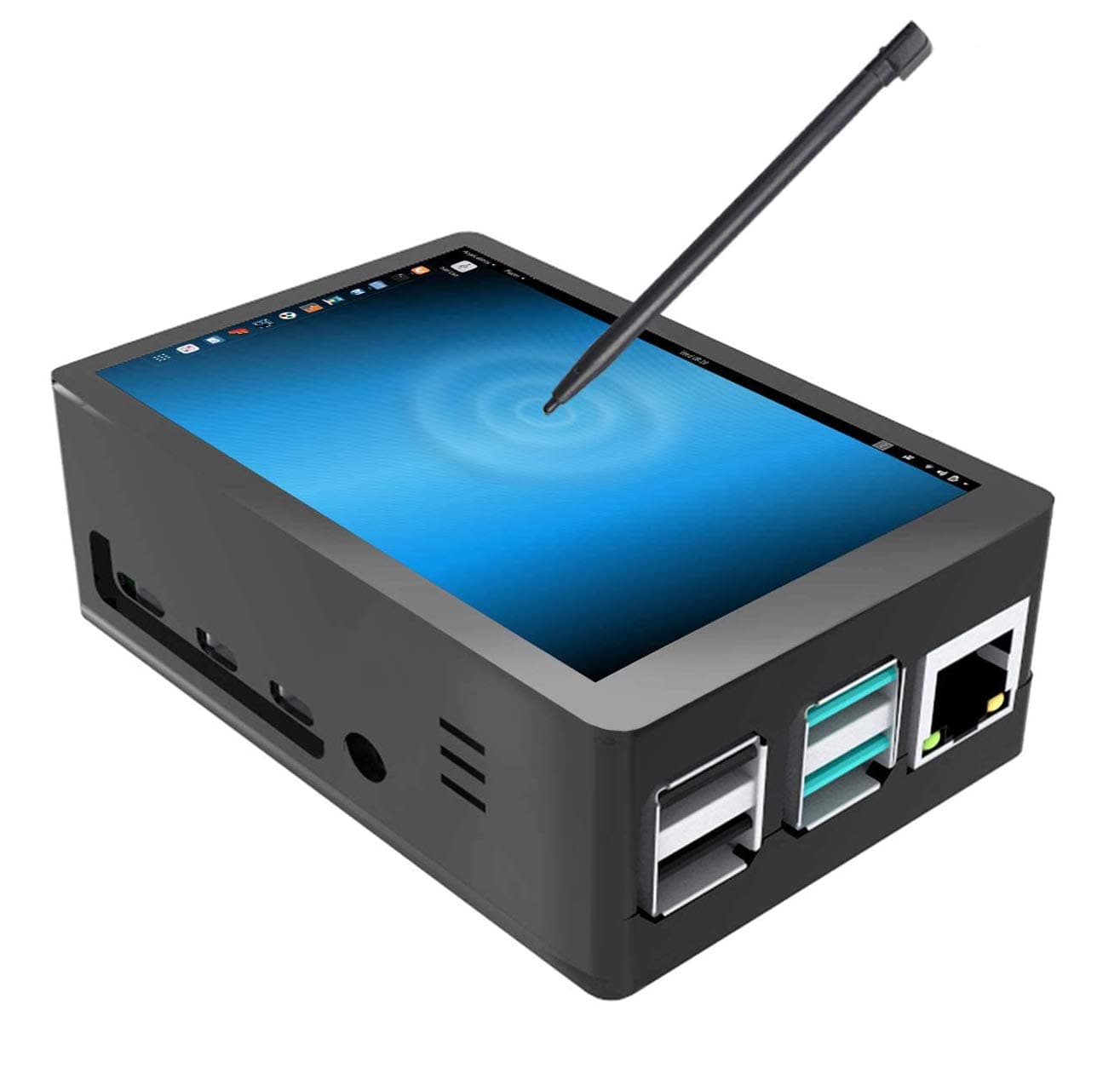
❄️ Keep your Pi cool and your projects cooler!
This 3.5-inch Raspberry Pi 4 touchscreen with a custom case features a built-in fan and heat sinks to prevent overheating, a 320x480 resistive touch display with 50fps refresh rate for smooth visuals, and supports 125MHz SPI input for stable, flicker-free performance. Designed exclusively for Raspberry Pi 4, it offers easy installation and enhanced human-computer interaction, with a pre-installed driver option to simplify setup.


| ASIN | B07WQW6H9S |
| Adaptive Sync | G-Sync Compatible |
| Additional Features | Touchscreen |
| Aspect Ratio | 1.33:1 |
| Best Sellers Rank | #62,088 in Computers ( See Top 100 in Computers ) #1,708 in Computer Monitors |
| Brand | Jun-Electron |
| Brightness | m2 |
| Color | Grey |
| Compatible Devices | Computer |
| Connectivity Technology | HDMI |
| Contrast Ratio | 2000:1 |
| Customer Reviews | 3.9 3.9 out of 5 stars (968) |
| Display Resolution Maximum | 480x320 Pixels |
| Display Technology | LCD |
| Display Type | LCD |
| Hardware Connectivity | HDMI |
| Has Color Screen | Yes |
| Item Dimensions D x W x H | 8D x 12W x 4H centimeters |
| Item Weight | 80 Grams |
| Manufacturer | Jun-Electron |
| Model Name | E361 |
| Model Number | E361 |
| Mounting Type | Desk Mount |
| Native Resolution | 320x480 |
| Number of Component Outputs | 1 |
| Picture Quality Enhancement Technology | Standard Display Technologies |
| Processor Count | 1 |
| Refresh Rate | 50 Hz |
| Resolution | 320x480 |
| Screen Finish | Glossy |
| Screen Size | 3.5 Inches |
| Shape | Rectangular |
| Specific Uses For Product | Business, Education, Gaming, Photo Editing, Programming, Video Editing |
| Total Number of HDMI Ports | 1 |
| UPC | 747045434949 |
| Viewing Angle | 160 Degrees |
M**I
Bad product
The case is weak and the screen is totally not working
M**K
Awesome contact service and product! Thank you
J**S
Es un engaño, hay muchos usuarios molestos con esta pantalla
A**S
Amazing screen for basic use, like command line or terminal. I love it!
P**M
This little display is pretty impressive. Touch functions work great. You can drive your RPi 4 with the little stylus that is included in the kit. I had no issues installing the hardware or adding the drivers using the instructions on the Amazon product page for this little case/display combo. I'll be honest, unless you have a specific project in mind for this, like making a wee-television for LEGO people, or using it for a control box with touch screen for something else I'm not sure what real applications this would fill that you could not do with other devices like tablets. Having said that... it's incredibly fun and the fact that the display supports rotation at the HARDWARE level (meaning mounted physically upside down) you can see the power-on/boot messages correctly is VERY impressive. As you can see from my photo, I have power connected at the top and the display is oriented properly. Simply use the rotate.sh command in the /home/pi/LCD-show directory and it reboots with the orientation you choose and remembers it. Very cool attention to detail in my opinion. This function is specific to this display where you'd normally use a rotate command in your /boot/config.txt file, but doing that does NOT get you rotated text when booting up from power-off. In any event, this seems like a neat little device. The RPi runs pretty warm with this screen, even with the fan and heat sinks, so I'd probably say over-clocking your RPi 4 might not be the best idea. Update: 05/07/2020 - After reading some other reviews, I thought I'd also mention that the screen resolution is not ideal in certain applications. I had some issues with things like browsers getting clipped off-screen and had to do a little additional work to move the window so I could get at certain buttons for certain windows. I'm sure there are ways around that, but for a casual user it might be frustrating. Aside from that.. it's still humming along.
P**M
The screen works it is just white and blank, the recommended driver software is for Pi3b and is not comparable with Pi4B, tried reaching out to supplier through provided link and github , but cant find updated software, anyone else in similar situation. ??
Trustpilot
Hace 2 meses
Hace 5 días