We remain fully operational. Our teams are working around the clock to ensure your deliveries continue safely.

Descargar la aplicación


Servicios al cliente
Sobre nosotros
Copyright © 2025 Desertcart Holdings Limited
Descargar la aplicación




🛫 Elevate your flight sim game with pro-grade control and unmatched realism!
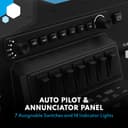
The Honeycomb Bravo Throttle Quadrant is a premium, all-in-one flight simulator control system designed for professional-grade realism. Featuring a fully configurable throttle setup for single to four-engine aircraft, it includes an advanced autopilot panel, annunciator lights, gear and flap levers, and a trim wheel. Built with aerospace-grade materials and pilot input, it offers seamless compatibility with top flight sim software and customizable controls, making it the go-to choice for serious flight simulation enthusiasts.





| ASIN | B07SK43CJ6 |
| Additional Features | Multiuse |
| Best Sellers Rank | #6,247 in Video Games ( See Top 100 in Video Games ) #19 in PC Game Flight Controls |
| Brand Name | Honeycomb Aeronautical |
| Button Quantity | 1 |
| Color | Black |
| Compatible Devices | PC, Mac |
| Connectivity Technology | USB-C cable |
| Controller Type | Throttle Quadrant |
| Customer Reviews | 4.6 4.6 out of 5 stars (1,584) |
| External Testing Certification | Não aplicável |
| Global Trade Identification Number | 04039621003042 |
| Hardware Platform | Desktop |
| Item Dimensions | 12.44 x 17.64 x 9.33 inches |
| Item Dimensions D x W x H | 10.5"D x 13.1"W x 10.2"H |
| Item Weight | 1 Pounds |
| Manufacturer | Honeycomb Aeronautical |
| Model Name | Bravo Throttle Quadrant |
| Package Quantity | 1 |
| Power Source | Corded Electric |
| Unit Count | 1.0 Count |
K**M
Quadrant
Purchased for my son for Christmas and he loves it. The quadrant was the perfect addition to enhance his flying experience on a flight simulator game.
S**K
Best do it all throttle on the market
Pros - Very high quality build, throttle tension feels like the real thing. Plenty of buttons and switches and extras. Configurable for just about any aircraft type. Very accurate. Cons - Trim wheel sucks, it should be analog but its not. Reverse axis is just a switch so you can't do realistic reverse thrust for a lot of airliners. Takes up a ton of space, airliner throttle handles are comically small. Not fully compatible with X-Plane 12. We all know the issues going on with Honeycomb right now, if you don't you should be aware they might not be around for much longer. Hopefully they are. Anyway, if you are only going to get one throttle, this is the one. It can do everything really well and the few things its not great at there are workarounds for or aftermarket accessories. And the aftermarket for this thing is absolutely huge. You want real 737 scale throttles with working buttons? You can get them. You want A320 handles that fit the Honeycomb Airbus levers? You can get that too. Don't wait to get one if you are thinking of it, like I said the company might not be around for much longer and this throttle and the yoke, especially the XPC yoke are superior at this price point.
G**G
High Quality and Reliable Shipping
The Honeycomb Bravo Throttle Quadrant exceeded my expectations. The build quality is excellent, the controls feel sturdy and precise, and it adds a great level of realism to my flight simulator setup. It also arrived on time, exactly as promised. Very satisfied with this purchase.
J**M
Well-made and Works Great
The levers, buttons, and switches all work very well and are solidly-made. The trim wheel does suffer from being extremely unresponsive for MSFS 2020, but that's not the fault of this unit. There are fixes online, but I decided to let it go. It "works" but not as well as I would like. As for the light panel, if you really want it to work well, you should download "Better Bravo Lights" which is a free app. With some very simple programming you can make the lights respond exactly how you want. Overall, this was the most expensive peripheral I've purchased, but it was well worth the money.
S**R
Not sure how to sing its praises any better than this
First of all, let me say that I am a seasoned flight sim enthusiast. I've been at it since 1982 with the first Microsoft Flight Simulator. So, I know my way around a cockpit! And let me tell you, this quadrant is a true gem. Out of the box, it works seamlessly with Microsoft Flight Sim 2020. And the positive feel of the switches and levers is a real plus. The attention to detail on this thing is amazing - from the way the levers operate to the overall functionality of the quadrant. And the mounting hardware is top-notch, making it a breeze to secure to your desk. This quadrant is truly an all-in-one cockpit system. It has a configurable throttle setup that can handle anything from single-engine general aviation to four-engine commercial aircraft. And the versatility doesn't stop there! You can customize your throttle, switches, and indicator lights to simulate multiple aircraft. It's the most versatile flight simulation experience possible. One of my favorite features on this quadrant is the gear lever with red/green LED landing gear indicator lights. It adds a level of realism that makes the experience all the more enjoyable. And the annunciator panel is a real game-changer. With 7 two-way programmable switches and 14 warning lights, it makes navigating the cockpit a breeze. In conclusion, the Honeycomb Bravo Throttle Quadrant is one of the finest flight simulation devices I have ever used. The attention to detail, versatility, and ease of use make it a must-have for any flight sim enthusiast. So, if you're looking for a top-notch cockpit setup, look no further than the Honeycomb Bravo Throttle Quadrant!
A**R
Tons of configuration options. Great throttle assembly.
The Brovo throttle assembly a very versatile device. It allows for many configurations from single engine piston engines through multiple engine turboprops and jets. The unit feels well built but is made from plastic. The plastic is high quality and feels nice to the touch. All the buttons work well as do the switches. All 6 sliders have smooth movement but they do not all match so you’ll want to be aware of this primarily with multiple engine aircraft. From left to right the first two are identical and the 4 after are identical so trying a multiple engine setup on an aircraft with spoilers you want to avoid having the first engine in the second spot from the left because it won’t match the other engines. I tried a configuration I’m accustomed to on a 747. Spoiler, engine, engine, engine, engine, flaps. With this configuration engine 1 will not match engines 2, 3 & 4. You can compensate to a degree but adjusting the curve on engine 1 but it will never match the other 3 so I just use the last 4 and use one of the piston engine throttles as my flap lever since the flap and speed break handle and throttle 1 interfere with each other in this configuration. I used .8 X .3” craft stickers which work great unlike my memory try to remember what the 7 unmarked switches do. I really like having the ability to adjust altitude, heading, climb and descent at my fingertips. The one area here that would be really nice is if the line on the dial was highlighted white or something to contrast the black button but it is raised so you feel the position at least. Great product and the only reason it’s not a 5 star are a couple of very minor things. Love it!!!
J**N
Bueno
M**9
Excellent quantity
I bought this for a gift for my brother for christmas and he loved it. He says it is excellent quality
C**D
Altought it took a little time messing with the configs, after some YouTube videos, I got it working perfectly. It’s a high quality product, and a must have for people that want to simulate to the next level.
K**.
Not comptabile with Xplane 12 on Apple Silicon, or even previous Intel. The mapping of the Speedbreak and thruster 1 can't be changed and they are detected the wrong way around. Engine 4 is also engine 2 and vice versa. Only thruster 3 and the flaps map correctly when you calibrate. None of the autopilot or LEDs work. You can get a few to work if yiu run this on Apple Silicon using Rosetta. Honeycomb were never interested in Apple users, soI've returned mine for a refund. This might be ok with Windows using the proper MS flight sim. It looks impressive, but lack of function makes it pretty useless.
B**N
Fantastiskt fin yoke till min flight sim. Leverans och hantering perfekt. Inget att anmärka på.
D**T
Ogromne możliwości konfiguracji. W komplecie wymienne dźwignie do różnych typów samolotów. Kółko TRIM i dźwignie działają bardzo płynnie. Możliwość zmiany parametrów autopilota, np. HDG,ALT, VS itd. To wszystko daje dużo większą przyjemność z obsługi samolotu. W połączeniu z VR jest bajecznie ;)
R**G
Damn good throttle at a very fair price. I love how versatile this throttle block is. It's not just an "Airbus" or "Boeing" throttle, it's what you want it to be. Change the handles as needed to make it just perfect for each flight. The throttle block doesn't feel plasicy or badly made. The sensors are top notch and well synchronized. Throttle values are the same when the handles are in the same place. Not a given with some other offerings on the market. I love how they added multiple buttons and dials on the throttle to add even more utility to it, for example to dial in autopilot values and control each of it's functions. Installation is easy and for many default cases it works perfectly out of the box (based on my X-Plane 11 & 12 experience). Additional settings are possible with the native software by honey comb as well as settings in the simulator. Overall it's not too difficult to make custom profiles and you'll find it to be incredibly powerful as it can directly manipulate things like X-Plane datarefs. I highly recommend this throttle for anyone who wants to enjoy a more realistic throttle setup but not commit to any specific layout or be limited by the number of axies. Almost every plane imaginable can be covered quite easily making this the go to throttle block in my book. Highly recommended.
Trustpilot
Hace 3 semanas
Hace 2 meses