We remain fully operational. Our teams are working around the clock to ensure your deliveries continue safely.

Descargar la aplicación


Servicios al cliente
Sobre nosotros
Copyright © 2025 Desertcart Holdings Limited
Descargar la aplicación


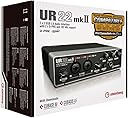



🎧 Elevate your sound game — pro studio quality, pocket-sized power!
The Steinberg UR22 MKII is a compact 2-in/2-out USB 2.0 audio interface delivering 24-bit/192 kHz resolution and dual Class-A D-PRE mic preamps. Compatible with major DAWs and iPad, it offers versatile MIDI I/O and comes bundled with Cubase AI and Cubasis LE software. Its rugged metal chassis and seamless connectivity make it the go-to choice for millennial pros seeking high-quality mobile music production and podcasting solutions.











| ASIN | B017MVUAHM |
| Audio Input | USB |
| Best Sellers Rank | #73,726 in Musical Instruments ( See Top 100 in Musical Instruments ) #486 in Computer Recording Audio Interfaces |
| Brand Name | Steinberg |
| Compatible Devices | Laptop |
| Connectivity Technology | USB |
| Customer Reviews | 4.6 4.6 out of 5 stars (1,114) |
| Frequency Response | 96 KHz |
| Global Trade Identification Number | 04957812590563 |
| Included Components | US Interface |
| Item Dimensions D x W x H | 8"D x 9.2"W x 4"H |
| Item Type Name | Audio Interface |
| Item Weight | 1 Kilograms |
| Manufacturer | Steinberg |
| Maximum Sample Rate | 192 KHz |
| Number of Channels | 2 |
| Operating System | Windows 7 |
| Supported Software | Cubase AI, Cubasis LE, and other major audio editing, mastering, and music production software |
| UPC | 889025101073 |
| Unit Count | 1.0 Count |
| Warranty Description | Https://www. Steinberg. Net/en/extras/terms_conditions. Html. |
A**A
Great interface
Product arrived in excellent condition. Well packaged and brand new, not open box. So thumps up. So now I am entering the world of audio recording. I bought this product ur222mk11 on sale for $118.00 at the time. I was looking at the newer model ur22c which is $189.00 but I am glad I got this one instead. It does 90% what the newer model can do and the other model would be better suited to someone who has the need of those extra features. I will be using mines mainly for podcasting. I won't go into, comparing the both models!! So setup was easy, downloaded drivers on my Windows 10 laptop installed software cubebase from the website, didn't use the CD from the product, because you'll get the latest drivers on the website, connected everything up and it works great. Build quality.... Great solid all metal, this interface has a great weight and feel to it. Not cheap at all. No drivers problem. No software problem.. Just my lack of experience. But its me learning how to use the software , but audacity seems to be a better choice of software for podcasting as a beginner, so I am learning how to do the same tasks in both. Cubebase has a beautiful interface and can do more but audacity is great also and can do the tasks i need with much ease. As with other reviews the headphone amp is lacking some beef to it . It works but could have been a tad better. I am using condenser mics and my pre amps sound good and i am able to get excellent results from my audio interface. I look forward for my recordings it brings a big smile on my face when you have dependable gear. Money well spent. 5 stars
H**W
Six stars !! This product gives beautiful sounds
I bought this for my learning disabled son, hoping it would give him great beautiful sounds that would encourage him to learn to play keyboard. With Cubase AI LE (included) this product succeeds beyond expectations in giving great beautiful sounds for at least five MIDI instruments, namely church organ (gorgeous and real pipe organ), piano (absolutely real), oohs and aahs (fabulous), numerous guitars, several drumsets. It then gives passable sounds for many other instruments. In some ways better than a real piano, in my estimation, since it takes up much less space and gives more than one high quality instrument. Note that to boost the sound I hooked the UR22 to a TCC TC-754 preamplifier (about $80 on Amazon) which then fed into the AUX jack of my $300 AV receiver, which plays the sounds created by the UR22 and Cubase over a 7.2 speaker system. With this setup, the organ sounds absolutely thunderous and majestic and real as anything played by E. Power Biggs. Oh, and of course, I hooked the UR22 to a MIDI keyboard, in my case an inexpensive MidiPlus AK490, costing about $65. PS(1) I tried the Ableton 30 day free trial. The church organ sounded less real than the Cubase version. PS(2) The UR22 can be installed on a 32 bit PC, and accept 32 bit music composition apps such as Ableton. But please note that Cubase requires a 64 bit PC, and refuses to install on a 32 bit. PS(3) To connect all the bits and pieces, cables cost around $30, including two 10 foot MIDI cables to hook the keyboard to the UR22, a pair of 25 foot RCA cables to hook the UR22 to my AV receiver, a pair of RCA to 1/4 inch adaptors to convert the UR22 sound output from 1/4 inch plugs to RCA plugs. So all in all it cost under $300 (I already had a 64 bit PC and an AV receiver). And gave me my very own audio recording and editing studio. So if you can play keyboard, you can put your very own songs on the web. PS(4) Of course the UR22 interface also allows you to plug in a mike and an electric guitar, so you can sing along with your composition playing your guitar listening to a MIDI drumset and then afterwards add organs, strings, etc etc. PS(5) As noted, my son is learning disabled. He just uses the keyboard and does not touch the computer at all. The computer is hidden away on a shelf about five feet from the keyboard, so he has no temptation to touch it. I select the instrument, and set it to play without recording. And leave it on all day so he can play anytime he wants. PS(6) In my experience, Cubase is easy to learn if you do the tutorials and allow quite a few hours getting comfortable with it.
N**Y
Great audio interface
After spending hours researching what audio interfaces were best for under ~$200, I finally decided to pull the trigger on this Steinberg UR22. I have only had the product for about 2 weeks now, but it has been working with no problems and was a breeze to set up. It also feels very solid, as the casing is completely metal. The input ports don't wobble or move. The knobs are nice and don't have any play in them. All of the functions I have used so far work without any problems. I am using an old laptop running Windows 8, and I primarily use it to record synthesizers, drum machines, and piano into my computer (Ableton). All of the reviews on cheap audio interfaces are generally not very good, and usually detail how hard it is to set up. This was the complete opposite for me. I literally took this thing out of the box, downloaded the driver onto my computer, plugged it in, and started recording. Couldn't have taken more than 10 minutes to get going. While this interface might not have all the inputs and features some people want, it is great for my needs and is an excellent value for the price. So far, I am happy with the product and would recommend it to anyone that is looking for a cheaper, beginner, audio interface. I will update this review at a later date.
P**S
Very good
Nice product and idea.
C**F
Awesome piece of hardware
Really happy that I did purchase this interface. Previously I had an old mixer, which was also used as interface for my guitar, and overall was working ok, but with this one, I get better sound quality; control over the amplification on 2 different Input; and the combo plug allow me to use both a regular jack and the mic plug interchangeably. Controls are easy to handle, overall the case is metal and very sturdy; no humming even if the box is close to other electrical items. Works like a champ with Cubase (a LE version is included, but now you can get that for free also from the Steinberg website). I can use both the guitar, using Guitar Rig 5, and my keyboard; and this is really nice, since I have one interface for every single need and fits on the desk perfectly
A**R
I'm a professional musician and bought this guy because of my frequent travelling and also to run additional pair of studio monitors at home. After having used them for about half a year, I must say I'm quite impressed. Pros: °The quality of audio output is good, not great. But at this price, it's unbeatable. °The pre-amps are industry standard and the hardware monitoring is turning out to be way more valuable than it seems at first. °Works great with all my DAWs and standalone audio applications with minimal latency issues. I'd recommend gaining good knowledge regarding sample rate settings for various mixing and recording purposes for optimal usage. Cons: °As mentioned by others, the headphones out doesn't seem to churn out enough gain, but it won't be a concern if you don't mind turning the knob into higher registers for the required volume.
J**A
It is a good piece of equipment. I am using it in my audio setup for my live streaming. Cheers
の**り
以前、仕事のサブマシンとしてProToolsを使っていました。 録音スタジオは退職(大病患って死にかけちゃって・・・)したので、しばらくDAWに触れていなかったのですが・・・ プライベートでミックスダウンしていない素材(個人で組んでいたアマチュアバンドの素材)が残っていたので、久しぶりに弄ってみようかと。 本来ならツールスが使い慣れているので、ツールス(LEがあれば)にしようかと思ったのですが・・・最近のものは仕様が変わっているようで・・・ 「毎年使用料を払う・・・だと?」 「永年使用だと高額・・・だと?」 ちょっと弄るだけでそんな出費、却下!却下ぁぁぁ!!!(汗) ※一度「ProTools fast」を入れてみたのですがプラグイン(特にDynamics系)が貧弱すぎて使えませんでした・・・ って事で、Cubase AI同梱のコレを選択。 恥ずかしながら、Cubaseは全くの未経験です(レビューにおかしな使い方書いてたらコメントお願い申し上げます) まずは・・・youtubeでライセンスやらアクティベートやらの登録方法をお勉強w うん、大丈夫そう! 実際にやってみて・・・ こんなに時間掛かるものなのか~! 何か、あっちこっち行ったり来たりしてないか?? ツールス入れた時も、こんなだったっけなぁ?随分昔だから覚えてないけど・・・。 とは言え、動画通りに作業を進めるとインストールまで問題なく終了・・・便利な世の中になったものです。 まずは、何も考えずに出来るとこまでやってみようかと・・・ ファイルのインポート・・・どこだ・・・これか? 実際に、各楽器のwavファイルをまとめてインポートしてみて・・・ ちなみに・・・ Cubaseは、複数ファイルをまとめてインポートする時「トラック分け」か「1トラックにまとめる」の2択なんですね。 これはこれで便利かも。 ツールスは「作業スペースに貼る」か「リストにインポートしておく」かの2択。 使い慣れれば、どちらにも利点はありそうですね。 ところで・・・ 各トラックの波形、全部「単色」なんだけど?寂しいなぁ・・・(汗) 色とか変えられないのか?まぁ、あとで探してみよう。 デフォルトの波形トラックの幅・・・細いなぁ(笑) 掴んでドラッグ、適当に広げて・・・この方法はツールスと一緒なので問題なし。 取り合えず、ソロで1トラック再生~♪・・・ん? スピードが?! あっ!最近のDAW、FSのデフォ設定「48KHz」なのか~(笑) 昔のDAWって、常に「CD」を基準にしてたからデフォルト「44.1K」が多かったんだけどね。 実際、Wordclock「44.1K」で回してるスタジオも多かったし。 私が勤務していたスタジオでは、映像とリンクさせるために48KのWordclockで部屋が動いてたから、音楽制作の時はわざわざ44.1Kに設定変更してたんだけど・・・。 最近のDAWは「音質重視」なのか・・・youtubeとかの動画作成を考えての「映像基準(映像作品は基本48KHzです)」なのか・・・ まぁ、とにかくFSは44.1に変更~っと・・・どこだ?・・・あ~あったあった(笑) もしかして、新規プロジェクト開いてからインポートじゃなくて、オーディオインポートを先にやる(オーディオファイルをDAWで開く形)にすると、ファイルの形式にリンクする?・・・いや、Cubaseでの方法は知らんけどね(汗) あっ、あとファイル貼る時に自動でプロジェクトにFSを合わせる方法とかも見つけとかないと・・・たぶんあると思うんだけど・・・。 ソロとミュートを使いつつ、各楽器の位置(omfじゃないもので・・・)を合わせて・・・まぁ、これは感覚で出来るかな。 作成した各トラックにデフォルトでEQとDynamicsが幾つか開けるようになっているようなので、ちょっと覗いてみて・・・ EQ、一個しかないんだけど・・・このEQ・・・使いにくい・・・ まぁ、きっとどっかに別のEQもあるはず・・・だよなぁ・・・まさかこれだけじゃないよな?これだけじゃキツイぞ?? Dynamicsは2種類(これも探すと他にあるのかな?)、割と使いやすそう。 掛かりも、こいつの特性さえ掴めばそんなに不自然じゃなく出来るかな・・・? ミックス後のファイナライザー(マキシマイザー)代わりにも使える・・・かな・・・? 恐らく、プラグインエフェクトが多数どこかにあるのでしょう・・・あるよな??リバーブ系とか歪み系とか・・・ さて・・・ パンの設定を・・・え~っと、どこだ?? ってか、ミックス画面(フェーダー画面)ど~やって出すんだ?? このあたりで力尽き(眠くなり)終了。 病み上がり・・・いや全然上がってない身体に、無理はよくないからねっ! 保存は、普通に保存場所を選択して名前付けて・・・オッケ! 久々のDAW遊び、初日はこんな感じでした。 まだ、各トラックの音量バランスも取ってないし、バスも選択してないし、そもそもミックス画面すら出してないし・・・ 特に音量のバランスは・・・ ドラムだけスタジオ録音してメンバーに配布、あとはそれに合わせて各自で自宅録音した音素材を持ち寄ったものなので・・・各楽器のバランス滅茶苦茶なんですよ(笑) 何より・・・ オーディオインターフェース買ったのに、まだ楽器繋いでね~ぞ!!!(爆) やべ・・・ホントに使えんのか?私・・・(汗) 現在、割と・・・スタジオ時代に比べてかな~~り時間に余裕がある仕事(9:30~16:00業務)をしているので、暇に任せてイジリ倒してみるつもりです。 と言う事で・・・ え~、マニュアル本も色々出ているようなので、皆さんはこんな強引(ムチャクチャ)な覚え方はせず普通に一つづつ丁寧にマスターしてくださいね(汗) 初日の評価としては・・・☆4で。 {追記} 何とな~~~く、大まかな部分は把握出来たような・・・全然出来てないような・・・全く出来てない感じですが・・・ 取り合えず「フェーダー」は出ました(そこかいっ!笑)(画像参照) フェーダー画面を出す際は「デバイス」→「MIX console」を選択。 ちなみに「console(コンソール)」と言うのは、皆さんの言う所の「ミキサー」の事。 音の世界では、あれを「みきしんぐこんそ~る」と呼びます。 エンジニア同士で喋る時は、略称で「卓」って読んじゃいますが。 ちなみにちなみに映像の編集機は「編集卓」照明の調整機は「調光卓」って言います(余計な知識だって?) ちなみにちなみにちなみに「ミキサー」と言うと、ミックスする「人(エンジニア)」の事を呼ぶので・・・紛らわしいw ・・・ってか、まさかフェーダー画面開くのに「ウインドウ」じゃなくて「デバイス」から入るのは盲点だった・・・お恥ずかしい(泣) ところで、やっぱEQがひとつしか見当たらないんだけど・・・7バンドなんて贅沢言わないから、せめて5バンドくらいの付いてないのかなぁ? あとは・・・他のエフェクト関係と、バス(Group)送りの組み方と、完パケトラックの作成と・・・ うぉっ!まだ全然出来てね~じゃん!!(汗) ってな感じで、楽しみながらちょっとづつ遊んでます。 マトモな完パケ、完成するのに何か月かかる事やら・・・仕事じゃないし、何より楽しいからいいんだけどね~(笑) とは言え・・・マニュアル本、買っちゃおうかな~高いけど。 ※結局マニュアル本買っちゃいました。 ギタリストのためのCubase Pro 8/Artist 8入門 〜ギターの録音からミックスまで・Cubase Elements 7 / AI 7 / LE 7にも対応 AI専用マニュアルと言うものは存在しないので、なるべく平均的に網羅していそうなモノを選択してみました。 使用法など詳しくは、この書籍に記載した私のレビューを参考にしてくださいませ。 {追記2} 先日、Windows10のアップデートがあり・・・ その後、Cubaseを立ち上げようとしたら・・・ え? せっかく、何とな~~~く形になって・・・きてはいませんが・・・全然・・・(^^;) ここで中断は凹むぞ(泣) ・・・あ~ どうやらWindowsアップデート時、何かの原因でライセンサーの連結が切れちゃったみたいですね。 取り合えず、以前の手順を思い出しつつ連結しなおして・・・完了。 曲は相変わらず進展していませんが、まぁ何となく理解は出来てきたので・・・ 1年後くらいには、一曲完成・・・するかな(汗) {追記3} こんな長文、読んでる人いるのかな・・・(汗) とか思いつつ・・・ 何となく「仮Mix」っぽい所までたどり着きました。 ちなみにCubaseには「マスタリング用プロジェクト」が付いています。 あまり詳しくない方のために・・・ 何も考えずにただ音を聴きながらMixをすると・・・市販のCDなどの音圧には到底及びません。 ※詳しい理由を書き始めると大変なので・・・知りたい人はググってw なので、そいつを「マキシマイザー/ファイナライザー」等と呼ばれる、いわゆる「コンプレッサー」で潰していきます。 全体を持ち上げつつ、ピークを振らせないギリギリのラインで音を潰すので、メーターを振り切る事無く「聴感上の音」が大きくなります。 ただし・・・ この作業は、実は「諸刃の剣」 これを行う事で、大きな音には聴こえるようになります。 しかし、やりすぎると全体的に「べた~~」っと潰れた、楽器の個性も抑揚も無い「つまんないMix」になります。 まぁ、最近の流行りのMixは・・・市販のCDでも割とこんな感じのも多いですが・・・どれとは言いませんが・・・(汗) って事で何とな~~く、ここまでたどり着いたのですが・・・ Cubase AI付属のプラグイン・・・と言うか以前から少々気になっていたのですが、Cubase AI自体のピーク値がツールスに比べて少々余裕を持った設定になってる気がするなぁ・・・ もうちょっと振っても割れ無さそうな・・・と言うかもうちょっと振らないと・・・わかんないけど。 まずは、こいつの「個性」を見極めてからになりそうです。 あっ、結構楽しめてるので☆5に上げときますw {追記最終} 20年ほど録音スタジオでミキサーの仕事をしていました。 その経験を他の方にも参考にして頂けたらと思い、つらつらとレビューを記載してきましたが・・・ 「日記はブログに書け」とのご指摘を受けました。 Cubase AIでの「マスタリングの手順と個性(個体差)」をもう少し詳しく記載するつもりだったのですが・・・ 取り敢えず、このレビューはここで打ち切りにします。
S**O
O aparelho cumpre o que promete. Chegou antes do prazo. A instalação dos drivers e do cubase, através do site do fabricante,se deu sem nenhum problema e funcionou de primeira no windows 10.
D**.
I had a M-AUDIO Fast Track Pro before that I sold long ago, that was working pretty well, but was all plastic and felt pretty cheap. But that said, it never broke. Then, bought a Presonus Audiobox USB 96 when I had a new recording project, and I did not work as supposed. I could still hear the original signal even when the knob was fully toward the DAW side (Right). So annoying it was unusable. Tried everything and I could not correct the issue. A common problem with these models as I found out later on. So I sold it. I was looking at Focusrite, but model with MIDI is more expensive than the Steinberg, and is not very stable under Windows PC. Also looks like a toy. The Steinberg is perfect! Low cost, very sturdy and easy to setup. Works great under Windows 10 and Reaper. The mix knob works as it should, and it have midi IN/OUT. It also looks classy and beautiful. Feel really hi quality. Sound on the Hi-Z input is really clear and dynamic. I just wish it had a ON/OFF switch, and 2 Hi-Z input instead of only 1.
Trustpilot
Hace 2 meses
Hace 2 semanas