Some deliveries may take a little longer than usual due to regional shipping conditions.

Descargar la aplicación


Servicios al cliente
Sobre nosotros
Copyright © 2025 Desertcart Holdings Limited
Descargar la aplicación

🔧 Scout like a pro — never miss a cable beat!
The Klein Tools VDV501-852 Scout Pro 3 Kit is a professional-grade cable tester designed for voice, data, and video cables. It features comprehensive testing including PoE diagnostics, cable length measurement up to 2,000 feet, and multi-cable run identification with 18 locator remotes. Built for durability and ease of use, it includes all essential accessories in a rugged carrying case, making it the go-to tool for network installers and IT pros who demand accuracy and efficiency.

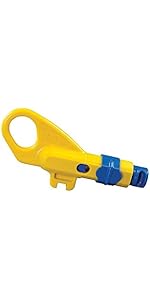

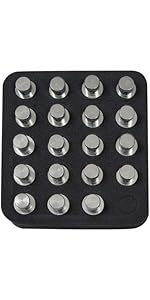


| Brand | KLEIN TOOLS |
| Color | Black/Yellow |
| Item Weight | 1.2 Pounds |
| Item dimensions L x W x H | 6.9 x 3.2 x 1.5 inches |
| Power Source | Battery Powered |
| Style | w/Locator Remotes, PoE |
N**8
Worth every penny
In my role as deputy director of IT in a small shop, I've needed to add equipment I can trust to help make sure we get the job done right the first time. This is tool and the location end have been amazing for helping us figure out location of lines, testing old ones, finding where issues are with length detection, verify our new runs, and make sure poe is up to voltage for running the phones and cameras. It might not be as fancy as some other more expensive tools, but it is a workhorse and gives tou everything you need in a good rugged case! Definitely recommend for any network installer or cable runner trying to make sure they got it right.
D**O
Much needed and works great
Solid tester, gives you all the information you need. I really like this, it’s not a fluke certifier but it’s also not $7000.
M**E
I am not a pro installer, but this seems like a pro tool
This kit does exactly what I needed, it tells me what the network map actually is. I am helping out some public libraries with little to no budgets for this type of work, so I volunteered to pick up the tools and put in some time. The large number of remote ID plugs makes the process much simpler than using some simpler tools like a "toner" that you have to go one wall LAN port at a time. In a multi-floor building with about 50 LAN ports, that takes quite a bit of effort. Using the 18 plugs, plus the included map+test "dongle" gives me 19 points to map before I need to move them to another set of LAN ports. The mapping plugs simply tell you what numbered plug you are looking at from the LAN cable at the network switch end, while the map+test can tell you if the conductors are good or have a problem (cross wired or broken/open). I like it and recommend this along with the available toner and perhaps an additional set of map+test dongles so more than one "iffy" lines can be checked in one setting. Note that if you buy the map+test kit that starts at #7 and goes to #12 (VDV770-851) it is somehow about $30 less than the kit VDV770-850 that contains one less dongle and are numbers 2 through 6. A single dongle sells for about $24 and you are able to order any ID code you like. That makes my mapping plug and dongle count up to 25, which is approximately half of the entire building. If you have all good connections, then the single included map+test dongle should be adequate as those have extra features used for suspect wiring. I also bought the Klein VDV500-123 tracing probe tone tool (about $40) as the wire bundles are quite confusing in the LAN room and it helps find the correct line quickly. Do you need something like this for your home? Nope. But if you are looking at a building network that contains many LAN outlets, your time has value... Simple math can tell you if you feel this is worth it. In my case, I am older, have creaky knees, and get impatient when I am forced to do things the hard way; so for me as I help the libraries in my area, I find this equipment to be incredibly valuable!!! Basically it pays for itself in the first library with approximately 50 LAN ports spread out over 4 levels (remember the creaky knees?). :-)
L**Z
This is the one!!
They say a craftsman is only as good as his tools, and when it comes to testing Ethernet cables, that couldn’t be more true. I’ve been in the game long enough to use everything from the dirt-cheap testers that barely do the job to the ultra-premium Fluke models that cost as much as a small car. The Klein Ethernet Tester Pro? It hits that sweet spot of reliability, affordability, and functionality. Unlike those budget testers that just scream “miswire” without telling you why, the Klein actually gives you useful data. It’s sensitive enough for PoE applications, which is a huge plus when working with powered devices. The build quality is solid—this thing can handle job-site abuse without falling apart. I’ve used it for multiple installations, and it has saved me time and frustration, not to mention unnecessary callbacks from clients. If you’re testing Ethernet drops more than just a couple of times a year, do yourself a favor and invest in this. It’s accurate, quick, and easy to use. Your clients will thank you (or at least, they won’t call you back complaining that their connection is dead). Now, is it a Fluke? No. But unless you’re doing hardcore daily network testing, you don’t need to drop that kind of cash. For the price, Klein absolutely delivers.
C**L
Toner function didn't work for me
The toner function didn't seem to work with the companion Klein Tools VDV500-123 toner probe, and I followed the instructions. With a cable from my Ethernet switch plugged into the top RJ45 port, pressing the toner button on the Scout 3 starts the toner function on wire#1, and the probe immediately starts sounding anywhere in the vicinity of the Scout 3, no matter where it is pointing. placing the probe tip next to the correct wire on the switch just results in some 60hz hum. Cycling through each wire on the Scout 3 is the same, then going through the wire pairs starting with 1-2, 3-4, 5-6, 7-8, all pairs, the probe alarm cuts off and pressing the probe tip against the cable results in the same 60hz hum, that's all, no tone. If I can't get this to work on the bench, it's not going to work on the field. This is one of the reasons I spent a premium on this tool, there are cheaper toners out there but I wanted a quality tool that would work. Either I am doing something completely wrong, or if the Scout 3 and/or the Toner Probe is at fault, and I hate to return a tool that is working. The other RJ-45 test functions seems to work OK. Responding to another reviewer complaining about the battery not fitting, you have to rotate the battery 180 degrees so that the battery wire is not preventing the battery from seating properly in the battery compartment.
L**N
Solid tool
Great tool. Lots of nice features. Pricey but probably worth it.
C**N
Great.
This did exactly what I needed it to do and was fairly simple to figure out. If it seemed like that's how it would work, then that's how it worked.
A**S
Distance
I love how you can measure cable distances with this.
Trustpilot
Hace 1 mes
Hace 1 semana