We remain fully operational. Our teams are working around the clock to ensure your deliveries continue safely.

Descargar la aplicación


Servicios al cliente
Sobre nosotros
Copyright © 2025 Desertcart Holdings Limited
Descargar la aplicación
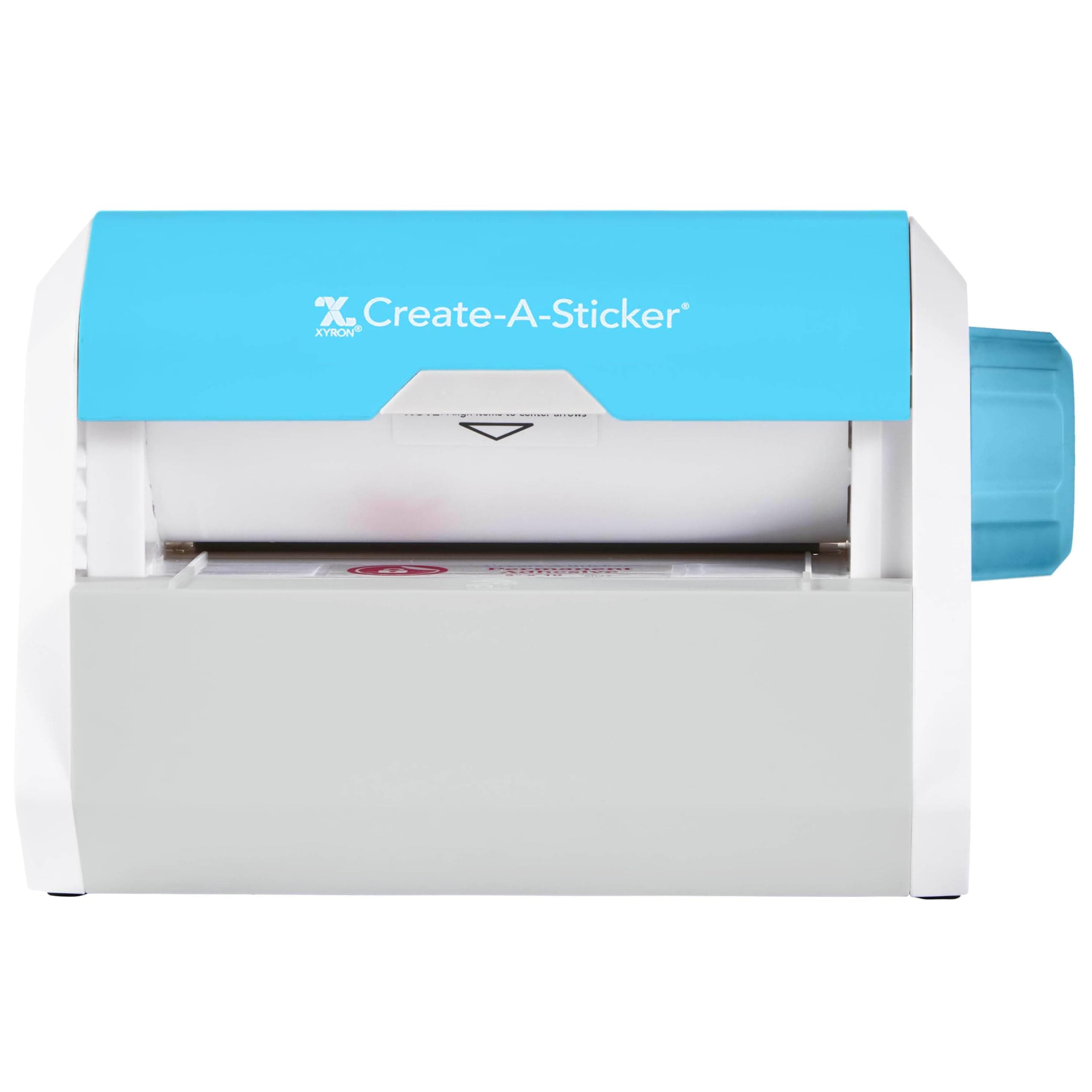
🎨 Stick it, love it, flaunt it — your DIY branding just got an upgrade!
The Xyron Create-a-Sticker is a manual, non-electric 5-inch sticker and label maker designed for small businesses and DIY enthusiasts. It applies edge-to-edge, acid-free, non-toxic permanent adhesive quickly and mess-free, supporting a variety of materials like paper, fabric, and photos. Compact and portable, it comes pre-loaded with a 10-foot adhesive cartridge and features easy refill swaps, making it ideal for professional-quality custom stickers without the fuss of glue or power.


| ASIN | B000WWGANC |
| Best Sellers Rank | #5,279 in Arts, Crafts & Sewing ( See Top 100 in Arts, Crafts & Sewing ) #57 in Scrapbooking Stickers & Sticker Machines |
| Brand | Xyron |
| Brand Name | Xyron |
| Color | Blue, Gray |
| Customer Reviews | 4.2 out of 5 stars 6,552 Reviews |
| Global Trade Identification Number | 00608931000733 |
| Included Components | 5" x 10' permanent adhesive cartridge |
| Item Dimensions D x W x H | 5.91"D x 9.06"W x 5.91"H |
| Item Height | 5.91 inches |
| Item Type Name | Xyron Create-a-Sticker, 5", Sticker Maker, Machine, Permanent Adhesive (0501-05-10A) |
| Item Weight | 0.5 Kilograms |
| Manufacturer | Xyron |
| Material | Plastic |
| Material Type | Plastic |
| Operation Mode | Manual |
| Print media | Paper (plain) |
| Product Dimensions | 5.91"D x 9.06"W x 5.91"H |
| UPC | 608931000733 |
| Unit Count | 1.0 Count |
| Warranty Description | 1 year limited warranty. |
J**E
Crafter's Dream Machine For Reverse Sticker Making!
I was looking for this machine for a while, I bought it used however it was brand new. Unsure if it was used more than once to be honest but it worked out perfectly. The only thing was that the cartridge was already inserted which didn't bother me as it was a play instead of a plug & play. The ease of use was great, stickiness was awesome, however be aware of sticking yourself to your own project. It was hard for me to unstick myself, caused me to reprint something for a client. The machine could have been better made to be able to tear the end result a little easier but still works. Fits in any work space however mine went back into the box until it's next use.
D**N
Great little machine for home use.
This machine works like a charm, I am pretty happy with the purchase. I notice a lot of the same questions and such popping up, though, so I figured I'd take the time to try and clear some things up for anyone who actually reads through the reviews. So ,what this machine does is it takes whatever you roll through it and adds a layer of adhesive to the bottom of it (covered by peel-back paper). That's pretty much it. While the diameter of your sticker is 5 inches, the length can be quite long since it simply outputs a continuous sheet. Ideally, if you are making small stickers (2 inches, 1 inches) the best thing would be to group them together in a page making program or something like that so you are not wasting the roll on one or two very small stickers. Making them in bulk is more cost efficient. The machine DOES NOT add any sort of matting or laminate to the top of the sticker, so keep that in mind. It doesn't use batteries or power; it's totally operated by a hand crank knob which works fine. It tends to be at it's best when your stickers are relatively simple shapes with broad curves. Complex and detailed die-cuts will probably not work too well because of the way the adhesive sticks to the paper. If you want to make stickers of complex shapes, I would recommend NOT die-cutting the shapes (like in a Silhouette machine or a Cricut) but rather giving them a loose border instead. The important thing to keep in mind about this machine is that the quality of the sticker that comes out of it is wholly dependent on the quality of what you are putting INTO it. It will make perfectly decent, basic, casual stickers with just plain printer paper or craft paper. But if you want really solid stickers, you will have to pick your medium. And, additionally, if you want stickers that can be placed outdoors or on cars or something like that, you will either need to seal your stickers with some form of waterproof matting spray OR use single-sided laminate sheets (which are easy to find in office supply stores). Personally, I have been able to make near-professional quality stickers on this thing using good quality photo paper to which I then apply a laminate sheet. You could also put vinyl through this machine, but most printable vinyl already has adhesive on it, so it's kinda redundant. The "permanent' adhesive rolls are definitely permanent. The glue is very good, about the same as the average sticker you would buy in a store. You can put it on glass if you want, but keep in mind that getting it off will probably require some chemicals or scraping. (if you want to make stickers for glass, you might want to instead try static-cling vinyl sheets). Anyway, it's a great little machine and makes way more durable stickers than the average sticker paper sheets you find in craft stores. Kids will probably love it, and it seems like a very child-friendly machine. Now I'm tempted to buy a slightly bigger model of the Xyron machines.
R**K
Simple, even for someone who isn't crafty.
I saw this on sale, so I bought in on an impulse. I love it. I had been buying label paper and print random stickers for my son, then cut them into squares. Once you cut label paper, it is hard to get the labels off, labels don't stick to many things, can be super annoying to line up in the printer with the templates, and oh the jams from using fancy label paper. And again labels are very short term, so what If I want to actually make something crafty. Well I can't draw, paint, even write legible so I need to print. Then glue, yeah not enough, too much, paper gets wet, I glue my fingers together, almost glued my lips together once (you know how lol) point is, not crafty, but want to be We have stuck these to glass, plastic, metal, the walls. Very simple, I print a bunch of little whatever we are doing. Try to cram as much together as not to waste. Feed it in, often it is small so I might push with my fingernails, slowly turn the dial. The adhesive is perfect, they can be stored a while, and larger things my 5 year old can even run himself. I love this thing. If I had to come up with a negative, it is the paper ripping edge thing. Just like with saran wrap, foil, etc, it is just pointless. I'd like some sort of little cut button with a blade, but I will just use a scissors. ETA, When I reviewed this in 2018, it was for the xrn500en, which is still showing in the product video. the pictures now are of a different model. A newer model it seems. overall, while they look different on the outside it is still using the same cartridge, same turn knob, same tear edge, so everything I said probably still holds true. My original is still working great, I was looking to get one for a gift, but wanted to clarify.
J**N
For saving modern stickers, this is the pick
Pretty good. Has trouble with smaller stickers and have had one or two get swallowed up though that might just be user error on my part.
J**E
Fantastic... for the first sticker, then it broke.
If you don't encounter any problems with this, I suppose it would be a great product. But if it gets jammed (which, for me, happened five minutes into using it), you might as well throw it away--it's virtually impossible to fix. This is how it works: There's a roll of paper with adhesive on it, and another roll of plastic to "pick up" this adhesive--these two turn at the same time. If you don't put anything into the machine and use it, the plastic picks up all the adhesive and what comes out is essentially a smooth, non-sticky piece of paper (like the paper after you take a sticker off its backing). If you put something into the machine, it goes between the two layers and the adhesive goes onto the item instead of the plastic. For me what happened was the plastic got kind of crooked, which made it crumple up and essentially jam the machine. The cartridge is built in a way that makes it impossible to take off the roll of plastic or paper (that's why when you purchase a new filling, its basically most of the machine instead of just some rolls of plastic and paper). As a result, it was very, VERY difficult to fix--by the time I was able to "un-jam" it, most of the measly 18 ft roll was gone, and I was able to make just two more stickers before it ran out. The cartridges are ridiculously expensive ($14.99, which is almost the entire price of the machine) also, and the quality of the stickers that DO succeed aren't very good-- I suppose it's good for convenience, but this is way too expensive for something that basically just puts glue on things (the adhesive isn't like a sticker's at all, and gets very stringy and messy like the glue from a glue stick). Needless to say, would NOT buy again.
A**B
Nice little machine, affordable, just a few ticks
I debated on swapping this for the new machine which also does magnets and laminating, but for the price, I figured I could just buy another machine if I was sold on this brand. And for the most part, I am just interested in making stickers. I run a lightweight glossy paper through a color laser printer and then put the designs through this bad boy. Great quality stickers. I've only had a few instances where the edge got caught going into the machine and bent. My beef with this machine, however, is that it wastes a lot of adhesive. When you tear off a design, you're ending up with a good inch and a half or so of border when you start your next project. To get the most out of this machine, I'd recommend running through as many pieces as you can in one fell swoop. It can be a bit tricky to get them to not overlap as they go into the machine (another bummer that's happened to me) but once you get the hang of it, you'll maximize your adhesive. I also send small items in side by side. As some comment, there is no indication when you're about to run out of adhesive, and the machine just stops. You're left to try to salvage the piece by unrolling out of the machine (I was able to do this once successfully) and then I ran it through again on a new refill cartridge. If only the manufacturer would put some sort of indicator on the refill to tell you when you've got a little left (like, a foot). That would be extremely helpful. All in all, this is an expensive way to make stickers for projects and a heck of a lot easier than using double stick tape.
J**Y
It's Okay
I bought this machine to turn my little doodles into stickers and have been very happy with my purchase. It is really easy to use, and I ended up making a lot of stickers to decorate my sketchbooks. The paper is a little hard to tear off since the part you're supposed to use to tear the paper isn't super sharp, so I end up using scissors to cut it off to avoid pulling extra paper. After several uses, the knob got a lot harder to turn, so I think my machine is going to jam soon, but I at least got a lot of stickers out of it.
S**N
INCREDIBLE PRODUCT
My goal with this product was to fix the stickers for my hot wheels play set collection. They are brand new stickers but due to age they don't stick anymore. This machine made them stick again! I had several suckers I've tried to make stick that just kept peeling away, especially the ones on curved surfaces. I took them all off one at a time, used an exacto knife to feed them into the machine, and cranked the knob. That's it, the sticker is sent out the other end good as new! This saved a lot of my stickers!
Trustpilot
Hace 1 semana
Hace 3 días