We remain fully operational. Our teams are working around the clock to ensure your deliveries continue safely.

Descargar la aplicación


Servicios al cliente
Sobre nosotros
Copyright © 2025 Desertcart Holdings Limited
Descargar la aplicación

🚀 Power your Ryzen build with speed, stability, and future-ready tech!
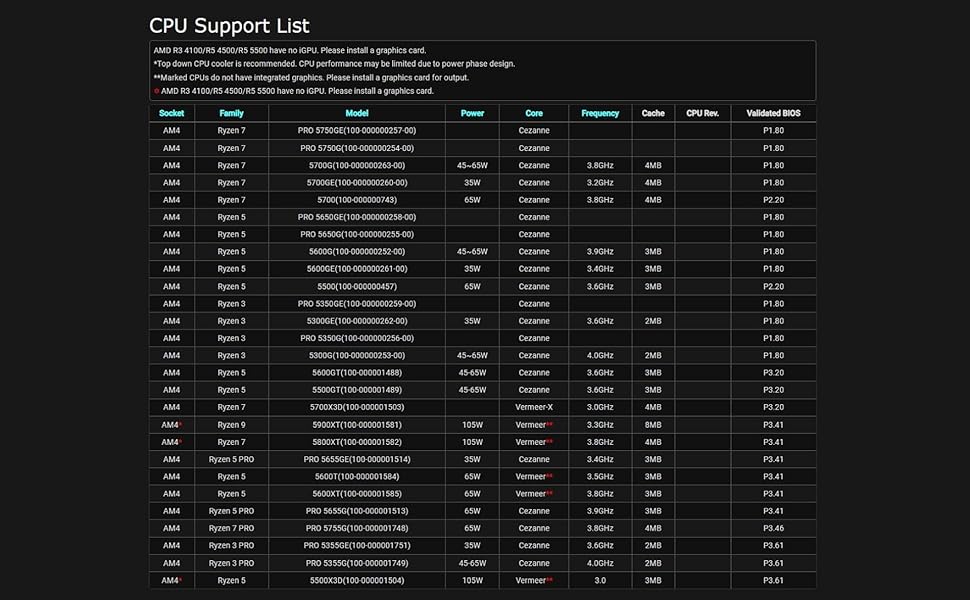
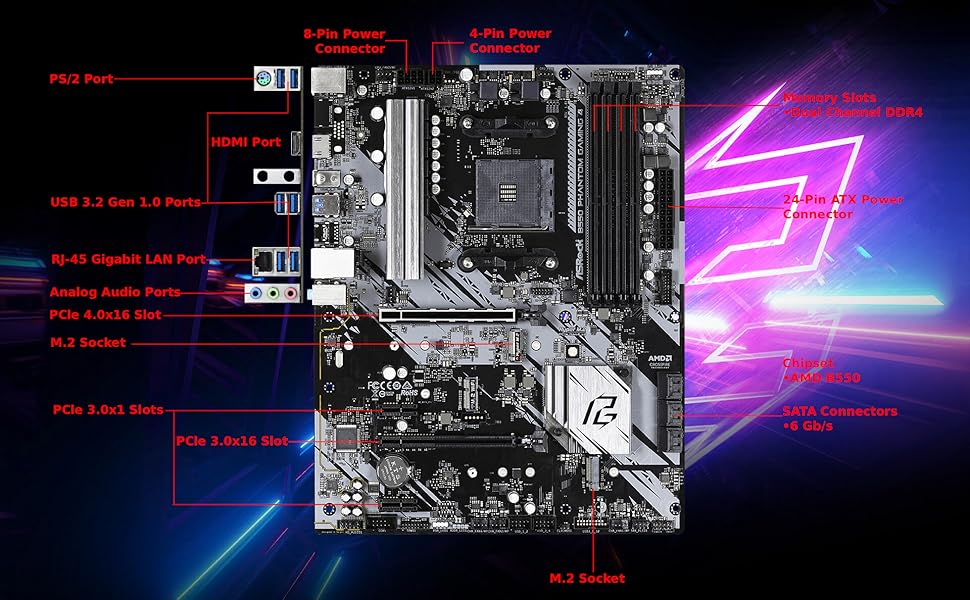
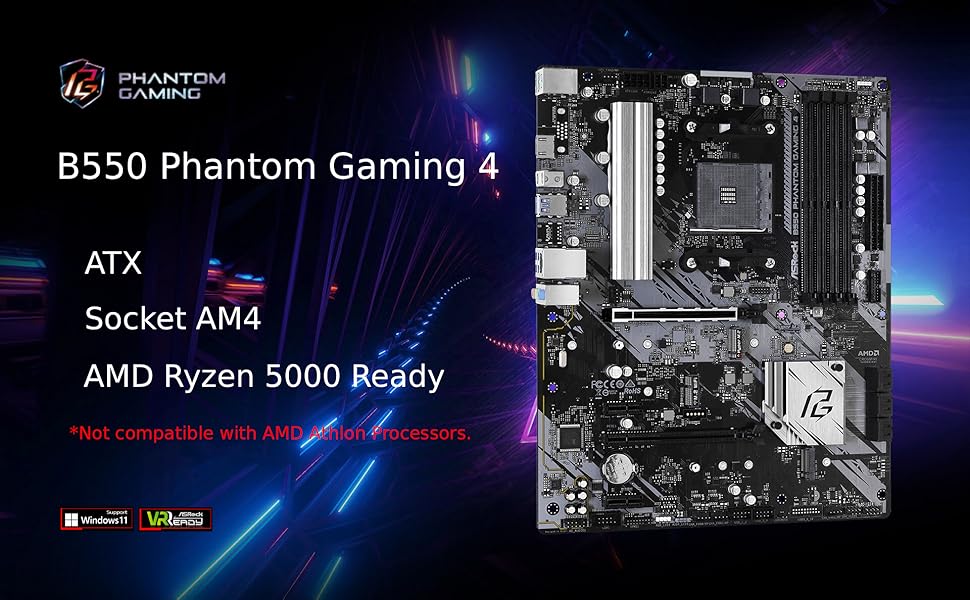
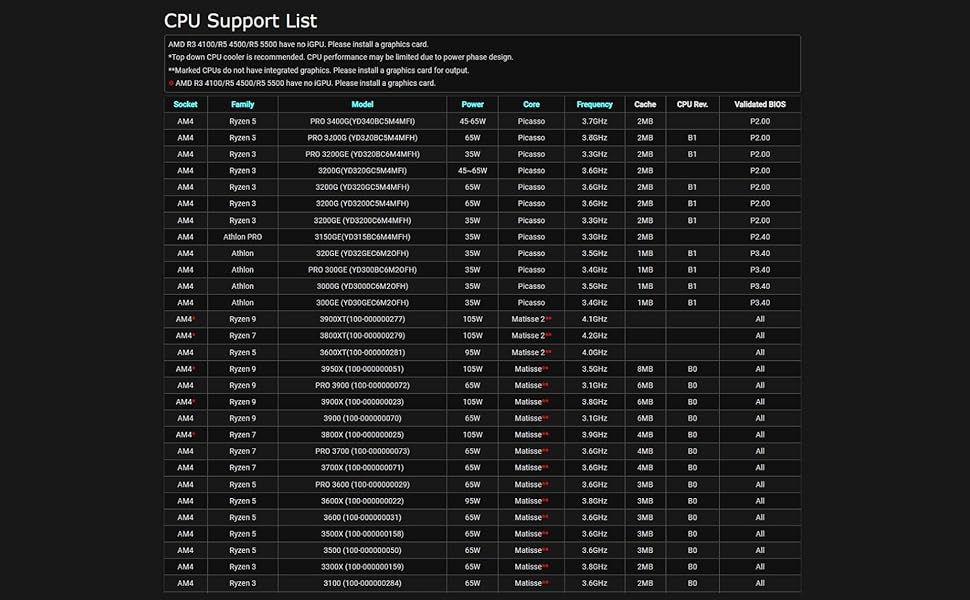
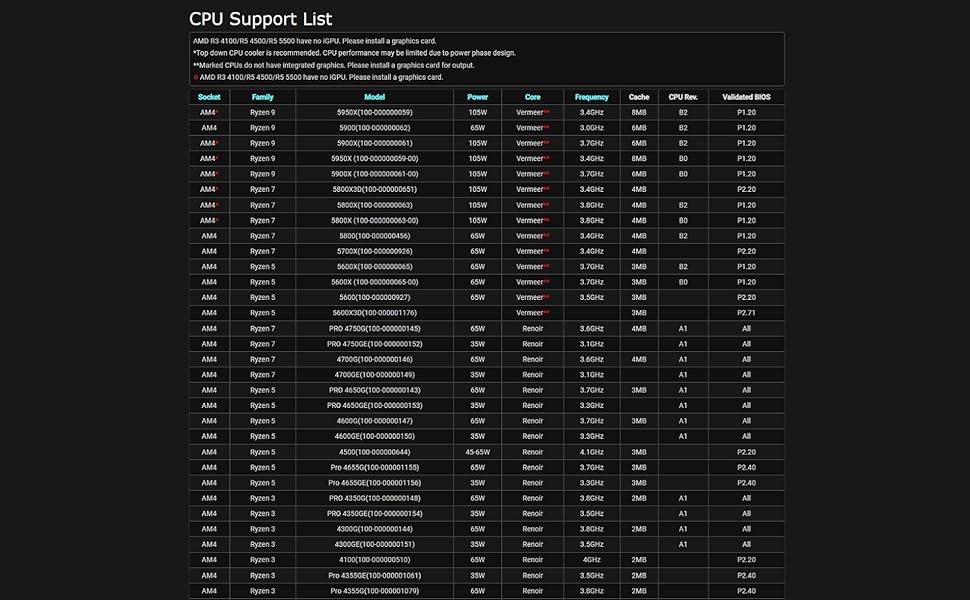
The ASRock B550 Phantom Gaming 4 motherboard supports AMD AM4 Ryzen 3000 to 5000 series processors, featuring DDR4 4733+ (OC) memory support, PCIe 4.0 x16 slot for next-gen GPUs, and six SATA 3 ports for extensive storage options. Its 8-phase power design and Digi Power technology ensure stable overclocking and reliable performance. Equipped with multiple USB 3.2 Gen1 ports, M.2 slots, and TPM support, it’s optimized for Windows 10 and 11, making it a versatile and cost-effective choice for professional and gaming PC builds.
| ASIN | B089VTZ83Q |
| Best Sellers Rank | #56 in Computer Motherboards |
| Brand | ASRock |
| Built-In Media | - Quick Installation Guide, Support CD, I/O Shield - 2 x SATA Data Cables - 3 x Screw for M. |
| CPU Model | Athlon |
| CPU Socket | Socket AM4 |
| Chipset Type | AMD B550 |
| Compatible Devices | Personal Computer |
| Compatible Processors | AMD Ryzen 3000, 3000 G-Series, 4000 5000, 5000 G-Series |
| Customer Reviews | 4.2 out of 5 stars 941 Reviews |
| Global Trade Identification Number | 04710483931499 |
| Graphics Card Interface | PCI Express |
| Item Dimensions L x W x H | 10.5"L x 2.5"W x 13.5"H |
| Item Weight | 1.2 Kilograms |
| Main Power Connector Type | 24-Pin |
| Manufacturer | ASRock |
| Memory Clock Speed | 2400 MHz |
| Memory Slots Available | 4 |
| Memory Storage Capacity | 128 GB |
| Model Name | B550 PHANTOM GAMING 4 |
| Model Number | B550 PHANTOM GAMING 4 |
| Number of Ethernet Ports | 1 |
| Number of Ports | 16 |
| Platform | Windows 10 |
| Processor Socket | Socket AM4 |
| RAM Memory Technology | DDR4 |
| Ram Memory Maximum Size | 128 GB |
| S/PDIF Connector Type | Optical |
| System Bus Standard Supported | SATA 3 |
| Total Number of HDMI Ports | 1 |
| Total PCIe Ports | 4 |
| Total SATA Ports | 6 |
| Total Usb Ports | 9 |
| USB 2.0 | 2 |
| Warranty Description | 3 years |
R**K
ASRock B550 Phantom Gaming Motherboard
I'm not using this motherboard for gaming; I'm using it to migrate to Windows 11. I selected it because it supports TPM (pretty common these days,) has enough SATA ports for me, and supports AMD CPUs with built in graphics. Windows 10 was installed on one of the installed disks. Apparently Microsoft wants us to buy a new version of Windows in order to migrate, so my Windows activation is no longer valid. I'm guessing this will be true when a motherboard changes even if the same disks are used. Update: Windows 11 activated. The motherboard supports it, but (because of Windows issues) I was unable to update Windows 10. I had to install Windows 11 rather than upgrade. If you use Windows, you should buy your Win11 license using Groupon for about $10. The picture shows the installed motherboard. The I/O shield is on the top left, under the fan. Partially hidden under the CPU fan cable is an unused four pin 12V ATX connector next to the connected eight pin 12V ATX connector. My power supply didn't come with a four pin connector, so I didn't use it. The manual doesn't make it clear exactly why there are two 12V ATX connectors. As you can see, there's no graphics card used here. The motherboard supports (AMD) CPUs that have built in graphics, which is all that's needed when a gaming motherboard isn't going to be used for gaming. The motherboard has six SATA ports. I'm using four because three extra disks were available. You should be more careful than I was when considering which case you use. The case I used has two connectors that don't plug in anywhere on the motherboard. It doesn't have a reset button, instead using a front button to control RGB lighting. I use it as a reset button instead, so I can't control RGB lighting. The back panel has six USB 3.2 Gen 1 ports, an HDMI connector and even (although I haven't seen one in ages) a PS/2 mouse/keyboard port. There are also line in, speaker out, and microphone ports. I don't use these. I would use the speaker out but my speaker line is a couple of inches too short to connect where I can see it. The case is installed inside a desk and I'd have to do this by feel. It's not that important yet. The headphone port on the front of the case works. The motherboard supports more fans than I have, has a COM port connector (which requires a PCI card to use,) an RGB LED header and an addressable RGB LED header, two USB 2 connectors, and a TPM connector. Almost all of these connectors are extras. You don't need any extra TPM. The motherboard and CPU provide this function. I have the case LED connector plugged into the addressable RGB header. It probably should have been plugged into the plain RGB header, since my front fans don't glow at all. I'd try switching it, but glowing fans weren't important enough to bother with. The /ac model also contains wireless LAN antennas. The same I/O shield is used for both models. It has unused holes. Here's the net: This motherboard does everything I ask of it, but I'm not really stressing it. It's physically sturdy. It started off in a case that wouldn't fit where it was needed and moving it to a smaller case didn't cause any problems. Before moving it, it ran 24/7 for about two weeks and now that it's been moved it's been running 24/7 for an additional week. You should look at reviews that contain graphics cards if you're going to use one. (I think you'll need one to support multiple monitors.) Make sure your case and motherboard are going to work well (enough) together.
A**N
No real caveats for the price
This board works flawlessly out of the box (at least it does now). The BIOS version on the board I received was P1.50. According to ASRock's website, any BIOS newer than P1.20 supports Ryzen 5000. I intend to pair this board with a 5600X. Some people have received outdated BIOS versions, but that issue seems to have cleared up. I got the board on sale for $90, which is a bang-good price. It isn't very flashy, and the IO shield is rather cheap, but the build quality of the board isn't bad either. The 2oz copper traces really help with heat management, making this board really good for overclocking as long as you have an appropriate cooling solution. The board comes with FOUR M.2 slots (2 Gen4, 2 Gen3) because the M.2 slots are double stacked. This particular model lacks Wi-Fi support, but it does have an M.2 slot for Wi-Fi. The board only has one PCIe x16 slot, so if you intended to rock multiple GPUs you are going to need something more expensive. Overall, very good motherboard and incredibly good price.
F**Z
Excelente producto
Excelente producto
R**L
Careful.
The board worked great for 1 week. Mine didn't work with XMP profile, it was causing constant BSOD and Crashes to desktop while gaming and sometimes youtube videos would freeze. Tried everything including trying out all the BIOS versions available at the moment. I also used it to work from home using teamviewer and what not. It didn't crash on those situations. It could go hours without crashing. 2 weeks worth of troubleshooting and suggestions from Asrock and nothing worked. Will receive another board and see if that one works. **UPDATE: Decided to purchase a MSI B550 Tomahawk before initiating RMA to see if the problems persisted. They have. Conclusion: My Ryzen 3 3300X is the culprit. Already initiated RMA request for that one. For reference my specs are: -Corsair 3200Mhz 8GB x 2 and OLOy 3200Mhz 8GB x 2 (I bought the OLOy because at first I thought the problem was my RAM. -Ryzen 3300x -Corsair CX450 -Zotac 1650 Super -NVME WD 550 Blue 500 GB
K**O
Muy mala la placa
La peor placa madre que he comprado en mis 20 años usando pc, no la recomiendo, no te deja aumentar la velocidad de las ram al reiniciar tu OC se desactiva, al intentar poner el modo seguro no fa imagen ni el logo de asrock asi tengas activo el sistema de compatibilidad, si usas los 2 puertos m.2 (es valido que canales sata se desconecten) lo que no es válido es que te reconozca el disco duro de respaldo pero no te permita inicializarlo, la placa madre me regula la velocidad de internet con cable ethernet y con wifi pero curiosamente con USB conectado al celular ahi si va rapido el internet que placa madre mas mala. NO LA RECOMIENDO es preferible poner 30$ mas y comprar la aorus B550
C**R
Recomendado para gamers sin mucho presupuesto
Muy buen MB para GAMING de bajo precio, sin ningún problema de envió el producto funciona genial.
S**.
Lo mejor calidad precio
Lo mejor calidad precio
F**A
Es una placa muy buena
Al principio viendo las las reseñas tuve miedo que me viera con algun tipo de problema, pero para mí suerte no fue así me llego bien y sin problemas, si desconfíe cuando me llegó el paquete ya que se veía muy golpeado pero revise la placa y todo bien, solo debo de actualizar drivers y es todo
Trustpilot
Hace 2 meses
Hace 3 semanas