We remain fully operational. Our teams are working around the clock to ensure your deliveries continue safely.

Descargar la aplicación


Servicios al cliente
Sobre nosotros
Copyright © 2025 Desertcart Holdings Limited
Descargar la aplicación
Buy anything from 5,000+ international stores. One checkout price. No surprise fees. Join 2M+ shoppers on Desertcart.
Desertcart purchases this item on your behalf and handles shipping, customs, and support to Argentina.
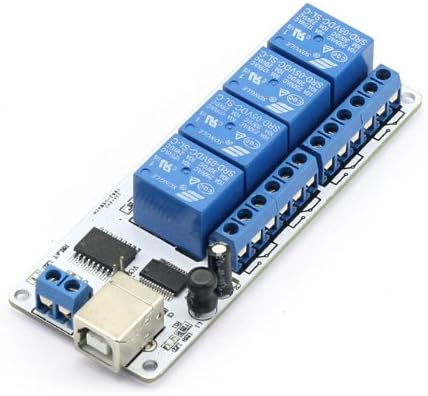
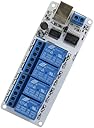
SainSmart USB 4 Channel Relay Automation (5V) Review: SainSmart USB 4 Channel Relay Board is pretty smart - This review is based on the experiences that I had buying/using this product. I am also going to respond to some of the other reviewers that had some "constructive" criticism had of the product. 1. First - the price and form factor are perfect. If I had to duplicate this product using other means (i.e. DAQ Board/Relay Board) -- I am going to spend $100+ for the same functionality. This product simplifies everything and its priced at less than $20. 2. Second -- the command set is simple. I know it is "interesting" when the product is not well documented (or even provided the wrong information). I was unable to get the VCP mode to work but the Bit Bang mode worked perfectly. The advantage of the Bit Bang DLL is that you can get additional information (part number, serial number). I spent roughly 4 to 6 hours working on my software subroutines which is basically a one time (up front) "cost" of figuring out a new board. 3. Finally - there were some reviewers complaining that the board does not include the capability of handle inductive kick (i.e. diodes) in the case where you are hooked up to a motor or something. In my case, I am driving some simple lights so I don't want to have the mfg include parts that I do not require or need. In summary - this is a nice product. I have bought six and used two. This product is now part of my permanent toolkit for projects. Review: Solid USB Relay - Been using this daily for 2 years now and it's a workhorse once you get it set up. Just use a Python script or a shell script to control it and it works great. LEDs doe the relays are convenient too.
| ASIN | B009A524Z0 |
| Best Sellers Rank | #224,183 in Industrial & Scientific ( See Top 100 in Industrial & Scientific ) #400 in Electromechanical Relays |
| Brand Name | SainSmart |
| Coil Voltage | 5 Volts |
| Connector Type | 5-pin Header Connector |
| Contact Material | Silver |
| Contact Type | Normally Open |
| Customer Reviews | 3.6 3.6 out of 5 stars (43) |
| Manufacturer | SainSmart |
| Maximum Switching Voltage | 5 Volts |
| Minimum Switching Voltage | 5 Volts |
| Model | 8542140528 |
| Mounting Type | PCB Mount |
| Operation Mode | Automatic |
| Part Number | 8542140528 |
| Specification Met | Energy Rating, FCC |
| Unit Count | 4.0 Count |
| Wattage | 1 watts |
S**T
SainSmart USB 4 Channel Relay Board is pretty smart
This review is based on the experiences that I had buying/using this product. I am also going to respond to some of the other reviewers that had some "constructive" criticism had of the product. 1. First - the price and form factor are perfect. If I had to duplicate this product using other means (i.e. DAQ Board/Relay Board) -- I am going to spend $100+ for the same functionality. This product simplifies everything and its priced at less than $20. 2. Second -- the command set is simple. I know it is "interesting" when the product is not well documented (or even provided the wrong information). I was unable to get the VCP mode to work but the Bit Bang mode worked perfectly. The advantage of the Bit Bang DLL is that you can get additional information (part number, serial number). I spent roughly 4 to 6 hours working on my software subroutines which is basically a one time (up front) "cost" of figuring out a new board. 3. Finally - there were some reviewers complaining that the board does not include the capability of handle inductive kick (i.e. diodes) in the case where you are hooked up to a motor or something. In my case, I am driving some simple lights so I don't want to have the mfg include parts that I do not require or need. In summary - this is a nice product. I have bought six and used two. This product is now part of my permanent toolkit for projects.
T**T
Solid USB Relay
Been using this daily for 2 years now and it's a workhorse once you get it set up. Just use a Python script or a shell script to control it and it works great. LEDs doe the relays are convenient too.
J**W
Falsely-advertised - no user manual included.
This is in response to Amazon removing my truthful feedback on a SainSmart 5V 4-CH USB relay module. Amazon said my feedback "didn't follow their guidelines". No, the problem with my feedback was that it was a truthful assessment. Amazon obviously did not perform any kind of QA/verification of this module before deciding to distribute it. And sain (the manufacturer) is selling a worthless piece of junk. BOTH Amazon AND sain are at fault. Furthermore, this item by sain is an absolute atrocity regarding quality, design, support, and operation. It's totally useless. More specifically: (1) each relay device on the module lacks a back-EMF (inductive kick) diode connected in reverse polarity across the relay coil which prevents damage to other circuitry on or connected to the module. (2) The module does NOT run on USB port power as packaged (Amazon states that it does); one must modify the module to power from the USB port. This requires installation of a jumper header (not included) and soldering. (3) sain has failed to support this module; after several email exchanges with sain regarding operation/programming of the module, they have failed to provide me with the CORRECT USB command set that controls the module. This is because they probably DON'T KNOW anything about it. In conclusion, from now on, I will NOT trust Amazon to verify quality, operation, and support of the merchandise Amazon distributes. That means, if I can't independently verify product integrity before buying, I will NOT buy from Amazon. Finally, Amazon needs to beware/screen cheap, copied-junk scams.
M**E
Handy board but poor documentation
I read most of the reviews before ordering this device to use as part of a custom temperature-control system. I have a fair amount of experience with serial devices and machine programming. I expected getting this up and running would be fairly straightforward but it ended up taking a few hours. Here's what I now know: 1) I got the 5v version. The relays can be powered from the USB, but this requires a standard PC-type jumper (not included). As-shipped, I guess you would need to connect a 5v external power supply. If you don't have jumpers laying around, order some. 2) I was intending to operate this device via the virtual COM port on my PC as some reviewers reported (though I noticed that some reviewers reported trouble doing this...). It wasn't clear to me after reading other reviews but it seems that this device will only respond to serial commands (relays mapped to bits in a single byte, not as documented in the description download) AFTER it has been place in the so-called "bit bang mode" by a prior call to the SetBitMode() function in the FTD2XX.DLL (after each power-up), so you'll have to load/learn that interface to use serial/VCP (or first run the Relay Manager utility in the description download - it apparently leaves the chip in this mode). After putting in the effort to do this, I decided to just use the DLL for everything and not serial. There doesn't seem to be any way to put the FTDI chip in bit bang mode by sending commands to the virtual COM port interface (as far as I could find) - not convenient... 3) My program was in 64-bit VBA. FTDI has a 64-bit PC driver but all the examples I downloaded from their website were 32-bit (had 32-bit Declares). I had to modify the Declares for all of the functions I needed (add PtrSafe and handles should be LongLong).
Q**E
Demystifying Sainsmart
As other customers have implied about this product working with Linux, yes this is a pain in the #%@. I attempted to get talking with a Pi3/rasbian distro and have still been unsuccessful. There are some folks that have created their own drivers for this and other similar USB relays, however I had no luck with those either. Sainsmart support is as commented, completely worthless and will chime in that the product testing has not transcended Windows. Well, most people will probably be using these with berries and arduinos to fulfill home automation projects as I was. This thing chatters and can be seen by Linux distros, it just can't talk with it. Until I find that secret driver..
D**N
The device itself seems to work OK. It does ...
The device itself seems to work OK. It does require external 5V DC power supply. The provided software development support is inadequate, to say the least.
A**F
Für das Relais lässt sich mit einer KI sehr leicht Software entwickeln auch ohne Programmierkenntnisse. Bei "Anton CNC" findet Ihr eine komplette Anleitung zur Installation und zur Programmerstellung mit Ki. Das ist wirklich kinderleicht - es lohnt sich das Video anzuschauen.
B**B
Getestet mit Ubuntu. Funktioniert gut. Leider schalten zwei der vier Relais von selbst beim Einschalten des Rechners bzw. beim Einstecken des USB-Kabels. Angeschlossene Geräte werden so unwillentlich geschaltet. Erst nach kurzem 2-fachen Klickern und LED-Flackern wird dann der Grundzustand (alle Relais aus) eingenommen.
C**A
Top
D**M
Wird mit der Funktion beworben, aber geht nicht! Support leider Mangelhaft. Seit Tagen funkstille auf diese Nachfrage Also: ich möchte diese Boards mit einer Dos Kommandozeile steuern. Es soll auch laut geschickter Software gehen, allerdings immens anders als Dokumentiert. Der Zuliefer hat diverse Tools anderer Hersteller geschickt, aber nix geht richtig. Hier mein Feedback, den der Support von SaintSmart (Hersteller) erwartet hat von mir: The Boards (2 of them) are only working when i use a special command. I use "Windows command line application" for switching on and off the KMTronic USB One Relay" (DOS COmmandline) and the "USBRelay_test.exe" KMTronics But the Windows Dos Commands are different from the manual and the PDF! Required arguments: -c:n COM to use. -r:n#n Relay number, State. (0=Off, 1=On) usbrelay.exe -c:3 -r:Y#X -q X is 0-9, y is ignored Thats switches: X Relais all OFF 0 1 1 2 2 3 1+2 4 3 5 1+3 6 2+3 7 1+2+3 8 4 9 1+4 Why on Earth are that Boards doing that strange things? 3+4, 2+4, 1+2+3+4 are not to find, if i use ZX the Z is ignored. >99 Overflow Error Ergo: Sie lassen sich schalten, aber nicht alle Relais und nicht wie die mit dem Roten Platinen auch Absolut oder Relativ. Das wäre noch verschmerzbar gewesen, da ich dies abfangen könnte, da aber nicht alle Relais in allen Kombinationen schaltbar sind... wars das und ich nehme die "normalen" roten und einen 5 auf 12V booster In meinen Augen eine gute Platine (design ist scheinbar gut), sie läuft an 5V Nativ (nicht wie die roten an 12V bei 4ch), aber schlechte umsetzung. Leider ist dieser kleine PC Pin Jumper echt ärgerlich wenn man ihn nicht hat. Das könnte der hersteller ruhig dabeilegen, denn manche haben die echt nicht auf alten platinen oder ähnlichem Ebenso sind die Softwarebeispiele etc eine ansammlung von Fremdprogrammen (u.a. Denkovic, Sigma, KMTronics ) Sie gehen zurück, da der Hersteller keine Lösung anbietet für das scheinbar beworbene Feature. Keine Ahnungs was die da zusammengebrutzelt haben an Code in dem Chip...
P**R
Es wird eine zusätzliche Stromversorgung benötigt.
Trustpilot
Hace 1 mes
Hace 1 mes