We remain fully operational. Our teams are working around the clock to ensure your deliveries continue safely.

Descargar la aplicación


Servicios al cliente
Sobre nosotros
Copyright © 2025 Desertcart Holdings Limited
Descargar la aplicación


Buy anything from 5,000+ international stores. One checkout price. No surprise fees. Join 2M+ shoppers on Desertcart.
Desertcart purchases this item on your behalf and handles shipping, customs, and support to Argentina.
🌟 Elevate your smart home vibe with effortless fan & light control!
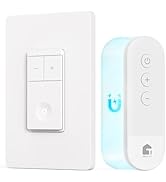
The TREATLIFE Smart Ceiling Fan Control and Dimmer Light Switch is a sleek, single-pole combo switch designed for 2.4GHz WiFi networks. It independently controls 4-speed AC ceiling fans (up to 1.5A) and dimmable non-smart lights (up to 150W LED/CFL or 300W incandescent) with smooth dimming and fan speed adjustments. Compatible with Alexa and Google Home, it supports custom schedules and remote app control without requiring a hub. Installation requires a neutral wire and separate fan/light load wires. This FCC-certified switch offers a modern upgrade for smart homes seeking integrated, voice-enabled climate and lighting control with a 2-year warranty.












| ASIN | B086PPRWL7 |
| Actuator Type | Push Button |
| Best Sellers Rank | #26,890 in Tools & Home Improvement ( See Top 100 in Tools & Home Improvement ) #3 in Ceiling Fan Wall Controls |
| Brand Name | TREATLIFE |
| Circuit Type | 1-way |
| Color | White |
| Connectivity Protocol | SmartThings, Treatlife APP, Wi-Fi |
| Connector Type | Screw |
| Contact Material | Metal |
| Contact Type | Normally Closed |
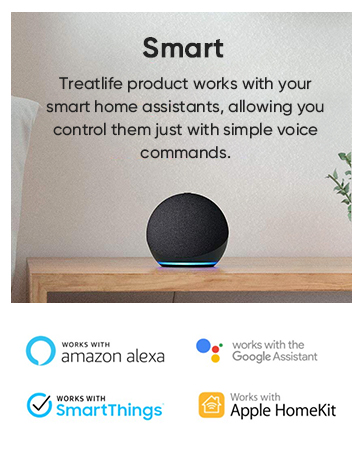
| Control Method | App, Touch, Voice |
| Controller Type | Alexa,Google Home,Smart Things,Remote Control |
| Current Rating | 1.5 Amps |
| Customer Reviews | 4.2 4.2 out of 5 stars (4,731) |
| Included Components | 1 x ceiling fan control, 1 x 1 gang wallplate, 2 x screws, 4 x screw nuts |
| International Protection Rating | IP00 |
| Item Dimensions | 1.97 x 3.54 x 5.12 inches |
| Manufacturer | TREATLIFE |
| Material Type | Plastic |
| Model | DS03-1 |
| Mounting Type | Wall Mount |
| Number of Items | 1 |
| Number of Positions | 1 |
| Operating Voltage | 120 Volts (AC) |
| Operation Mode | ON-OFF-ON |
| Specification Met | FCC |
| Switch Type | Push Button |
| Terminal | Spst |
| UPC | 795890921008 |
| Unit Count | 1 Count |
| Upper Temperature Rating | 50 Degrees Celsius |
| Warranty Description | 2 years warranty |
| Wattage | 300 watts |
S**G
Works great to control both a Ceiling Fan and Light in ONE dual switch.
As many others seem to say, "I have been looking for a smart switch that controls both the fan and light". Till now I had to buy separate smart switches to control both. This switch works great in fact I purchased a second one with in a month of installing the first. Install was very easy as the wires on the back of the switch are identified as to their function so you won't mistake which to connect to your home wires. To install this switch to control both fan and light, first turn the breaker off for your switch. You can tag all the wires with the included stickers showing what they control. You need a hot/Line/power wire usually black to feed the electric to both the light and fan through the switch and you need a Neutral Wire usually white. They will attach to the black and white wires from the switch with the wire nuts provided. You will also need a ground wire usually green or bare copper which attaches to the green wire from switch. You then need load wires which are the wires coming from the light and fan. The fan power wire will connect to the yellow wire from switch and the light load wire will connect to the red wire from the switch. Now your switch is wired. The neutral wire and ground wire from the light and fan get attached to the ones from the switch and line/power wires. All neutral wires are connected together and all ground wires are connected together. I usually connect the wires together with wire caps like the ones provided and I then usually use electrical tape to wrap around the wires and the cap holding them together. Electrical tape comes in colors so I use the color that matches the wire for easy identification. Keep in mind this double switch is probably bigger then one you may be replacing in wall, so the switch and wires will all need to fit in the electric box in your wall. I could not find what the warranty on the switch was and so I contacted Treatlife via email as it is the only way to contact them. I got contacted by their tech, Frank Chire, who told me the warranty on the switches was 1 year. He was very helpful with other questions I had and made me feel that if anything went wrong with the switches or I had any other questions or concerns he would take care of them. The switches integrate with Alexa as well as other switches I have installed. You need to download the Smart Life app to your phone and if you want the switch to work with Alexa then you need to enable the Smart life skill in the Alexa app. The switch was detected by the app without any issues. Once installed on the app you can change the switches name and don't forget to name the individual light and fan switches to something that makes sense to what they control and where they are located. The switch has a light built in which works opposite of most in the sense that if the light or fan is on the internal light is lit. If the fan or switch is off the internal light for that switch is off. I like a lighted switch so I can see it in the dark to turn it on, this defeats that purpose. If you are using it with Alexa then you can just tell Alexa to turn it on. It is a bit bright. This can hopefully be fixed with a software/firmware update that will allow the app to set when the internal light goes on based on the switches state on or off and it should also allow the option to have it off all the time. The other issue I have is the dimmer at the top is shared between both switches which is a bit cumbersome. It may be a nice design change to have you hold the individual switch down on the bottom of that switch to lower it and the top of the switch, (it would be like a rocker switch), to raise. Overall the best switch on the market for controlling both the fan and light of a ceiling fan and at a very good price. The Treatlife DS03 Fan and Light combined switch Pros and Cons: Pros: Easy Install with the wires marked as to their function. Two switches in one. Works well with Alexa for making a smart home. Low price for a smart switch. Tech support from my interaction seems to care about customer satisfaction. Everything but screw drivers are included, Switch, Cover Plate, Wire nuts, and labels for your wires. 1 year warranty. Cons are all just my personal feelings and do not affect the switches operation: The internal light on the switches is not controllable as to when or if it is on and works opposite of what I am used to. The single dimmer portion of the switch is a bit cumbersome to use. Treatlife can only be contacted via email no phone number. I will revisit this review if the switches give me any issues. For now 5 stars. Great value.
J**R
Very Functional Smart Switch for Ceiling Fan and Light
I am again pleased to have bought and installed another Treatlife smart device. I have most of their other products and this ceiling fan smart switch is a welcome addition to their product line. I have a child that likes to have a ceiling fan on at bed time, but turned off after a while. Since I frequently forget to turn it off, this is a great way for me to have the fan turn off automatically each night. Also I had never gotten around to installing a separate light and fan switch. We had one switch control power to the fan/light and then used the pull cords to turn on the lights or fan. So, this helps make life better in being able to turn either the light or fan from the switch and no longer need to rely on the pull chains. You need to make sure you have proper house wiring to support this switch. First, you need to have a neutral wire. That shouldn't be a problem unless your home is older. Second, you need to have separate wires from your switch box to your ceiling fan--one for fan and one for light. Most modern installs should have the standard black, white, copper wiring along with a red wire running from your switch box to the fan mounting box. Without that red wire, you won't be able to control the fan and light separately. Previously, I only had a single switch to control my ceiling fan. When I connected the light unit in the fan, it was wired together with the fan. So, we had to use the pull chain to turn the light on and off. So, I had to change the light unit's wire to my red supply wire before installing the switch. Luckly I have a newer ceiling fan unit and didn't have to remove it in order to re-wire. Aside from having to re-connect my light fixture wire, the install was straightforward. Obviously you should be skilled enough to be careful working with electrical connections. But, if you can handle turning off the right breaker and removing your existing switch, you should be able to handle this in just a few minutes. You simply connect the wires properly. The only difference from a "normal" switch connection is having separate wires for the fan and light. Treatlife includes wire labels to help make this a little easier. You don't need any sort of hub or device controller. You do, however need to make sure you have a 2.4 Ghz wifi network (not 5 Ghz). Connecting to the "app" was quick and easy. I am using the older Smart Life app and not their newer Treatlife app. As of now the Treatlife app doesn't include Siri shortcuts. So, I'm sticking with the Smart Life app for now. Otherwise, there's no difference between the apps. Their app makes it very straighforward to add timers (say automatically turn the fan off an hour after someone turns it on) or schedules (turn fan on at 8 PM or at dusk). You can also also create Siri shortcuts for actions. For me, that was shortcuts to turn lights on full, dim, or off and ceiling fan high, low, and off. I also set the fan to lower at 11 PM and turn off at midnight. The programming is very functional and easy to do. Their instructions were good and easy to understand. The manual control is easy to do. You can easily turn on/off the fan or lights with a push of a button. In order to control the light brightness, just double-tap the light button and use the +/- buttons to increase/decrease the brightness. Similarly, double-tapping the fan button allows the +/- buttons to speed/slow the fan. The only complaint my child had was that the LED on the switch when the fan runs was "too bright" for him. I don't think the LED is all that bright, honestly. I contacted the manufacturer and they are checking to see if it can be disabled. As of now, there's no solution. I put a thick post-it note on there for now, and that's solving the problem low-tech. Overall, I am very pleased as I have been with all my Treatlife purchases. This ceiling light/fan switch has met all my expectations.
A**T
Overall, this switch works well. Easy to sync up and easy to use. My biggest gripe is how large it is. I had a lot of troubles getting it into the electrical box and screw down tight enough. I installed a new fan in a room that had a switched outlet. I ran new 14/3 wire to the box and rewired it so that the switched outlet was no longer switched and instead I controlled the fan/light in the ceiling with this dimmer. The wiring itself wasn't very difficult but getting things into a standard 12.5 cubic inch box was tricky. I had to constantly rearrange the wires and got everything to JUST fit. I even had to install a different box because mine was installed "incorrectly" by today's standards and didn't have the amout of room needed. There is still a minor gap but its good enough for me. I would suggest that if you have a standard single outlet box and have 3 wires coming into it, look into getting a deeper box (3" deep instead of 2.5") installed to save yourself some headaches or even install a larger 2 gang box and have a blank plate beside it. I was originally going to do a 2 gang box and have separate controls. I kind of wish I had to save me A LOT of troubles. The other option would be if they had screw terminals or push in connectors on the switch itself instead of having to wire nut everything together. I may have been able to save some space inside the box.
J**N
A huge improvement over the wireless remote that came with our Hunter ceiling fan. Both fan speed and light intensity controllable from the switch AND from your preferred smart home app, no need to operate the wall switch at all. Can put the fan on a timer to turn off automatically, as we tend to forget to switch it off in the morning. The device is also breeze to sync with the TreatLife app. A few cons, to help improve the design further: - For the install, I had to file down the bolts in the metal junction box, which would otherwise obstruct the passage for the switch box. Whether the plastic body could be reduced further to make it fit in a wider variety of wall boxes, is unclear. - The plastic buttons are made too loose. Feels cheap and detracts from an otherwise great product. - If the light/fan on-off buttons are operated too quickly, I noticed that the light would remain on even when both L/F switches are in the Off position. - A note for users: Google Home does not have a fan speed control on their app, unlike Amazon Alexa or TreatLife's native app. Also, the fan switch links to Alexa and Google Home producing two devices (not one) corresponding to the fan, acting only as an On/Off for the motor - keeping the same speed as ran at last time it was used.
T**R
Installation was same difficulty as all of these smart switches. Automated control is pretty straight forward but the manual control is very different than the old "analogue" switch that was there. This requires button combinations (you have to remember to double tap the mode) to set the switch to which mode your dimming/speed adjustments are going to affect (fan vs light). The old switch was just two simple sliders, one labelled "light" the other "fan". Not a big deal, but different.
M**N
Bought this for my daughter's room to replace the existing ceiling fan/light combo switch I had. Installation was easy enough and initial setup through the Smart Life app was very easy. I have two main issues with the switch though. The first one is that sometimes the light will stay on even though it is "turned off". There appears to be no rhyme or reason for it. It will do this when you use the app to turn the light off or the physical switch. Eventually, after playing with both the switch and the app the light will work correctly and turn off when it is supposted to. This appears to be completely random. The second issue is the Google Home integration does not work. It will show up in my "home" but it only shows up as a "light" and even then the light from google home controls the fan. Turning off the light in Google Home turns off the fan. There is no ability to dim the light or control the fan independently. This is unfortunate as the Google Home integration was the primary reason I purchased this. All my other products registered in the Smart Life app work correctly and integrate into Google Home with the exception of this one product
M**B
I installed this a few days ago to control an older-model ceiling fan and light at my cottage. The installation went well and the switch connected to my wifi without any significant problems. I needed this wifi-controlled switch because I plan to turn on my electric fan heaters remotely to warm the cottage up before I arrive, which usually takes at least a few hours or even longer if it's cold. The fan is perched high in the vaulted ceiling and is necessary to mix the warm and cold air. The wifi thermostat for the forced air fan heaters (Sinope TH11124WF, reviewed separately on Amazon) also works quite well. I really like the app (called Treatlife). It's pretty slick; as good as I've used with my many wifi devices. In fact, I liked the app enough that when I went to replace another light switch, I bought a Treatlife product so I can use the same app. I now have over a dozen proprietary wifi apps, which can get to be cumbersome, so I'm starting to buy products from manufacturers that I know and like for both their products and their apps. It seemed a little expensive for what it is, but it works well so I'm satisfied. Regards, Mark
Trustpilot
Hace 1 día
Hace 2 días