We remain fully operational. Our teams are working around the clock to ensure your deliveries continue safely.

Descargar la aplicación


Servicios al cliente
Sobre nosotros
Copyright © 2025 Desertcart Holdings Limited
Descargar la aplicación
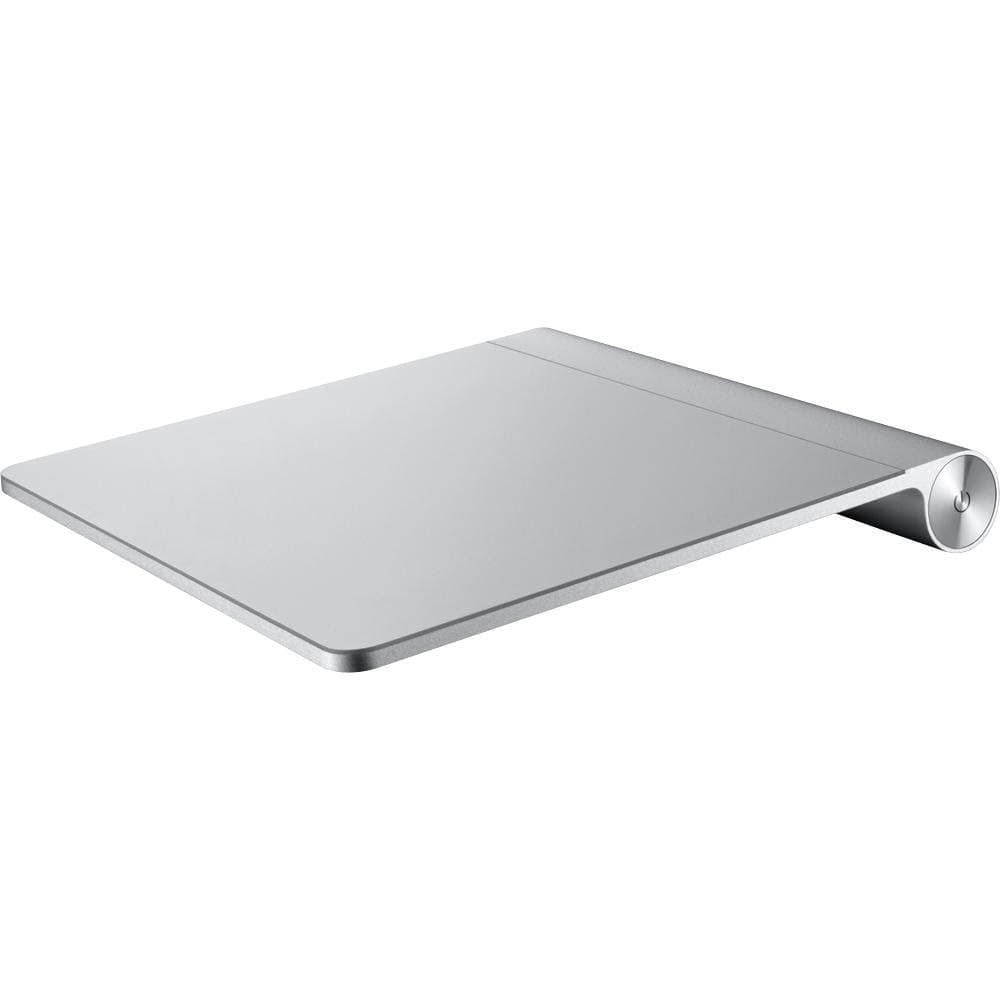
✨ Elevate your Mac workflow with the Magic Trackpad—where touch meets precision! 🖐️
The Apple Magic Trackpad MC380LL/A (Renewed) offers a spacious, 80% larger Multi-Touch surface than MacBook Pro trackpads, delivering precise, button-free control via Bluetooth wireless technology. Certified renewed with a minimum 90-day warranty, it combines premium Apple design with eco-conscious value, perfect for professionals seeking seamless, natural navigation on their Mac desktops.


| ASIN | B016E2YUHG |
| Additional Features | Wireless |
| Best Sellers Rank | #1,757 in Amazon Renewed ( See Top 100 in Amazon Renewed ) #18 in Computer Touch Pads #516 in Renewed Computers & Accessories |
| Brand Name | Apple |
| Button Quantity | 16 |
| Color | Silver |
| Compatible Devices | Mac |
| Connectivity Technology | Bluetooth, Wireless |
| Customer Reviews | 4.2 4.2 out of 5 stars (419) |
| Global Trade Identification Number | 00636173544654 |
| Hardware Platform | Desktop |
| Item Dimensions | 5.2 x 0.7 x 5.1 inches |
| Item Weight | 4.96 ounces |
| Manufacturer | Apple Computer |
| Model Name | MC380LL/A |
| Package Quantity | 1 |
| UPC | 636173544654 |
R**N
Perfect!
The track pad arrived in two days and is indistinguishable from a brand new one. It works perfectly.
M**R
I'm happy with it.
First time buying a refurb so a bit apprehensive. Overall in excellent shape. There's just a teeny tiny chip out of one edge - almost unnoticeable and no effect on function. Just what I needed. I am a long-time trackpad user - I don't even LIKE a mouse - and the new, updated version is just too big for my limited desk space. Battery life is phenomenal.
D**N
This pad does work with ChromeOS FLEX
Works well on my ChromeOS FLEX desktop once I updated the kernel.
D**E
exercise does not have to leave the house
It's shaped like a treadmill, but it's so small, so I can use it anywhere without taking up too much space. I can walk while reading a book or watching my favorite series, and it makes me feel happy and active. The seller is also very nice and quick to help me with any questions. I love this product because it helps me stay healthy in a fun way!
S**7
Must Push In VERY HARD To Perform Any DRAG Function. Extremely FATIGUING On Hand And Wrist.
This is called the "secondary click", or "force click". When you push in gently and feel one click, then push in harder and feel a second click. Like on the normal trackpad built into any given MacBook Pro. Except with this external trackpad, you have to push in VERY hard to get that second click. And unlike on the trackpad of a normal MacBook, with this external trackpad you have to access that secondary click, or "force click" in order to perform any "drag" task (highlighting, drawing, drag & drop, etc.) It doesn't take very long for this to become very fatiguing on your hand and wrist. As someone who does a lot of music production and needs to be able to do very fine adjustments while dragging, this thing is a cumbersome nightmare. It's amazing that it's so much worse than the normal trackpad built into my MacBook Pro (which I love), but for whatever reason it is. I wish I'd realized this within the return window but I didn't. NOT EASY TO USE. But the dumb AI reading my review just gave me a green check by "Ease of use" because I mentioned how easy it is to use the BUILT-IN Trackpad on my MacBook. Ffs
S**A
In place of my mouse
I was having some problems with one of the older magic mouses I had and this was a perfect opportunity to replace it with a track pad (I've been wanting one of these also so that was an even better time). I'm also an amateur photographer and have been recently using some graphic editing software. So drawing with a mouse is pretty difficult. Photo editing with a mouse is not so back but using a track pad for both photo editing and graphic design is a really good choice. The sensitivity to touch on the track pad is not so much adjustable as the speed. My only complaint is when I use it for Google Maps. The street view is hard to get into cause you have to press (click) and drag and that's no simple. Its like a two step thing and its not easy to do with one finger. I have tried using two fingers but that only works sometimes. So overall I like it. It helps keep the amount of space needed to a minimum. The mouse has to get moved all around - track pad stays stationary while your finger moves on the pad and that space is moves is pretty small.
A**G
Missing pad.
My track pad died and it was hard to find another but I was able to find a refurbished pad. It work but there's a small rubber pad that make the track pad work and it was missing. I tinkered with it by adding a eraser tip to compensate the missing part. Didn't work. With nothing to lose, I decided to take apart my old pad by prying off the back and replacing it on the working pad. That works. Now I'm reluctant to order refurbished items.
J**R
A great replacement
The batteries leaked on my old one. This works as it should.
C**E
Adquirí este artículo para una iMac de finales de 2013. Funciona perfectamente. Es muy funcional.
P**N
Unwrapped, plugged in, iMac recognised it straight away. In as new condition perfectly wrapped, why pay more works beautifully.
S**.
Solo funcionó 97 días y la garantía ya no aplicó.
J**.
I have a fairly old Apple bluetooth keyboard comparable to this renewed trackpad. The keyboard isn't as smart as new ones in terms of power management and gets through batteries too frequently, but it is otherwise totally reliable and I'm writing on it now. I mention it because there's no reason why fairly old tech that's been well looked after (let alone "renewed"!!) shouldn't work OK, especially if you're not bothered about all the bells and whistles. The trackpad by comparison loses its connection after a few minutes of not being in use and then will not re-connect until powered off and on again, occasionally forcing a full re-pairing of the Mac - Likewise the Mac does not do anything when you select 'connect' from the bluetooth menu as it clearly can't "see" it, despite having registered it previously. Overall a very frustrating experience and I'm returning it immediately.
Trustpilot
Hace 1 día
Hace 5 días