

Desert Online General Trading LLC
Dubai, United Arab Emirates
Desert Online General Trading LLC
Dubai, United Arab Emirates


💻 Elevate Your Workspace with Style and Security!
The Microsoft Wireless Desktop 3050 with AES is a sleek and secure keyboard and mouse combo designed for professionals. Featuring advanced AES 128-Bit Encryption, customizable shortcut keys, and an ergonomic palm rest, this wireless set enhances productivity while ensuring comfort. With Bluetooth connectivity and BlueTrack Technology, it works seamlessly on any surface, making it the perfect addition to any modern workspace.


| Wireless Type | 2.4 GHz Radio Frequency |
| Brand | Microsoft |
| Series | PP3-00001 |
| Item model number | PP3-00001 |
| Hardware Platform | PC |
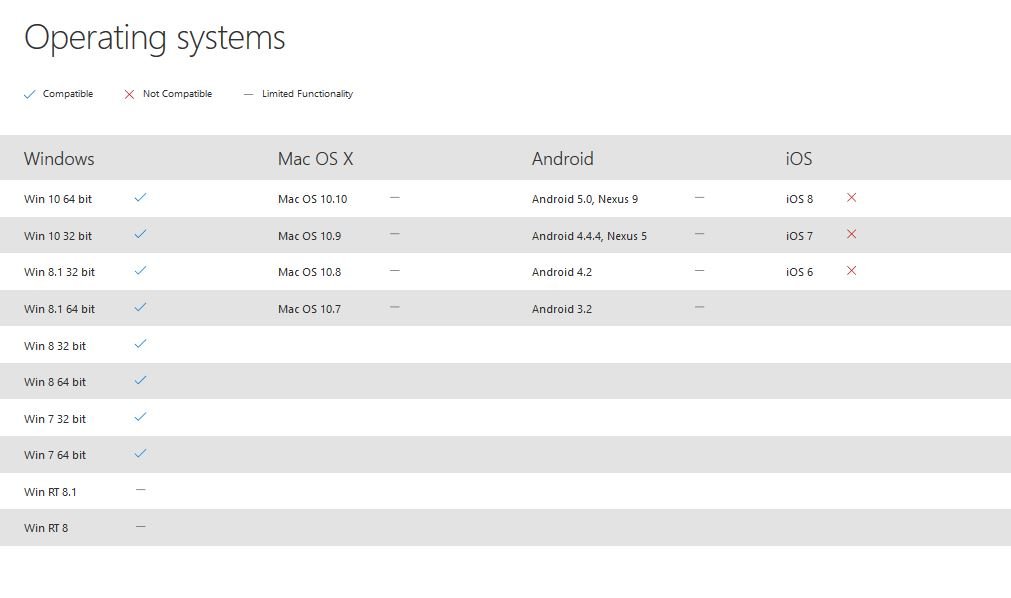
| Operating System | Windows,Microsoft |
| Item Weight | 1.82 pounds |
| Product Dimensions | 1.97 x 8.27 x 21.89 inches |
| Item Dimensions LxWxH | 1.97 x 8.27 x 21.89 inches |
| Color | Black |
| Power Source | Battery Powered |
| Batteries | 4 AA batteries required. (included) |
| Manufacturer | Microsoft Input |
| ASIN | B014W20BAA |
| Is Discontinued By Manufacturer | No |
| Date First Available | September 1, 2015 |
V**M
Bigger is better!
First off, let me start out by saying the mouse and keyboard and big. If you have small hands or want a slim design, look elsewhere. But if you are like me and have big hands and desk space, this is the keyboard and mouse for you.Let's start off with the mouse. I have this same exact mouse, I bought it probably 15 years ago. To this day, it still works. The mouse goes into "sleep" mode when not in use so it saves battery. Maybe I replace the batteries twice a year? I don't know, I have rechargeables so I don't care. The mouse has some weight to it and is on the larger size which I love. All of the mouses available today are so miniature its uncomfortable and not good for your hand. This mouse is perfect and when I my old keyboard died, I tried finding the keyboard that went with the mouse. So I was very pleased to find out that I got a keyboard and another identical mouse. So now I have an extra should my other mouse die.The keyboard, this babies big. It is not a slim design, its not for saving space. But the ergonomic pad thing in the front is great and the feet stands underneath provide a nice slope. Key typing is responsive and works great. I have no complains about the keyboard other than its a big large.Overall, this is an excellent setup. If you want something compact and small that you can fit in your pocket, not for you. But if you want a solid keyboard and what I think is the most comfortable mouse to use, this IS for you. I would highly recommend this setup.
A**R
Best Keyboard I have ever used
I have purchased this keyboard multiple times for all of my computers as well as some other people’s. The first one I purchased back in 2012 and it’s still working beautifully. The pad on the bottom is both comfortable and durable. The hot keys are very programmable. The key stroke is not mechanical but I honestly prefer to to the mechanical feel. It’s a great size and the mouse is also wonderful to use. This is the only keyboard I’ll ever recommend.
I**E
Finally something that works like it is supposed to!
So far so good. I am not a fan of wireless peripherals because of the lag or connection being lost, or the batteries not lasting very long causing the fore-mentioned issues to happen. I have not had any issues with this as of yet, but have only had it for a few months. It was easy to install and easy to program. I wish it had lights for the Caps Lock and the Num Lock, but it has other features that are kind of cool. Some of those are: Media buttons, calculator short cut key, several other shortcut keys that if used can make things so much easier! You can open, save, print, etc. documents right from the keyboard. The mouse is responsive and I like to program a Back button and a Close button and this one does that. Because it is a Microsoft product the Close function will close the active tab in a window rather than the entire window so when browsing the web and you have several pages (tabs) open, it will only close the active one. No need to open each browser page in a new window. Love it...
J**G
Pretty good, but has some flaws
I purchased this keyboard and mouse set in January 2019 to replace a Microsoft 5000 Ergonomic wireless set that I'd used for more years than I can even recall. The older set still worked great, but I wanted a 'standard' keyboard to make typing transitions easier when switching between laptop keyboards, work keyboard, home keyboard, etc.Battery life is excellent for both the keyboard and mouse!The mouse very comfortable in my hand. Not too big. Not too small. It's just right. It definitely isn't silent when clicked, but it isn't annoyingly loud (at least not to me). I love being able to scroll horizontally (it's been my top mouse requirement for at least 10 years). Frustratingly though, the horizontal scroll is TERRIBLE in Excel (you have to press Shift while tilting for more reasonable scrolling), yet it works exactly as expected in other applications like Notepad++. Go figure!As far as the keyboard goes, it has all (if not more) of the same great features as its larger, and more expensive, 5000 sibling. You have dedicated keys to easily adjust volume (very convenient in a work-from-home world), manage audio\video playback, open your default email program, browser, etc. as well as several keys whose behavior can be customized. I really only have two complaints about it, but they're pretty significant to me:1. The actual numbers (F#) for the function keys are in dark blue (not easy to see if there's any type of shadow or glare) above the keys. The keys themselves show only the icons related to their non-F-lock shortcuts. I do a fair amount of programming and find it very difficult to locate the appropriate keys when in a hurry. So, I have to try to remember that, for example, I need to press the Open Folder button to start debugging (F5) and the Save button to step (F11). It can become incredibly annoying.2. At just over the 2-year mark, the letters wore off completely on so many keys that I couldn't take it anymore. After researching and reading dozens of reviews, I ordered stickers to serve as replacements. Unfortunately, the highly rated stickers I purchased have since proven to be a poor solution. If I can't come up with something better, I'll be forced to purchase a new keyboard... and because of this experience, its brand is not likely to be Microsoft.
R**C
An excellent keyboard and mouse for the price
Just replaced a Logitech MK710 with a Microsoft 3050. What an improvement! I've used Microsoft in the past, but switched to the Logitech a couple of years ago. A problem common to both is the lettering wearing of of the keys. I'm interested in seeing how well the 3050 holds up.Some initial thoughts. First, connectivity is much improved with the 3050! No more drops or lags with the mouse. This alone justifies the change. Second, the 3050 feels better engineered. Not sure how to describe the difference as it may be more the appearance. Third, both keyboards have palm rests and are comfortable to use. Fourth, I do prefer the function keys on the Logitech as they are larger and marked more clearly. That said, I'm not a heavy user of them.After a week of use I am very pleased with the change and can recommend the 3050 for others.
Trustpilot
Hace 2 meses
Hace 2 semanas