We remain fully operational. Our teams are working around the clock to ensure your deliveries continue safely.

Descargar la aplicación


Servicios al cliente
Sobre nosotros
Copyright © 2025 Desertcart Holdings Limited
Descargar la aplicación
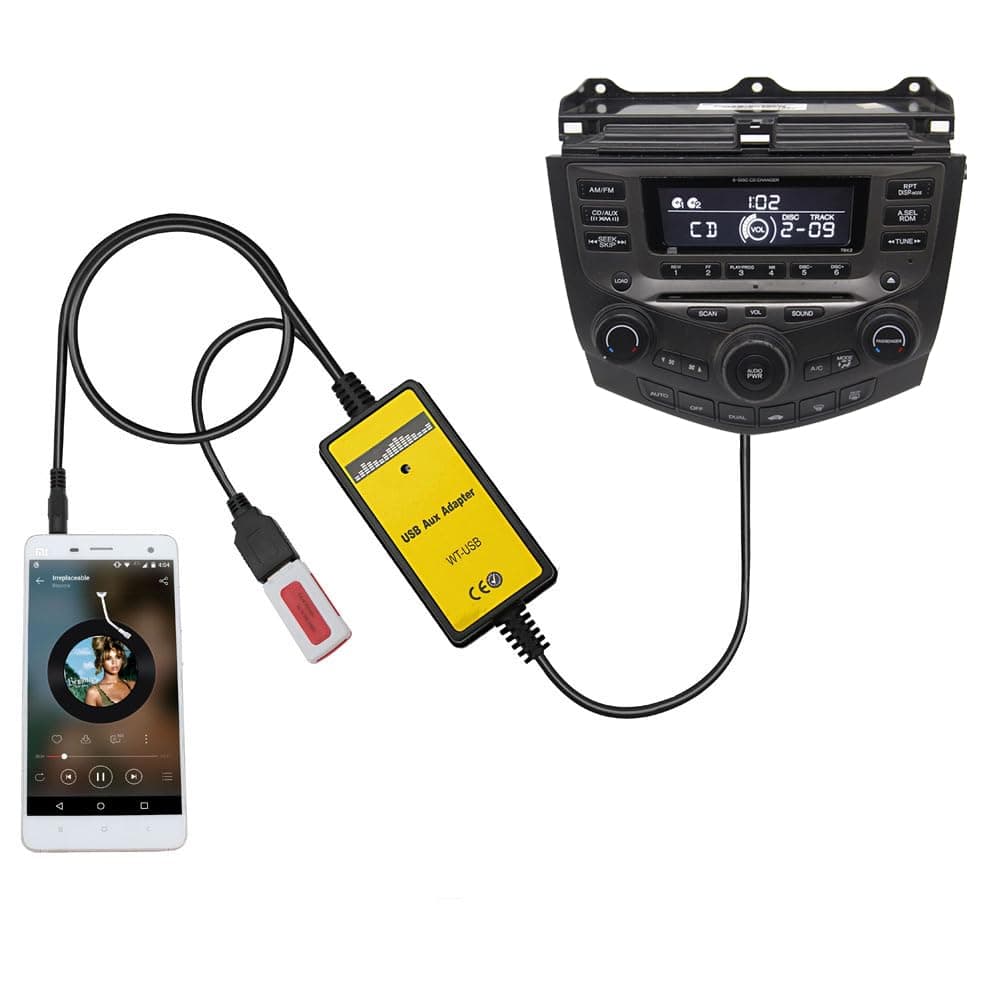
🎶 Upgrade your drive: From CD stuck to digital deluxe!
The Yomikoo Car Audio CD to AUX & USB Input Adapter is a plug-and-play device that converts your Honda or Acura’s original CD player into a versatile digital music system. Compatible with models from 2002 to 2014, it supports AUX and USB connections for seamless playback of high-quality MP3s from phones, flash drives, or MP3 players. Easy to install in under 20 minutes, this adapter breathes new life into older car audio systems, eliminating the limitations of CD changers and enabling a modern, expansive music experience on the road.


| ASIN | B015X7QVGG |
| Best Sellers Rank | #773 in Car Audio & Video Input Adapters |
| Brand | Yomikoo |
| Color | Yellow |
| Compatible Devices | Cellphone & MP3 Player & Flash Drives |
| Connector Type | 3.5mm AUX + USB 2.0 |
| Current Rating | 35 Milliamps |
| Customer Reviews | 4.2 out of 5 stars 1,116 Reviews |
| Finish | Matte |
| Input Voltage | 12 Volts (DC) |
| Item Dimensions | 60 x 0.2 x 2 inches |
| Item Weight | 0.16 Grams |
| Item dimensions L x W x H | 60 x 0.2 x 2 inches |
| Manufacturer | Yomikoo |
| Model Number | QX003 |
| Nominal Power | 0.42 Watts |
| Number of Items | 1 |
| Number of Ports | 2 |
| Package Quantity | 1 |
| Power Plug Type | Type A - 2 pin (North American) |
| Specific Uses For Product | Car Audio & Video, Cell Phone, MP3 Player |
| UPC | 714491786045 |
| Unit Count | 1.0 Count |
| Warranty Description | 1 Year |
| Warranty Type | Limited |
C**S
Gave new life to my 2007 Odyssey EX. Easy to Install
I installed this at the parking lot during my lunch break at work and I was able to do it in about 20 minutes. My 2007 Odyssey EX have something plugged into the aux port and I thought removing that will disable my cd changer. After installing, I tested my radio and CD and everything works fine. The radio have 'XM ready' printed on it so the pluged that I removed could be for Xirius XM radio which I never subscribed. I am not limited to 6 CD's anymore during a long drive. I can now save my songs on the USB as MP3 files and get the same CD quality sound. The sound is not as loud as the radio but if your MP3's are 320kbps, then it plays louder compare to having an MP3 at 180kbps. So, make sure to save your file using the highest quality. At 320kbps, the sound level is at 3/4 compare to the radio or CD sound. So instead of having my volume at 15, I will set it at 20 which is still only halfway as my stereo can go to level 40.
T**T
Works but there is a high pitch ring
Easy to install but there is a high pitch right in the background. You don’t notice it unless there’s no music going or if the music is quiet
K**M
Works perfectly fine, great for the money
Pros: 1. Easy to install. Just pop some paneling off, take the compartment below the radio/hvac controls out, and plug it in. 2. Cheap, compared to getting a head unit or replacing the whole center console. Cons: 1. Minor install complication - I needed to make a hole in the compartment below the radio in order to have the somewhere for the cords to come through. Not the end of the world, and easy enough to do with a drill. 2. Sound. Every so often, I get a faint buzzing noise when plugged into the aux cord. I don't know if that's caused by my phone, the adapter, or my car, but it's not enough for me to want to return the thing. Also, I was hoping to be able to skip songs on spotify with car controls when connected to my phone via USB, but I couldn't get that to work. Might be my own fault, I didn't think it was worth spending too much time on it.
K**A
Great quality for the stock radio!
This aux adapter works great! It sounds much better than my Bluetooth adaptor I had connected to my cig lighter and the normal radio route. There is just one thing the USB won't play music from an iPhone 6s that is not the fault of the manufacturer it's because the 2007 Honda Fit stock radio is old tech. The wires of the aux adapter are thick and durable. So far the sound has been consistant but we'll see as I continue to drive around... I recommend using this product if you don't have quite enough money install a new radio! This purchase/installation inspired me to purchase a new radio system, although I will only have this set up in my new car for about a month or two I'll re-install the factory radio when I'm ready to sell this car which will make it a little easier for me to sell this thing when the time comes! I hope this helps!
R**A
Honda 2004 Accord 6-speed Manual Coupe
The install was a slight challenge only because there were no specific tutorials on YouTube for my exact car but I figured it out and the sound quality is better than that of what I previously used, a double din touchscreen Pioneer aftermarket radio’s aux port (the aux port stopped working after a few years) so I removed the aftermarket radio, put the original compartment back in and now use the original stock radio with it’s BEAUTIFUL bass and original pure sound quality from being the stock’s radio with no extra wiring, just plugged this cable into the original Honda OEM radio and it fit perfectly. Had to remove the radio and pull it out to install it, only dropped one screw but it’s all good 👍🏻😊💯 it’s so perfect, I love it. Regarding the reviews about the audio needing to be turned all the way up, this isn’t the case for me. I have an iPhone 13 Pro Max and an old dongle that I connect to the aux (not using the USB port) and it works beautifully. Thanks for a great product! UPDATE: it is now April 30th, 2024 and the product is still working beautifully. Just for others to know it’s durability. Thanks again!
I**K
So-so the idea works but could be better
Very easy to install! Just plug it in! Worked beautifully the very first time. Once everything was put together I noticed a smal whining sound coming from the speaker as I was driving. Even if the music was off. As you would accelerate the whining became louder. When you would let go of the gas pedal the whining would quite down.. but the worst problem was the constant static I keep getting. I'll have to wave the phone around in circles for it to stop. Or hold the phone in a certain way... basically I ordered a fm transmitter instead. As I would keep getting frustrated with the static.. It's like here you won a 500$ but you have to fill out all these applications then in 2 years you'll get it!
C**D
Easy to install and sounds great.
Took me about 30 min to install. Sounds great & even plays mp3s off of thumb drives. Couldnt be happier. Note: I've found that any USB thumb drives you want to use with it need to be formatted as FAT32. A lot of drives come formatted with exFAT nowadays, and this unit doesnt seem to be able to play files from it. (although it can apparently see the folder structure). It also doesnt work with NTFS. 2nd note: You'll come across a lot of people saying its impossible to use FAT32 with anything bigger than 32GB... this is not correct. I personally have a 256GB thumb drive formatted FAT32, which works fine with this unit (and yes it still holds 256GB). The native windows formatting software wont do it, but there are free programs out there that will.
M**E
Unusable
Recieved it fine, box was fine, ect. The install was pretty easy - I used a flat head screwdriver only, no panel tools. Fit in great. But then I go and turn my radio on - lo and behold, I'm missing entire channels. There was no bass at all and it sounded like I was listening to the background music with some echo of the voice. It was very tinny and has tons of static. Considering the sound fluctuation when I touched the screen (on both a cell phone and an MP3 player) I suspect that was electrical interference and I need a ground loop isolator, which may not be entirely this products fault, but the horrible quality otherwise is. I did not try the USB part, so I can't speak to quality or usefulness there (but make sure to read the instructions. The files do need arranged a certain way if you use a flash drive). I'm returning it and trying another brand.
Trustpilot
Hace 2 semanas
Hace 1 mes