We remain fully operational. Our teams are working around the clock to ensure your deliveries continue safely.

Descargar la aplicación


Servicios al cliente
Sobre nosotros
Copyright © 2025 Desertcart Holdings Limited
Descargar la aplicación





Buy anything from 5,000+ international stores. One checkout price. No surprise fees. Join 2M+ shoppers on Desertcart.
Desertcart purchases this item on your behalf and handles shipping, customs, and support to Argentina.
🚀 Elevate your stream game — because your audience deserves the best view!
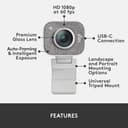
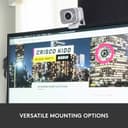
The Logitech StreamCam is a premium webcam designed for creators and professionals seeking crisp, smooth 1080p video at 60fps. Featuring AI-powered autofocus, USB-C connectivity, and vertical video support, it’s optimized for modern content platforms like Twitch, YouTube, and Instagram. Versatile mounting options and advanced Logitech Capture software empower you to produce polished, studio-quality streams and video calls with ease.

| ASIN | B07W4DHS5B |
| Antenna Location | content creation for social media platforms, creating high-quality YouTube videos, live streaming gaming sessions, video conferencing for remote work or education |
| Are Batteries Included? | No |
| Battery Average Life | 72 Hours |
| Best Sellers Rank | 21,448 in Computers & Accessories ( See Top 100 in Computers & Accessories ) 141 in Webcams |
| Box Contents | VFEDFVD |
| Brand | Logitech for Creators |
| Brand Name | Logitech for Creators |
| Camcorder Type | Webcam |
| Colour | White |
| Compatible Devices | Laptop, Personal Computer |
| Compatible Processors | Intel Core i5 |
| Customer Reviews | 4.4 out of 5 stars 12,111 Reviews |
| EU Spare Part Availability Duration | 1 Years |
| Effective Still Resolution | 4 MP |
| Effective Video Resolution | 1080 Pixels |
| Exposure Control Type | Automatic |
| File Format | MP4 |
| Flash Memory Bus Interface Type | USB |
| Flash Memory Installed | 128 GB |
| Flash Memory Speed Class | 2 |
| Flash Memory Type | SDHC, SDXC |
| Flash Memory UHS Speed Class | 2 |
| Flash Memory Video Speed Class | V30 |
| Flash memory type | SDHC , SDXC |
| Focus Type | Auto Focus |
| Form Factor | streaming |
| Global Trade Identification Number | 05099206087682 |
| Has Image Stabilization | Yes |
| Image Aspect Ratio | 16:9 |
| Image Capture Speed | 60 fps |
| Image Stabilization Type | true |
| Item Dimensions D x W x H | 14D x 14W x 9H centimetres |
| Item Type Name | Webcam |
| Item Weight | 7.83 Ounces |
| Lens Type | Prime |
| Manufacturer | Logitech for Creators |
| Maximum Aperture | 2.8 Millimetres |
| Maximum Display Resolution | FHD |
| Maximum Focal Length | 1 Millimeters |
| Maximum aperture | 2.8 Millimetres |
| Maximum focal length | 1 Millimeters |
| Minimum Aperture | 10 Millimetres |
| Minimum Focal Length | 1 Millimeters |
| Model Name | Logitech StreamCam |
| Model Number | Logitechstreamcam |
| Network Connectivity Technology | USB |
| Number of Batteries | 1 A batteries required. |
| Operating System | 4th Gen Intel Core i5 or better, Windows® 10 or later, macOS 10.14 or later |
| Optical Sensor Size | APS-C |
| Optical Zoom | 3 x |
| Photo sensor technology | CMOS |
| Product Features | Low Light |
| Screen Size | 75 |
| Sensor Type | CMOS |
| Shooting Modes | Maximum video resolution: 1080p/60fps in MJPEG Supported resolutions 1920 x 1080, 1280 x 720, 960 x 540, 848 x 480, 640 x 360, 320 x 240 frames per second MJPEG: 60f30 – 30 ./s, 2 PS, 2 4 fps, 2 0fps, 15 fps, 10 fps, 7.5 fps, 5 fps YUY2, NV12:30fps, 24fps, 20fps, 15fps, 10fps, 7.5fps, 5fps |
| Style Name | Streamcam with HD Vertical Video 60FPS |
| Supported Audio Format | AAC, MP3 |
| Supported Image Format | JPEG |
| Unit Count | 1.0 count |
| Upper Temperature Rating | 35 Degrees Celsius |
| Video Capture Format | MP4 |
| Video Capture Resolution | 1080p |
| Video capture resolution | 1080p |
| Viewing Angle | 78 Degrees |
| Water Resistance Level | Not Water Resistant |
| White Balance Settings | Auto |
| Zoom | optical |
O**N
Good quality inexpensive cam for mac
Bought this camera for doing interviews, I have one built into a MacBook but I tend to have that to the side and a larger screen central on my desk. The picture quality on this cameras great, I’d say it’s definitely crisper than the built in one. If you download Logitechs options app you get more control over it, you can control the fps and and the aspect ratio. It functions really well in low light which is a bonus as my office is north facing and doesn’t get too much direct sunlight. It’s plug and play which makes it really easy to use. The sound quality is also decent. All in all a good piece of kit and well worth it for the money.
P**D
A Game-changer for Video Calls
Having resided to the fact that my laptop's built-in camera was akin to peering through a colander, I finally bit the bullet and bought a proper webcam. You know, the thing that you used to plug into your computer during the early-2000s, when the 'digital home' was a cheesy expression for 'Jump on the USB peripheral bandwagon'. I guess back then we had an excuse seeing as cameras were generally 1.2 megapixel, or more frequently, absent altogether. But in these times of remote working, I've learned that making an impression online is and should be no different to physically meeting people in person. That is, aside from wearing shorts below a shirt and blazer. Now this isn't to say that I felt alone in my grainy, dull video world. Many of the people that I've been required to Zoom have used equally bad and unflatteringly positioned laptop-lid cameras to present important information. But this only makes the case creating a strong impression even greater. I settled on the Logitech StreamCam seeing as the ever-popular C920/22 are now long in the tooth, and honestly not that much better than a laptop's camera for the price you're paying. The StreamCam is a little on the pricey side, but absolutely worth every penny. For starters, it can be positioned in a wide array of ways. The C920/22 also have this 'clamp' ability, but it's worth mentioning as not all manufacturers provide this design. A tripod mount is also included. The device itself is a decent size and feels superb quality. It makes you realise why the sub-1cm depth cameras in our laptops are so poor, almost reassuringly so. I like the white colour and grey fabric microphone cover; they look clean and modern. I'm also very pleased that it features a USB-C connector. It'll take quite a few years before this interface becomes a standard, but the more manufacturers that jump on-board the better - it's just very convenient when new computers offer these ports and you can actually use them. But what it really all comes down to is performance, and the StreamCam doesn't disappoint at all. The video quality is miles ahead of the C920/22 and competing products, to a point where YouTube videos drawing comparisons really don't do the StreamCam justice. In perfect lighting it is crystal clear with incredible exposure, lacking any blown highlights or noisy dark areas; in less-than-ideal lighting it continues to outperform built-in cameras, and anything less results in an image that will more than do the trick. It works best with even artificial lighting. The microphone is an interesting one. Having used the StreamCam on a few devices, I will say that it performs better than most, but when it came to the MacBook Pro, callers believed that the latter's microphone was actually better than the StreamCam's during a direct comparison, with it being more tinny. So your mileage may vary. There's an argument to be made that, in good lighting, this device may actually be overkill for video calls. I would disagree on the grounds that the StreamCam is incredibly versatile, and is going to look good in a wide variety of environments, whereas I honestly wouldn't take a gamble with other cameras. Give it a go!
A**B
1080p questionable
I've been researching webcams for a long time now, in desperate need to upgrade my C270 which I've had for more than 10 years. My use is solely for online video meetings. No streaming or YouTube, plain simple conference video streaming. Anyway with most reputable brand webcams being out of stock, choice was rather limited. I ended up buying the streamcam for four reasons: - It was available - Its price had not been inflated due to current shortages - The Logitech Brio, which I was really after, was available but for silly money - The streamcam's design PROS - Design: it's a lovely webcam to have on your desk or monitor. Whilst rather large, it feels solidly constructed and fits well in a modern environment. I really didn't want a black boring webcam like most are designed these days. I wanted something which stood out, this one does. - Field of view: I was a little worried the field of view wouldn't be wide enough, but actually it's perfect for meetings, my head isn't cropped like it was on the C270, I fill in about a 1/3 of the image and have a nice living room background. - A serious upgrade on my C270. But then again, the C270 is so limited by today's standards, any new webcam was going to be great. - Microphone: clear voice, but do make sure you use "Dual Mono" and not "Stereo" for meetings. In stereo, the audio recording is incredibly low. In dual mono, the voice is amplified and you can be heard. CONS - Skype: I bought this camera for Skype meetings, and Skype just cannot give me an image better than 480p. You read that correctly. I appreciate it's not Logitech's fault here, but 480p is simply appalling. I've tried everything, read up online solutions, even submitted a ticket to Microsoft, Skype just won't handle this camera with my setup. It could be my graphics card which is a little old, a Nvidia 660GT, but Skype only uses 3% of its GPU when running, so no excuse. I tried Skype on a three year old laptop, same problem. I then tried Skype online via Edge browser, and I get a clear 720p image there. I get a clear 720p image with Zoom, and 720p with Google meet. So I feel defeated by Skype, and this was an important reason for my purchase. - 1080p quality: seriously questionable. The increase in detail between 720p and 1080p is so minor, it's difficult to notice. I even feel Logitech is simply applying some sharpening to a 720p feed. I've attached a series of pictures to demonstrate this. Compare the 100% crop of the streamcam vs. a 1080p video using my Huawei Mate 20 Pro phone. Sure, the Huawei was 5x more expensive and was released around the same time as this camera, but the Huawei has 4 cameras, using Leica glass, can take 4K videos, has loudspeakers, screen, GPS, WiFi, Bluetooth, NFC, Infrared, battery, wireless charging, GPU, CPU, 128Gb memory... by this very standard, the Logitech is incredibly overpriced. - 1080p meetings: currently, few communication tools provide 1080p meetings. If you have a professional subscription to Zoom, you can get 1080p. Otherwise, almost everyone limits their feeds to 720p. Again, a bit of a let down. Whilst 1080p means future proofing, there's no service right now you'll find to take advantage of the highest resolution. SUMMARY It's an "OK" camera, overpriced for its performance, but given the current market, I probably would recommend it.
C**R
Great for Microsoft Teams, although it has been a little buggy
Picture and sound quality has been great for Microsoft Teams calls during work. From my video preview, the image quality is excellent, and not had any issues being heard in meetings. The camera itself feels really good quality, and has a good mounting solution so it fits on my monitor perfectly. The camera was a bit larger than I was expecting, but that's my own fault! See the attached image as an indication, it's sitting on a 32" monitor. The cable is quite chunky, but has reasonable flex so was able to route it without too much issue. (Update: Teams hasn’t had any issues since end of November, so whatever was causing the problem has been fixed). Teams does not seem to like it sometimes, my voice can be distorted and "sounds like a robot", but a switch to the internal MacBook microphone and then back again fixes it. It's probably an MS Teams issue rather than the camera, but just noting anyway.
E**A
This is the best webcam i could find.
Ive been using this webcam for over a year now, its really easy to set up. It does require a usb C so if your motherboard doesnt support that you can get a usb to usb c adapter. Ive used it with and without an adapter and ive noticed that the video quality doesnt change. I have had some kinks with the webcam glitching out before (artifacting, freezing etc) when ive been using it for too long like for recordings but that might be a obs issue since that doesnt happen on discord, during zoom meetings or anywhere else. The exposure, contrast, focus and zoom can all but changed within the logitech software too which ive found really useful and my desk is next to my window so i needed to turn my exposure way down. This is a great budget webcam I do really love it.
J**N
Would recommend
Good for starting out and short term. Highlights colors really well and easy to set up. I would recommend a ring light to bost potential.
C**S
Disappointing Performance in Some Conditions: Logitech StreamCam
I recently tried the Logitech StreamCam for my YouTube and Twitch live streams, but unfortunately, I wasn't very satisfied with its performance. Promising Specs: On paper, the Logitech StreamCam offers Full 1080p HD at 60fps, which sounded great for high-quality streaming. However, in practice, I found the quality delivered was not up to par with what was promised. The sensor quality seemed lacking, especially in medium light conditions. I noticed that the image quality wasn't as sharp or clear as I expected, which was disappointing. In medium light conditions, the StreamCam struggled to deliver good image quality. There was noticeable graininess and lack of detail, making it less than ideal for indoor streaming setups. And thing is that any low-medium quality camera performs well in bright conditions... On the positive side, the StreamCam is easy to set up and use. The plug-and-play functionality is convenient, and the adjustable mounting options are nice for finding the right angle. Conclusion: Overall, I found the Logitech StreamCam to be disappointing, especially considering its price point. While it's easy to use and has some handy features, the image quality, particularly in medium light conditions, left much to be desired. If you're looking for a webcam for streaming, you may want to consider other options.
S**R
Brilliant! Just be sure to do these two things...
Lighting and configuration. You spend £100+ on a webcam, get all excited as you get it out of the box and then plug it in. Does it look worth it, at first? No... but that's because you're using the standard auto settings and probably have lack-luster lighting. I'm not going to go into detail here because there's countless blog posts and youtube videos out there on the subject (google 'streaming lighting set-up' if you're interested in this), but the high-end feel of this webcam can only be unlocked with the proper set up/prep. Otherwise you might as well make do with a <£20.00, 30fps, off-brand webcam... I have a ring light around my streamcam and a couple fill lights on either side (on low settings) to get rid of any shadows. Personally I prefer low, consistent light and then make up for the darker image using higher exposure and upping the gain a little (but not so much that you get noise/frame drops). Again, look up a video on this for more details as it's all personal preference. This next detail is why I decided to add a review; YOU DO NOT NEED TO DOWNLOAD LOGICAPTURE to save these setting. Running this on your PC while also playing a game and streaming? I just don't have the spare CPU for that, and I'd imagine a lot of people also have this issue. Luckily, I have Logitech headphones and have G-Hub on my PC already, and turns out you can also use G-hub to save configuration settings for the Streamcam in different profiles/modes. It's great, and uses next to no CPU comparatively. So now I don't have to change all my basic settings every time I restart my PC and my CPU usage isn't dangerously high. Only downside is that 'gain' isn't a setting within G-Hub, so you will still need to alter this every time you stream. This has made my life a lot easier so thought it'd worth putting it out there for anyone else with low CPU capacity who still wants to mess about with their settings for the best image!
Trustpilot
Hace 5 días
Hace 2 semanas