We remain fully operational. Our teams are working around the clock to ensure your deliveries continue safely.

Descargar la aplicación


Servicios al cliente
Sobre nosotros
Copyright © 2025 Desertcart Holdings Limited
Descargar la aplicación
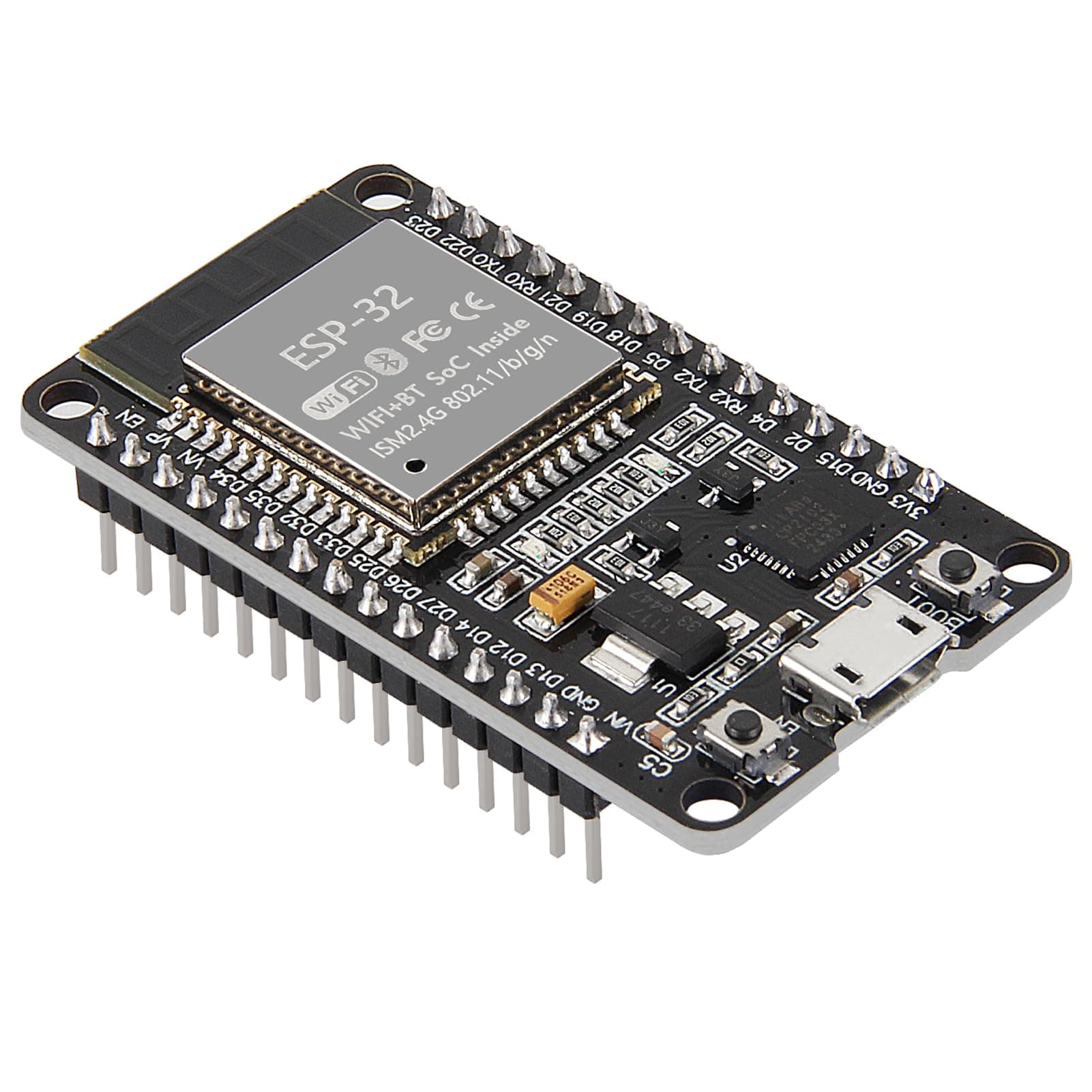
🚀 Power your next-gen smart projects with the ultimate dual-core wireless brain!
The ESP-WROOM-32 ESP32 Development Board is a cutting-edge 2.4GHz dual-mode WiFi and Bluetooth microcontroller featuring a 240MHz dual-core processor, ultra-low power consumption, and integrated antenna with RF amplifiers and filters. Fully compatible with Arduino IDE, it supports AP, STA, and combined modes, making it ideal for scalable, reliable IoT and embedded applications.


| ASIN | B07WCG1PLV |
| Best Sellers Rank | #1 in Single Board Computers (Computers & Accessories) |
| Brand | AITRIP |
| Built-In Media | ESP32 30-pin development board |
| Compatible Devices | Arduino Boards, Computers (PCs, laptops, tablets), Game Consoles, Smartphones, Printers, Keyboards, Speakers |
| Connectivity Technology | UART, USB |
| Customer Reviews | 4.4 4.4 out of 5 stars (1,317) |
| Manufacturer | AiTrip |
| Memory Storage Capacity | 512 KB |
| Mfr Part Number | 15363 |
| Model Name | ESP-WROOM-32 ESP-32S Development Board |
| Model Number | 15363 |
| Operating System | Linux, Windows, macOS |
| Processor Brand | TSMC |
| Processor Count | 2 |
| Processor Speed | 240 MHz |
| RAM Memory Installed | 512 MB |
| RAM Memory Technology | LPDDR3, LPDDR4 |
| Total Usb Ports | 1 |
| UPC | 701715430556 |
| Wireless Compability | 802.11bgn |
W**L
Works well as Homeassistant bluetooth proxy, additional easy driver install will be needed
I was investigating how to enable bluetooth with my Homeassistant installation and found documentation on creating a bluetooth proxy. This item was linked directly on the ESPHome website, which also includes a web-based firmware flasher. Encouraged by how easy this could be, I made the purchase. The competing option was a M5Stack Atom Lite, which looked quite promising as it comes within a case already. After weighing the shipping times, I went with this product. The two are essentially the same price if you factor in a separate case for the ESP-WROOM-32. Sifting through the reviews here, I found that manually installing drivers for the board would be required. If you just plug in the device, Win10 shows a popup but it does not actually install the needed drivers. You will need the easy to google CP210x USB to UART Bridge VCP Drivers, CP210x_Universal_Windows_Driver.zip available from Silicon Labs. After that, the web app flasher was easy to run. It wrote the FW needed and then lets you specify your wifi network. I had read many reviews that were disappointed with horrible wifi range. I am 1 floor below my router and it shows -71dB signal. Not great, but still functional. Maybe that's not bad considering there's no antennae. Other wifi devices in the same room were about -65-70dB. Immediately after connecting to wifi, Homeassistant recognized the device and it was easy to add it as an ESPHome device. It easily found the 3 bluetooth thermometers I wanted to connect (Thermopro TP357). I haven't had any notable dropouts for this first week but will continue to monitor. As the last step I am purchasing a case for the board. There are some generic plastic boxes available on Amazon, but I decided to go with Etsy for a custom 3D printed one.
F**E
One of the best microcontrollers on the market
This is truly my favorite microcontroller packaged into a great development board at an affordable cost. ESP32 works with Bluetooth Classic and BLE for short-distance data streaming. Two of these boards can be connected to each other and share data up to 80 meters away. The Wi-Fi connection is one of the most powerful features. You can connect the board to the internet and communicate with it via a web server. This allows you to make digital applications with physical and analog capabilities. The Wi-Fi communication can also be utilized to make a smart home. You can connect all the ESP32s together and control many different household operations via a Wi-Fi router. The cost is the third big pro. These boards are very affordable for what they can accomplish. This is a must for every circuit lab. I highly recommend this product to anyone who likes building things with microcontrollers.
A**U
Easy Bluetooth Proxy for HA. Works great.
I bought five of these to make as bluetooth proxies for my Home Assistant Green. It was fairly trivial. Go to the ESPHome website. Install the appropriate driver for your system (CP210x Universal Windows Driver X64 for Windows 11 in my case), plug in the device to a USB C (assuming you got the USB C version). Flash it, add your wifi credentials and add it to your Home Assistant. Maybe 5 minutes for my first one. Then you can just distribute them all over the house. Obviously this little computer can do a lot of other things, but I can guarantee this works for this without any difficulty at all. I'll have to figure out some kind of case, and I am adding POE to USBC adapters to each so I can just stick them up by my switches in various rooms.
A**R
Worked Well - Exact series identification harder than it should be.
These were the first ESP32s I ever bought, so I didn't really know what I was looking at or for, but they ended up working very well. As I learned more, I realized there are many different types, and it was hard to know what type this was. As someone else mentioned, I ended up using esptool command line tool. Here is what I got in hopes it makes someone's else's journey a little easier. Based on documentation, best I can tell this is the original ESP32 Series, not the S series. Here is what esptool tells me about mine: Chip type: ESP32-D0WD-V3 (revision v3.1) Features: Wi-Fi, BT, Dual Core + LP Core, 240MHz, Vref calibration in eFuse, Coding Scheme None Crystal frequency: 40MHz That confusion aside, they worked great for what I needed, they came package well, with Styrofoam pads protecting the pins and all 3 were in working order. Deducted 1 star for the confusion around knowing exactly what you are getting.
F**T
Easier than I thought it was going to be
I picked these up to make a cheap COB LED strip smart. It only came with an RF remote which is not sustainable. They arrived without documentation, but that isn't a problem for me. My will is stronger than that. They arrived sealed in antistatic bags and looked new. The onboard USB port is a micro USB. I used it to flash WLED and setup wifi. I powered the board and the LED strip from the same power source because they used the same voltage. Then, I used a GPIO pin to communicate with the light strip. It was easier than I thought it was going to be. A heat sink is not recommend because the ESP chip does not produce much heat. They do not include a display. The quality is fine for my purposes. If you are just getting started with something like this, read the WLED site or ESPHome. Step 1. The website will flash the firmware for you.
T**D
Vwry very good one,good price and good quality,wifi worked just fine i set it up with mucropython so easy but the pins was a little weak so be careful removing it from breadboard
M**K
Really useful microcontroller
A**Z
I had a few old Chinese addresses able rgb strips that just had a very basically controller and crappy power supplies. Install WLED on this board and now all the strips are smart light strips and they perform better than some of the other branded RGB led strips.
S**R
Ok
A**A
Am able to connect sensors and host a server on it!
Trustpilot
Hace 3 semanas
Hace 2 meses