We remain fully operational. Our teams are working around the clock to ensure your deliveries continue safely.

Descargar la aplicación


Servicios al cliente
Sobre nosotros
Copyright © 2025 Desertcart Holdings Limited
Descargar la aplicación
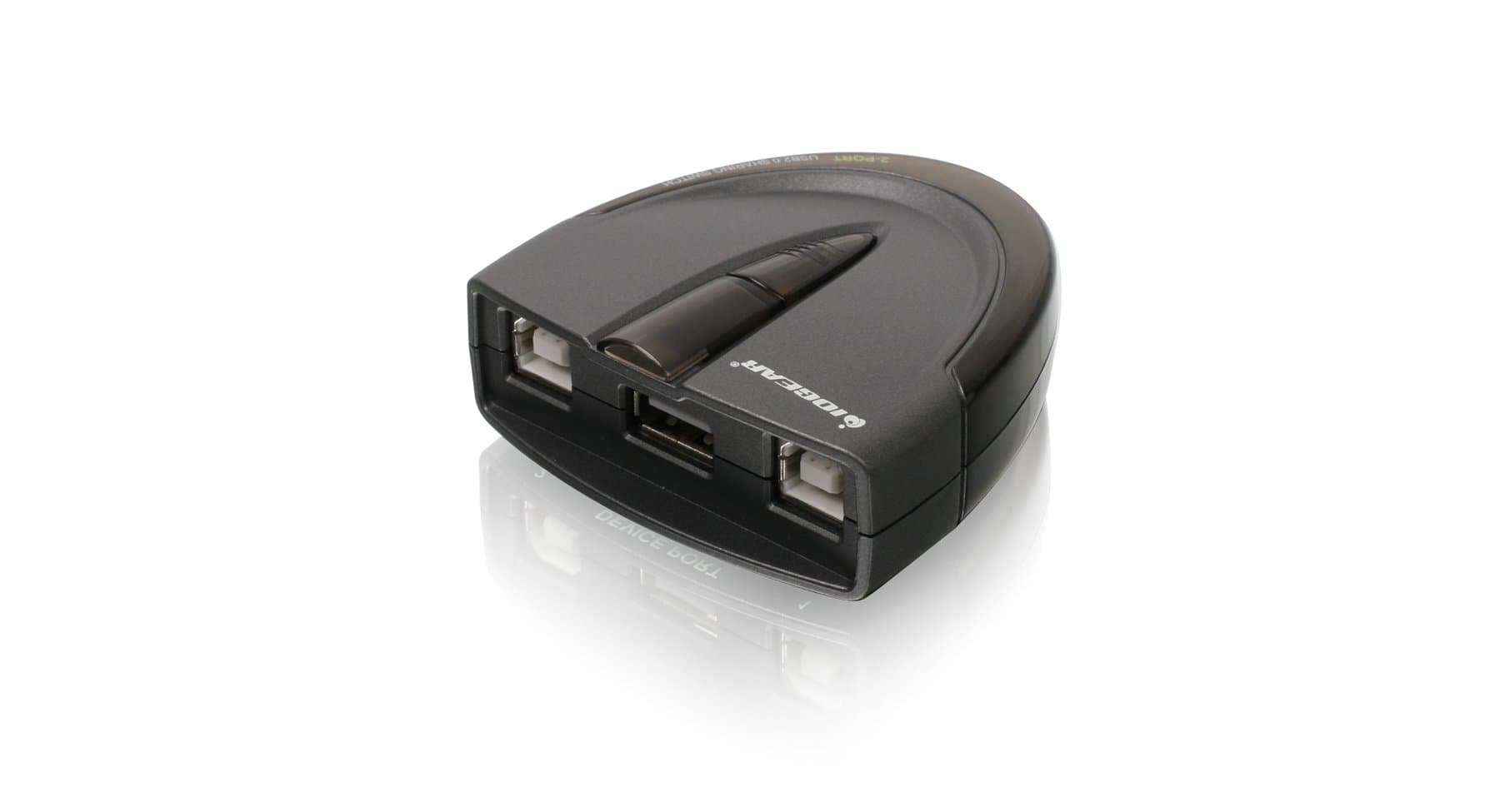
🔌 Share smarter, work faster — the ultimate USB switch for the multitasking pro.
The IOGEAR 2 Port USB 2.0 Switch (GUB231) enables two workstations to share a single USB device such as a printer or scanner. Supporting USB 2.0 speeds up to 480Mbps and backward compatible with USB 1.1, it offers both automatic switching via downloadable software and manual switching via a push button with LED indicators. Its plug-and-play design requires no drivers, includes a switch-lock for data consistency, and operates without external power, making it a reliable, efficient solution for professional environments.


| ASIN | B0036ZE6WE |
| Actuator Type | Push Button |
| Best Sellers Rank | #37 in KVM Switches |
| Brand Name | IOGEAR |
| Circuit Type | 2-way |
| Color | Black |
| Connectivity Protocol | Usb |
| Connector Type | Plug In |
| Contact Material | Copper |
| Contact Type | Normally Closed |
| Control Method | Push Button, Touch |
| Controller Type | Push Button |
| Current Rating | 0.5 Amps |
| Customer Reviews | 4.4 4.4 out of 5 stars (967) |
| Global Trade Identification Number | 00881317504807, 28813175048076 |
| Included Components | IOGEAR GUB231 |
| International Protection Rating | IP00 |
| Item Dimensions | 2.5 x 6 x 7.25 inches |
| Item Type Name | IOGEAR 2-Port USB 2.0 Automatic Printer Switch, GUB231 |
| Item Weight | 0.1 Pounds |
| Lower Temperature Rating | 41 Degrees Fahrenheit |
| Manufacturer | IOGear |
| Model | GUB231 |
| Mounting Type | Surface Mount |
| Number of Items | 1 |
| Number of Positions | 2 |
| Operating Voltage | 5 Volts |
| Operation Mode | ON-ON |
| Specification Met | CE |
| Switch Type | Push Button |
| Terminal | Usb |
| UPC | 072091729061 088021335042 521227118212 012300474009 854587036606 809199903808 021111387514 012303269954 168141590511 898029653617 731215279485 601000665819 102930933141 211131876208 001910660551 872182775157 132018317426 763615876391 881317504807 803982789181 320127544745 971477684942 021113034157 617407453126 172302777079 999992521931 |
| Unit Count | 1.0 Count |
| Upper Temperature Rating | 140 Degrees Fahrenheit |
| Warranty Description | 3 Year |
| Wattage | 2.5 watts |
E**T
Actually works great for a scanner unlike other switches I tried
I tried two other $10 no-name USB switches with good reviews from Amazon that completely failed for this function. I am using it to share the scanner function on a multifunction inkjet printer (Brother MFC-J5520DW) between two computers. I use the the manual switch (only printing auto-senses which makes sense when you think about it) and have not installed any driivers. Works great. Lights indicate which port is active, and the center button toggles between the two ports. There's about a 5 second pause after button press during which the light on the new destination port flashes and the unit beeps softly. I believe that "buffering" function is why this one works and other switches did not. Also I like that it uses standard USB printer cables unlike the others I tried.
M**.
Works Perfectly!
I recently purchased a label printer. It does not work off wifi, so it needs to be hardwired into a computer. The problem was that we have 2 computers that need access to the printer. I initially thought manually switching the cables would be easy, but it ended up being a pain for my wife, who is not tech savvy at all. This device ended up being the perfect solution! When either computer powers up, it automatically switches to that computer. If both computers are on, a simple press of the button switches between the 2 instantly. No drivers were needed, so it could not be easier to hook up and use.
B**R
Label printer compatibility issues
I am using the switch with a Brother QL-500 printer and a mac and a windows computer. The switch works 75% properly. In manual mode I can switch between my two computers and print fine. In auto-mode, it works from the Windows side but not the Mac side. Iogear tech support said that the Brother P-Touch Label printing software has its own print queuing and needs to be in full connection with the printer the whole time. Since the switch closes the connection on the unused computer, it shows as "offline" on the Mac. However, the auto-switching works fine from the Windows end even when using the P-touch software. So, I am wondering how accurate their response was. It seems like perhaps this is more of Mac issue than a Ptouch software issue. Anyway, there might be a compatibility issue with label printers in general given the way that they normally work (that is what the tech support said). But it's not that expensive and a manual switch isn't the end of the world.
H**E
Slick little gadget and it works great!
My wife and I both have desk top computers and need to print but space is limited so we can only have one printer, plus, they are expensive. This printer switch is super easy for non-IT techs like me to install. And it works really quite slick. Push the button and hold for a couple seconds, and boom, you just switched computer input to the printer. If you have two printer cables, this unit comes with a cord from the switch to the printer.
A**R
Did not work well for our purpose
Purchased this switch to share a thermal label printer between two PCs. Had two problems, first the software and driver installed correctly on our Windows 11 PC but would not install correctly on our Windows 10 PC. IOGEAR support worked with us but were unable to resolve that issue. Secondly we eventually found that this switch does not work using the software with a thermal label printer per IOGEAR support. One last tip: When installing the driver and software you must be running the setup.exe program as Administrator. This is not covered in the enclose instructions.
I**E
Worked like a Dream on two old Intel Macs
Like others who have to use older Legacy OS's for scanners printers etc. This worked right out of the box. Very nice packaging and the booklet catalog and manual were unexpected delights as you kinda see that less and less in electronics packaging. IOGEAR reminds me of how Logitech was great with affordable high quality peripherals and based on this product I'm eager to explore their other offerings all based off of this purchase. Note: You will need two printer cables.
R**V
Printer Switch
This printer switch is perfect - easy to hook up and worked exactly as I hoped first time out - switch makes it easy to quickly see which computer is hooked up for printing, and changing over to the other computer only takes a moment and it confirms the change with a click sound - great device for home office or anyone sharing a printer.
R**N
easy, easy, easy
I recently transitioned to working from home and have a separate work laptop. This product allowed me to connect two computers to one printer. I can push the button for which computer I want to print from (as opposed to unplugging, plugging into each computer). No software to download and has worked seamless so far.
T**N
funktioniert super
U**R
Just purchased this item. Was worried it would not be plug and play based on other reviews. I plugged it into my two printers, it beeped. It worked from both my primary and secondary printer immediately. Absolutely no issues and very straight forward. A worthwhile purchase. Of note, a printer cable is packaged/included with this device.
I**N
Works perfectly with an Epson docket printer.
L**A
Nonostante le istruzioni che vengono con l'attrezzo siano un po' intimidatorie (soprattutto quelle per Windows, con indicazioni a installare driver e impostare preferenze varie), io ho semplicemente attaccato la stampante e i due computer, un MacBook Air e un ecografo che gira con una vecchia versione di Windows, e tutto ha funzionato alla perfezione fin dal primo momento. Quando si dice Plug&Play!
E**8
Great piece of kit. Well worth the asking price.
Trustpilot
Hace 2 meses
Hace 2 meses