We remain fully operational. Our teams are working around the clock to ensure your deliveries continue safely.

Descargar la aplicación


Servicios al cliente
Sobre nosotros
Copyright © 2025 Desertcart Holdings Limited
Descargar la aplicación


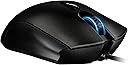


🎯 Unleash Your Inner Gamer with Precision and Comfort!
The Razer Imperator Ergonomic PC Gaming Mouse features a state-of-the-art 4G Dual Sensor System, adjustable side buttons for personalized control, and an ergonomic design that caters specifically to right-handed gamers, ensuring comfort during long gaming sessions.
M**E
Razer Does it Again!
First of all, this mouse is a beauty. The bulk of it is a sort of mottled matte grey, with the Razer logo appearing black when the internal light is inactive. When you do turn the light on, it pulses, which I was not expecting. I haven't found a way to switch it to a steady glow, but it doesn't really bother me in any case. The sides of the mouse have a velvety soft rubber grip, the thumb side in particular being very comfortable - especially when coupled with the movable side buttons. I typically have them on the closest setting because my fingers are not very long. The buttons all seem to work well, and provide a satisfactory click that's not loud enough to be obnoxious.The driver software is excellent, though I was somehow expecting a bit more, and I wish it had been easier to find. All of your settings are stored on the mouse itself, though, which was a pleasant surprise. The ability to separately adjust the tracking vertically and horizontally is especially nice.Cons: Slightly larger than I was expecting, especially in width. The underside of the thumb rest protrudes slightly, and can interfere when I try to glide the mouse towards myself, but I can easily compensate for this; it will just take some getting used to. I do have pretty small hands, so I don't imagine this will be an issue for most.Overall: Solid high quality mouse that fits my needs.I would highly recommend this to a friend!
B**2
Get's the Job Done
I just got a new Macbook Pro Retina and am really happy with the trackpad for most things but still wanted a mouse for the limited gaming that I do. I play World of Warcraft and was happy with the Razer mouse I had always used on my iMac and wanted to try another Razer to use on my MBP. I looked at all of the mice in the Razer line and decided on this one. Didn't want to deal with a wireless mouse and this seemed like something that would suit my needs and be comfortable to use. So far I am very happy with it. Works fine with Mountain Lion--no problems with the OS immediately recognizing the mouse. I also downloaded the drivers from the Razer site and that too seemed to work fine as far as being able to customize the buttons and other functions on the Imperator. Really no complaints--I can't really rate it as far as how well it works as and expert gaming mouse since I just don't play that many games, but as a secondary mouse with great customization options, I can certainly recommend this mouse.
G**Y
Amazing Mouse!
I purchased this mouse when I returned my Mamba 4G. It has the same sensor and the same software so I figured I would try it out. I was a bit unsure of how the shape would fit my hand, but it's fantastic! I can use a palm or claw grip comfortably and the tracking is superb. The lift issue that the previous version had seems to be gone, or minimized enough that I don't notice it. The software is easy to program and loads quickly. I hadn't used a Razer product in a few years since my Deathadder 1800DPI and it was nice to see how far they've come with their software. The adjustable side buttons were actually a nice touch, and allowed my to find the perfect fit for my hand (and I thought it was just a gimmick!). LOD is low, but can be adjustable (I always keep mine at 1), and the mouse tracks well whether you use 800 DPI or 6400DPI. I usually have mine set between 800-2000 and have no issues. I definitely recommend this mouse to anyone looking for a comfy shape and superior tracking. I'm glad I took a chance on it!
T**T
Scroll wheel broke after just 4 months
If I'm buying a gaming mouse, the number 1 thing I need above all else is accurate input. The scroll wheel sometimes registers an up scroll when I'm trying to scroll downwards, which means this mouse is basically useless for gaming now (in theory I should learn to switch weapons with the number buttons, but I'd rather not have my mouse breaking be the reason for it).It's comfortable, cool-looking, and nice, but if it doesn't work as a mouse it doesn't rate above a 1 in my book.
M**S
I wanted to love this mouse...
I was using the Razer Deathadder 3.5G for sometime now. I love that mouse and can't say enough good things about it. It is very powerful and very responsive. The only little issue I had with that mouse is that it really is not a truly ergonomic mouse. Because of this, I decided that it may be worth a try to upgrade to the Razer Imperator. I got the Imperator and it had many nice things about it, but I did experience some of what many other negative reviews mentioned when I tried to use this.The mouse itself is smaller than the Deathadder, but higher. I found still comfortable to use. I liked the sliding front/back buttons and I also liked the fact that the mouse wheel was better to click down. The mouse buttons are also clickier than the Deathadder. The surface of the mouse is texturized, and it has rubberized sides. It also has two DPI buttons on the top to raise or lower the DPI settings. It saves it settings on the on-board memory, which is nice because it keeps your settings on the mouse so if you plug it into a different computer, you don't have to reconfigure it.Out of the box, the mouse has some setting enabled that adjusts the calibration continuously dependent on the surface the mouse is on. This is probably very useful if you are using a Razer mousepad, but it caused problems for me. On some surfaces, the mouse would be very fast. Some it would be very slow. Some surfaces would cause the moue to jump around, and others would not work at all. I found the setting to turn off this surface calibration and that fixed the issues that I had, but it would have been nice not to include that feature turned on by default.The driver software for this device is a definite upgrade to the driver software for the Deathadder. It is easy to see the settings and of course contains more options. All of the buttons and settings can be customized.In the end, I experienced three problems that cause me to return this mouse. One was that the mouse would go up and to the left upon lift-off. This is very bad for gaming, because you don't want the mouse to move on lift-off at all as it causes accuracy problems. The second issue was that upon some reboots, the mouse would fail to register at all. You had to unplug and plug back in the mouse to get the OS to recognize it. The last issue that caused me to return the mouse was that I experienced random jumping. It was small at first, but then the mouse cursor would skip more and more until I simply could not use the mouse. These issues have been reported by other users, but in the end I could not take them after becoming used to the Deathadder which worked perfectly. It is a shame, because this was one nice mouse. I hope they come up with something that addresses these problems soon.
N**L
Excelente mouse para gaming
Es un modelo ligeramente viejo, y el segundo que compro después de que mi mouse anterior comenzó a fallar después de 4 años de uso intenso y no dude ni un segundo en adquirir otro.Altamente recomendado si eres diestro y quieres un mouse altamente ergonómico.
T**G
Just as i expected
The mouse came in a nice box. Plugged it in and works fantastic. Currently waiting on a razer mouse pad as well since people say it works even better with one of those mousepads. but over all great gaming/ everyday use mouse. the extra buttons come in handy and it fits my hand perfectly
A**ー
高かったし 質も悪いわ
三ヶ月も立ってないのに壊れたww クリック弱すぎsjskwくぁあ
G**O
rapido
servicio super confiable rapido y sin ningun problema recomendadisiomo comprado en amazon mexico enviado por amazon mexico y en DHL
C**.
great!
My old one lasted 5 years of intense comp gaming. Bought a new one instantly. Kn the fly dpi changes are very handy when going form auto to sniper.
Trustpilot
Hace 1 mes
Hace 1 día