We remain fully operational. Our teams are working around the clock to ensure your deliveries continue safely.

Descargar la aplicación


Servicios al cliente
Sobre nosotros
Copyright © 2025 Desertcart Holdings Limited
Descargar la aplicación
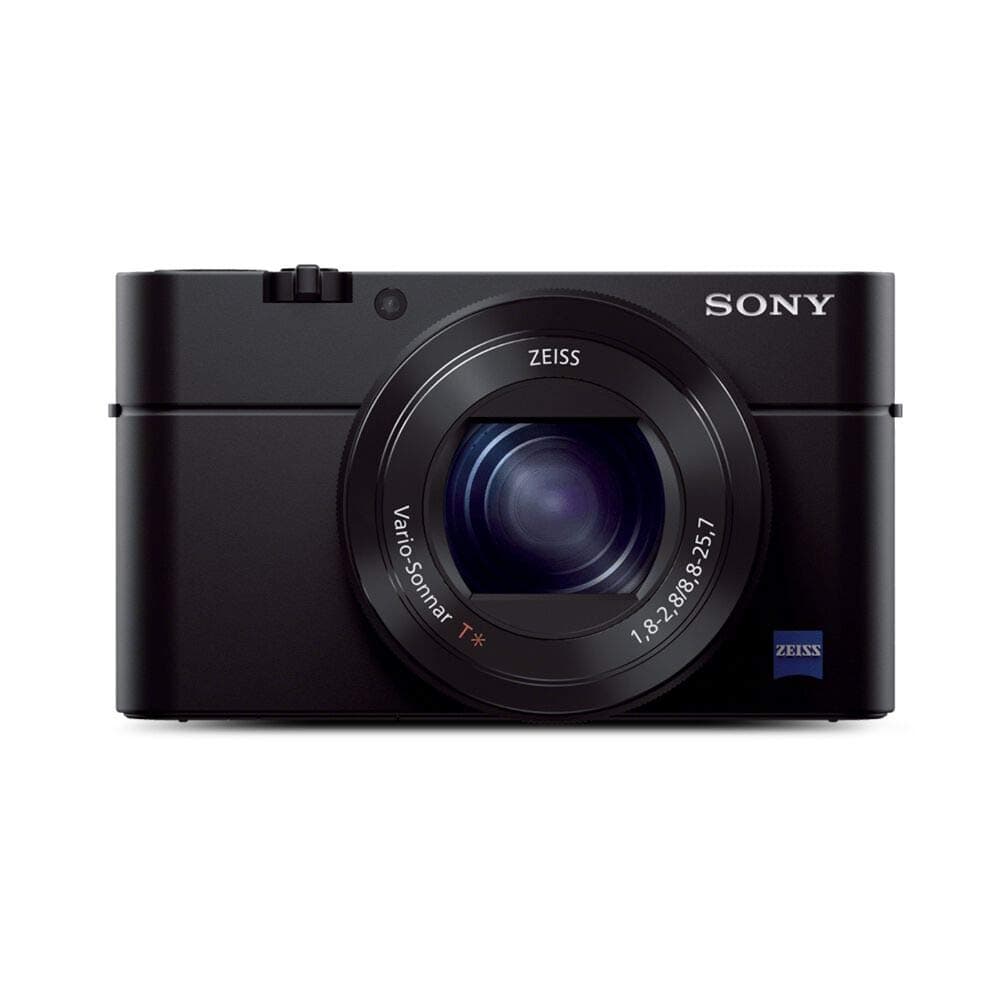

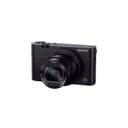
📷 Elevate your everyday moments with pro-level compact power!
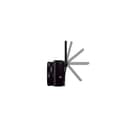
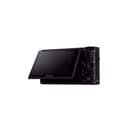
The Sony RX100 III is a premium compact digital camera featuring a large 1-inch 20.1MP Exmor R sensor paired with a bright 24-70mm F1.8-2.8 ZEISS zoom lens. It offers advanced low-light performance, a pop-up electronic viewfinder, and a 180° tiltable 3-inch LCD for selfies and creative framing. With Full HD 1080p video recording at 50Mbps, ultra-fast BIONZ X processing, built-in Wi-Fi and NFC for easy sharing, and a built-in ND filter, this camera delivers professional-grade image quality and versatility in a pocket-sized form factor.


| ASIN | B00K7O2DJU |
| Age Range Description | Adult |
| Aperture modes | F1.8 |
| Are Batteries Included | Yes |
| Aspect Ratio | Unknown |
| Auto Focus Technology | Center, Continuous, Contrast Detection, Face Detection, Live View, Multi-area, Selective single-point, Single, Tracking |
| Autofocus | Yes |
| Autofocus Points | 25 |
| Best Sellers Rank | #41,081 in Electronics ( See Top 100 in Electronics ) #356 in Digital Point & Shoot Cameras |
| Bit Depth | 14 Bit |
| Brand | Sony |
| Built-In Media | AC-UB10 AC Adapter, Micro USB Cable, NP-BX1/M8 Rechargeable Lithium-Ion Battery Pack (3.6V, 1240mAh), Sony Cyber-shot DSC-RX100 III Digital Camera, Strap Adapter, Warranty, Wrist Strap |
| Camera Flash | Built-In |
| Camera Lens | ZEISS Vario-Sonnar T* 24-70mm F1.8-2.8 lens |
| Color | Black |
| Compatible Devices | Smartphones, Computers, External Displays, External Recorders |
| Compatible Mountings | Sony Alpha |
| Connectivity Technology | HDMI, NFC, USB |
| Continuous Shooting | 10 |
| Customer Reviews | 4.3 out of 5 stars 659 Reviews |
| Digital Scene Transition | False |
| Digital Zoom | 5.8 |
| Digital-Still | Yes |
| Display Fixture Type | Tilting |
| Display Maximum Resolution | 46,656 pixels |
| Display Resolution Maximum | 1228800 |
| Display Type | LCD |
| Effective Still Resolution | 20.1 MP |
| Expanded ISO Minimum | 80 |
| Exposure Control | Aperture Priority, Automatic, Manual, Shutter Priority |
| File Format | JPEG (Exif v2.3, DCF v2.0), Raw (Sony ARW v2.3) |
| Flash Memory Installed Size | 64 GB |
| Flash Memory Supported Size Maximum | 1 GB |
| Flash Memory Type | SD/ SDHC/SDXC, Memory Stick Pro Duo/ Pro-HG Duo |
| Flash Modes | Automatic, Fill Flash |
| Focal Length Description | 8.8 to 25.7mm (35mm Equivalent Focal Length: 24 to 70mm) |
| Focus Features | Contrast detection |
| Focus Mode | Manual Focus (MF) |
| Focus Type | Manual Focus |
| Form Factor | Compact |
| Generation | 3 |
| Global Trade Identification Number | 00027242883222 |
| HDMI Type | Type D Micro HDMI |
| Hardware Interface | AV Port |
| Has Color Screen | Yes |
| Image Capture Type | Stills & Video |
| Image Stabilization | Optical |
| Image stabilization | Optical |
| Item Weight | 10.24 ounces |
| JPEG Quality Level | Basic, Fine, Normal |
| Lens Construction | 10 Elements in 9 Groups |
| Lens Type | zoom |
| Manufacturer | Sony |
| Manufacturer Part Number | DSCRX100M3/B |
| Maximum Aperture | 2.8 Millimeters |
| Maximum Focal Length | 70 Millimeters |
| Maximum Image Size | 5184 Pixels |
| Maximum Shutter Speed | 1/2000 Seconds |
| Memory Slots Available | 1 |
| Memory Storage Capacity | 64 GB |
| Metering Methods | Multi, Center-weighted, Spot |
| Minimum Focal Length | 24 Millimeters |
| Minimum Shutter Speed | 30 seconds |
| Model Name | Sony DSCRX100 III |
| Model Number | DSCRX100M3/B |
| Model Series | RX100 |
| Movie Mode | Yes |
| Night vision | No |
| Optical Zoom | 2.9 x |
| Photo Filter Size | 49 Millimeters |
| Photo Sensor Resolution | 20.1 MP |
| Photo Sensor Size | 1-inch |
| Photo Sensor Technology | BSI CMOS |
| Real Angle Of View | 24 Degrees |
| Recording Capacity | 30 Minutes |
| Remote Included | No |
| Screen Size | 3 Inches |
| Self Timer | 10 Seconds, 2 Seconds |
| Sensor Type | BSI CMOS |
| Series Number | 3 |
| Shooting Modes | Portrait, sports action, macro, landscape, sunset, night scene, handheld twilight, night portrait, antimotion blur, pet mode, gourmet and more |
| Skill Level | Professional |
| Special Feature | Fireworks, Food, Handheld Night, Landscape, Night Landscape, Night Portrait, Portrait, Sports, Sunset |
| Specific Uses For Product | Photography |
| Supported File Format | JPEG (Exif v2.3, DCF v2.0), Raw (Sony ARW v2.3) |
| Supported Image Format | AVCHD |
| Total Still Resolution | 20.9 MP |
| Total USB 2.0 Ports | 1 |
| Total USB 3.0 Ports | 1 |
| Total USB Ports | 1 |
| Total Video Out Ports | 1 |
| Touch Screen Type | Capacitive |
| UPC | 027242883222 |
| Unit Count | 1.0 Count |
| Video Capture Format | MPEG-4, AVCHD, XAVC S |
| Video Output | Micro-HDMI |
| Video Resolution | FHD 1080p |
| Viewfinder | Electronic |
| Viewfinder Magnification | 0.59x |
| Warranty Description | 1 year coverage for labor, 1 year coverage for parts |
| White Balance Settings | Auto, Cloudy, Color Temperature, Custom, Daylight, Flash torch, Fluorescent, Incandescent, Shade |
| Wireless Technology | yes |
| Write Speed | ≥ 3.5 MB/s |
| Zoom | optical |
R**D
An improved RX100M
(Update Dec 6th 2014) I highly recommend this book for the RX100M3 by Gary Friedman. I bought it and love it ([...]) I bought this camera because of its faster lens (f/1.8 to f2.8), which means, to me, more light entering onto the cameras sensor which, in turn, means to me slightly better images than previous models. Which translate to a shallower depth of field available. And that's exactly what I like and want in this model, and precisely why I bought it, even though I also have the previous M2 model. One thing I want to note here before I go on. The Aperture seems to move quite fast from 1.8 to 2.8 thru the smaller zoom range. In that, a case could be made that this lens is more of a steady 2.8 thru out the zoom range. So then what exactly did I get with this upgrade from my M2 to my new M3? Well, you've got the newer Bionz X processer. The new 180 degree LCD (for Selfies if you are so inclined). The pop-up EVF (which is an innovation in and of itself, and a help with image stabilization when pressed against my face). Zebra pattern and focus peaking which is available on my RX10 and now the M3. I feel the 24mm-70mm lens (though not the same reach as my previous M2 model - 28-100mm) is a good walk-around lens. And since I have been using this same zoom range for a long time on my DSLRs, I feel very comfortable with this zoom range in a very capable and now compact camera. When I use this for portraits at the long end of 70mm I expect to shoot mostly 1/2 to 3/4 body shots to full body shots. As opposed to the previous models zoom range of 28-100mm where I used it up to head and shoulder shots at the long end. This camera has the same Bionz X processor that Sony has in their A7 line of cameras (one of which, the A7R, that I have). That was another plus for me in buying this camera. As far as image stabilization, it is important to compact cameras today and thus, to me. And I find that holding the camera up to my face while using the EVF gives me the 'feel' of a more stabilized shot. And my pictures look better to me. This is important to me because now that I am in my 60's, try as I might, holding the M2 or my smartphone without an EVF - is not as steady as I'd like it to be or as I remember it was when I was younger. And I need image stabilization in lower light. And this EVF on my new compact M3 seems to provide that for me. The only 'unofficial' (perhaps non-technical) test I could do with this camera was to zoom it out to 70mm, and hold the shutter half-way to see how much 'lock' I had on the image. Then I tried it with my M2. My observation was that I did see an improved difference with the M3. There is a slight difference in camera size from the previous model (which I also have). The thickness of this model is about 2mm more. And the weight is about 8 to 9 grams more. What this also means in terms of fitting a leather case to it is that my previous models Sony leather case will not fit this camera. You're going to need the Sony LCJRXF/B Premium Jacket Case (Black). This new case will fit all previous models as well as this model. Just as the Sony LCJRXC/B Premium Jacket Case (Black) would only fit the M2 as well as the M1. Some people think that the case for the M2 will also fit the M3. It will not. I have tried it. I also recommend the custom camera grip by Richard Franiec (camera accessories by Richard Franiec). This goes for about 35$ and is worth its weight in gold - to me. It is far better than the Sony grip that I used on the M2 for 15$. Its made of metal (anodized aluminium) is sleek looking, feels good quality and solid, and gives you a good grip on the camera while still maintaining the cameras pocketability (because it doesn't protrude past the lens assembly). Of course with the camera grip added, the M3 will not fit in the Sony Leather camera case. So it is either one or the other. So to get around this I ordered another OP/TECH USA Soft Pouch Digital D-Micro (Black) for my M3 which I also have for the M2. And it fits great. If my review was any help with your decision to purchase, and I hope I was of some help, kindly choose 'Yes' in the comments section below. Thank You. Richard
O**6
This is a great camera that takes fast pictures
This camera fits the bill for my needs and works perfectly. There are a few things about this camera that swayed me vs. the competition. I looked at many cameras before deciding which one to buy. The canon cameras which I was going to buy have a few problems that steer me from them, for example the Canon G7X does not accept aftermarket batteries and can only charge via a dock charger. I am not spending fifty dollars for a camera battery when the original runs out, I will use my old AA battery camera if I have to in that case. Many people report noise in videos from the mechanism on the canon cameras. This camera charges by USB and of course you have the option to use the dock charger of your choice if you wish, if you don't have a dock charger they are available cheaply here on amazon. More options for charging is always better. The USB can charge with any android phone charger and mini USB cable. I tried several and they all work. Nikon is nice and everything but apparently those require a specific adapter to use so you will have to make room for that and the cable on your charging strips. I can verify that this camera takes aftermarket batteries just fine, and they are very cheap, in the tune of around five to ten dollars each. Since a single battery will likely last for at least a year or more at minimum that is a great value. A camera is useless with a bad battery or without a battery or one that does not function properly, so its pointless to buy something that won't accept aftermarket batteries especially with an item this expensive I expect the camera to last me many years. I don't mind if the battery doesn't show properly on the meter, I haven't gotten that far with the camera yet, its easy enough to change it out with a spare in a very short amount of time and keep right on shooting. This is a fast camera, that means it takes a snapshot very quickly, therefore it would be ideal for real world use and families with kids, there is very little lag time between when you hit the button and when the picture is taken. I don't think you can find a faster camera of this size. If you need to catch something quickly, this is your camera. Its easy to use, I had no problem adjusting to it. The flash seems to be made out of metal which is good, the hinges are metal which is good. You do have to flip the flash up with a switch and push it back down manually. I recommend using a light touch on this, as it does feel delicate but I don't think I will have a problem with that, again the hinges are made of metal so it should last. The flash can be angled if you hold it in the position you want to keep it in while shooting the picture, not that difficult to do if you need to do it. Some people might need this feature so I am mentioning it here. The Sony RX100 MK2 has a tilting screen but cannot tilt into the selfie position making it pretty pointless in my opinion (I spent a long time trying to figure this one out so I figured I would write it here). If you want a camera that tilts into the selfie position you must buy this one, the MK3 or one of the newer versions. The original Sony RX100 doesn't have a tilting screen at all. The screen on the MK3 does tilt down about halfway as well. The screen feels delicate but the hinges are made of metal so again, they should be fine. Just use a light touch on it and you should be fine. I haven't tried the viewfinder much yet but it does pop up when you hit the button or switch, when you put the viewfinder down the camera turns off, might be minor thing for some people. I guess my only complaint is the grip accessory, its just too expensive. Its a NEEDED accessory and at $14 its literately a 2 inch piece of rubber with some adhesive on the back. Its easily the most expensive accessory I ever bought ever for anything. But I guess if someone is buying a camera that costs $700+ then an extra $14 isn't that big of a deal.... Update: I have to update this, this camera takes video with absolutely stunning quality, that is the only way to describe it, when playing the video back, it looks like you are actually there. I have never seen a camera produce such stunning video and I highly doubt there are many cameras on the market that can produce a video like this camera can. This camera captured my summer memories perfectly. The camera is sturdy and the battery lasts a long time, it got me through an entire day at a theme park where I took many pictures and made many videos and still had a little bit of battery left at the end of the day. You can probably take 200 photos easy and film a bunch of short videos and you will still have life left. I filmed a 10 min video and it held up great. I also filmed a couple local bands and even at night with bright lights the video was absolutely stunning. It works great in low light and indoors.
C**O
worst camera I've ever owned
I hate this camera. I hate this camera. I hate this camera. When I'm on my deathbed, surrounded by my family, my children will say, "Please! Give us your final words!" They will be: "At least I, cough cough, don't have to deal with that stupid Sony RX100M anymore!" From about 2000 to about 2006 I used to buy a new digital camera every year. It was interesting to see them improve slightly year to year, but the ultimate feature eluded me: a camera that would take crisp pictures in low light without a flash. Every year the cameras were getting closer and closer to being able to do this, although they frequently failed. Then I lost interest. Years later, I finally splurged on this, figuring that, heck, 9 years or so have elapsed: they're sure to have gotten that down by now. Plus, this was no two hundred dollar job. This was top of the line, in its class. But guess what? Even top of the line compact cameras these days STILL cannot take pictures in low light! Imagine how disappointed when this one frequently failed in the afternoon, giving me blurry shot after blurry shot. (I'd upload them for your edification, but this apparently can't be done on Amazon.) More irritatingly for me, there's no way to delete all the pictures! Instead the best you can do is go in and delete everything on a certain date. But if you've been using the camera for say, a month, you're going to have to go in 30 separate times to clear everything out of your camera! As if that's not enough of a bother, everything's write protected, so there is no way to delete the pictures from your camera when it's connected to your computer. No, you have to disconnect the camera, open each day individually, and delete them that way. And don't think you save time by quickly deleting them from within Windows. No, Sony classifies all your images as "read only" so you can't delete them from within the computer. And don't think you can simply "select all" and uncheck "read only." Nope. Sony has seen fit to gray that option out. The insanity also applies to transferring your pictures to a computer: there's no way to simply "transfer all." Instead you have to choose a certain date and transfer them individually, each by date. Sony: I want my camera to behave like a USB stick. Everybody does. What's so hard about that? Canon cameras can do it. Kindles can do it. Why can't your product? What a hassle. Heed my warning: a super-expensive camera, but I only use it when I really have to, since it's such a hassle to get my pictures off. Also note: it does not come with a memory stick. Another annoyance: when you plug the camera into the wall (via the USB cord), it won't charge! The power has to be off! Why?!
M**N
With Some Caveats, This is a Great Point and Shoot Camera for Concerts
I went to a concert a few months back and had good seats, but only had an entry level smartphone to take pictures. As a result, the pictures were quite disappointing. I didn't want to be caught in a similar situation so after that experience, I decided to do some homework and look for a better camera. After reading many online camera reviews (articles and customer), I decided to go with the Sony RX100 III. The Sony RX 100 line is considered one of the highest quality cameras in a point and shoot form factor. As of today, there are six different RX 100 models, each with different capabilities and features. I chose the RX100 III over the other models for a few reasons. My main use of the camera is in a concert setting and the RX100 III, I believe, has the fastest lens of all the models and has the widest aperture which should be great for low light (though all models are considered great in low light also). Plus, though I don't plan on using often, having a flip-up screen for selfies can come in handy. The RX100 III has an EVF viewfinder whereas, the RX100 I and II models do not have a viewfinder. I'm really glad I decided to get a camera with the viewfinder as that comes in very handy using this instead of the LCD screen during a concert as to not disturb other audience members. I won't go into too much of the technical specs as but instead highlight features I like and dislike of the camera. Likes: - small size. I carry the camera in a case that I wear on my belt. - EVF viewfinder, great for concerts to turn off LCD display to not disturb others in audience - fast lens, 1 inch sensor, great for low-light situations - ability to shoot it JPG, RAW or RAW and JPG - three memory recall slots. This is great as I have saved all the settings I wish for concert picture taking in stored in one slot. All I need to do is recall the saved settings instead of having to fiddle with settings each time. Dislikes: - limited focal length of 24-70 mm optical zoom. Location, location, location. A good seat helps. - a lot of settings which can be a bit overwhelming - easy to accidentally bump the thumb wheel and change settings without knowing ( though the thumb wheel can be locked locked down) - buttons are not lit. So in the dark, I have to rely only by touch as to where the buttons are There are a lot of various setting options with this camera. Some are not that intuitive. I highly recommend the book "Photographer's Guide to the Sony DSC-RX100 III" as that explains a lot of settings which aren't readily apparent, like having the LCD display to automatically go blank when using the EVF viewfinder. Along with the book, I bought a couple of accessories. I got the Sony LCD screen protector along with an external grip (Haoge RX100 Skidproof Camera Bracket Holder Hand Grip for Sony Cyber-Shot) as some say the camera is slippery. I also got an extra battery and external charger. However, I found that I use the USB cable to charge more often as with the external grip, just charging the battery with the USB cable is more convenient to me that removing the grip each time. I have the camera set to save pictures in both JPG and RAW format. This saves two pictures for each shot. RAW saves all the information. If a picture is over or under exposed, with proper software, photos captured in RAW format can be adjusted after the shot. The camera also records high quality video and is known as a good camera for vlogging, though I haven't tried that at all. Overall, I really like the camera. It does take some getting used to and trial and error. I'm still learning some of the features. I included some pictures of my camera (with a external grip and screen protector). Also, a couple of concert photos (untouched, JPG format to give an idea of image quality) along with an outdoor low-light photo. If you have an up close seat, this camera can take some really terrific concert pictures, especially for a point and shoot. However, the 24-70 mm focal length does come into play. For pictures where I've been a few rows back, to simulate a zoom, I shoot using the highest megapixel, then crop the RAW photo. This is better than nothing, but there then is some noticeable noise in the picture. Acceptable but not as good as non-cropped. The best compliment I received thus far is a friend said something like "What's gotten into you? Those are the best pictures I've ever seen from you!". Good to know, better than the fail with the low end smartphone. I give the RX100 III five stars.
W**Z
A Very Nice Upgrade from Sony - Update 6/22/14
I bought the RX100 in its original configuration a few years ago when it first came out. I liked the camera from the outset and have taken more than a few pictures with it that I am really happy with. It is my choice for backing up my Nikon D4 or D800 when I can't deal with taking along two large DSLRs. I took a look at DXO mark and they rate the sensor the same as the sensor for my old D200 which may sound like damning with faint praise but the D200 was a workhorse and shot a lot of great stuff. I will say at the outset that I like the M3 a lot. I am happy I upgraded from the original but I think that if you have the M2 you may not need this update. The faster lens is a noticeable improvement. Indoor shots without flash at reasonable ISO's are much more feasible now. Updated 6/24/14 - I thought I would add a comment about a statement from the dpreview piece on the M3. Dpreview praises the cameras abilities and then go on to say that it is not "fun" to shoot with. I guess an old SX-70 may have been more fun with all the whirring and spitting of prints but beyond that I am at a loss. I have had great creative session with both the M1 and M3. In fact, one of my favorite things about the camera is that is so easy and transparent to handle. Pros: Articulating LCD - I think this is a huge improvement over the original RX100. The ability to easily shoot high or low angle pictures is a great advantage. I have always liked using compact cameras from the ant's eye view and this makes it a lot easier to do. Like most of the construction of the RX100m3, the articulating LCD feels well built but clearly this is not a ruggedized camera. Care must be taken with the flash, EVF and LCD or damage could result. Things don't feel cheap they just don't feel "battle ready" Picture Quality - I really like the output of the RX100M3. The pictures are sharp, vivid and relatively free of noise at moderate ISO settings. One of the big improvements in the area of low light is the enhanced widest aperture of the lens. One can pixel peep any lens into a corner (no pun intended) but Sony has done a very respectable job here. I will discuss this more later but by going with a fast, modest zoom with a nice wide end, Sony has created a more enthusiast oriented camera. As Robert Capa said, "If your pictures aren't good enough, you're not close enough." Zoom - As mentioned above the zoom range is modest. I just really like the ability to use 24mm equivalent at the wide end. The zoom speed is quite good. Again, I think it compares favorably to other high-end compacts that I have used. EVF - When I opened the EVF for the first time and look through it was terrible. Then I adjusted the diopter and it was beautiful. Seriously beautiful. This is my first EVF and I like it very much. I can see using it a great deal with this camera. Shutter - The shutters drops very quickly without any undue lag. I really like the burst mode on this camera with the shutter sounds turned off. It is a great way to get very natural candids of friends and family. Neutrals: Weight - The RX100M3 is noticeably heavier than the original. Noticeably but not significantly heavier. Yes, when you pick it up you are just a touch more cognizant of gravities pull but nowhere near the point where you would leave on the table because it's too heavy to deal with. When carrying and using the camera the extra weight never crossed my mind. Size - Certainly related to weight but also a function of adding goodies like the EVF and articulating LCD. I wear a lot of clothes with big pockets and I have never been one to just stuff a compact camera in a pants pocket on an ongoing basis. I have a very small Lowepro belt case for my original RX100 and the new one fits perfectly even with an extra battery tucked inside. The size and weight differences are certainly discreet. Added 6/22/14 The current implementation of the Fn button is very nice. I really didn't use this button in the past but now it brings up a very clear, easy to follow UI for the some of the most commonly accessed functions. I really like this feature. Added 6/22/14 I am growing very fond of the artificial horizon in the EVF. Despite 30+ years of photography I am still amazed how often in Lightroom I have to straighten the horizon. Maybe my head is just tilted. Whatever the cause, the artificial horizon really helps and as a result I am not losing any of the frame having to rotate in post. Cons: Menus - While the menu system on the M3 is improved and certainly better than the old NEX software it could still use improvement. My biggest complaint has to do with navigating between menu categories and sub-menus. To me the UI manipulation is not intuitive but is certainly workable. Functions - Marketing people are wonderful and I know scene modes and scene recognition must be important to some segment of customers but I am not in that demographic. I suppose there is little harm in all the bells and whistles but it is very funny that Sony includes both an Automatic and Superior Automatic mode. When does one say, "I don't want the superior results, let me kick this baby down to stinky normal Automatic mode." Items on which the jury is still out. Wi-fi - I know there are people who can't wait for the favorite camera to come out with built in wi-fi so it can't be dismissed. I would only say that thus far my experience with the RX100M3's wi-fi functions have been cursory and I will amend this review when I am able to be more definitive about my experience. Would I recommend this camera? For a lot of people yes I would. If you are an enthusiast this is a credible compact contender. If you are an ultralight traveller who likes good photos this is also a good choice. If you are thinking of some for an adventure vacation with water, snow, sand or surf, probably better to look at a ruggedized compact. Up until the RX100 all my compacts had been Canon's and they were great. I am happy with the move to Sony and believe I will be happy with the M3 for several years.
A**R
Fantastic photos, but iPhone 6 takes sharper videos
Amazing camera. I'm so glad I bought this. Don't waste your time with mediocre pocket cameras. If you want to take excellent quality pictures with fully automated settings, then get this. It also has a ton of customizable adjustments. And you can install apps on the CAMERA so you can do cool stuff like wave your hand in front of the viewfinder to take a picture (instead of pressing the shutter button). My biggest (minor) gripe is that the screen is way too sensitive to getting scratched. You have to get a screen protector for this. In our modern era of smart phones, there are lots of screens that are very scratch proof. Sony should do a better job with making this screen more durable. But hey, it's just the screen and not your photos. And there's a viewfinder you could use instead if you really wanted (and it's an amazing viewfinder). I can't believe the kind of detail this camera gets. It's a huge upgrade from my FujiFilm F200EXR. Zeiss lenses are legit. They're not kidding. In the picture I took of my cat, you can make out the shadow of the window screen on her nose and even the small piece of hair hanging from the tip of her nose which I didn't even know was there until after I looked closely at the photo. (The attached photos are from the same shot; the zoomed in version is just cropped from the larger version.) If you really like to have quality and convenience in the same package and you don't want to lug around a DSLR or a bunch of lenses, then you need to get this camera. -----Update July 4, 2016----- I've taken a few short movies with the camera, but I was a bit disappointed with the picture quality in comparison to my iPhone 6. The optical zoom with video can certainly be great sometimes, but I've decided that I'm always going to take videos with my phone instead whenever possible. One more thing... When I was taking a photo of a heron in a stream in the late afternoon, the auto picture settings were not optimal (see photos). Usually, like 99% of the time, the auto settings are wonderful, especially with morning light (see photo of finch). But for the heron, they weren't. Maybe it was the lighting. I did not try adjusting the settings manually, in which case it probably would've been fine. If you're getting this camera to make picture taking as easy as possible, then fyi, there are a few scenarios where the auto settings are not ideal.
P**4
Great Pocket Camera!
This little camera provides incredible performance in a very compact package! I was looking for a "pocketable" camera with a fast lens and large sensor, and the RX100 III delivers. I initially felt that the pop up electronic view finder was a critical feature. However, in practice I have seldom used it, even though it provides a great image. An extremely useful feature is the tilting rear LCD screen, which I use often when holding the camera at waist level or over my head. This allows me to effectively frame the shot when the subject is down low (pets or grandkids) or if I have to contend with a crowd or other obstruction blocking the subject. I haven't found the limited zoom range to be much of a handicap, especially when the camera is set to take 20MP exposures. While the files are big, this allows for substantial cropping, which has the same effect as zooming in further- without significant loss of detail. In the past, I typically set my cameras on "Intelligent Auto" or equivalent. However, with the RX100 III I've gone to consistently using the "Program" mode, in which the camera automatically sets the shutter speed and aperture. It is very easy to rotate the control wheel on the camera back with your thumb to select other aperture and shutter speed combos to your liking, depending on the situation. I've also set up the rear control wheel to allow very quick ISO adjustment. All the buttons plus the control ring on the front of the camera are programmable, which makes the camera highly customizable to suit your personal way of shooting. I've programmed the front control ring to adjust exposure compensation while in Program Mode. Being able to customize the functions of the buttons, etc., eliminates the need to dig through the many layers of menus to set the camera the way you want. Another feature that sold me on the RX100 III is its ability to shoot video in both AVCHD and XAVC S formats, the latter of which allows 50Mbps Full HD (1920x1080) 60p recording for incredible results. However, I've quickly found that my dated iMac isn't nearly fast enough to easily work with such high quality video. I've found two references to be very helpful in getting up to speed on the RX100 III. The first is a YouTube video by Dave Cheung (https://www.youtube.com/watch?v=6SqyM3_AQu0) that offers what is essentially a tutorial on how to customize the functions of the camera's buttons and other controls. You don't have to set the controls as he recommends, but his suggestions are a very good starting place. The second is an eBook (Kindle edition) by Alexander White (https://www.amazon.com/gp/product/B00N325FIY/ref=oh_aui_d_detailpage_o00_?ie=UTF8&psc=1) that in effect provides a comprehensive pocket guide on my iPhone or iPad (requires the Kindle Reader app). I found this to be very useful during a recent trip to Disney World, unlike the useless little manual that comes with the camera. This eBook includes color photos showing the results of various camera settings and functions, and I often refer to it on my iMac as well. While the RX100 III fits in the front pocket of my jeans or shorts, I also often use the ApeCase120 belt pack, which is just large enough to hold the camera by itself. It has a secure velcro closure on the flap, which allows for quick retrieval of the camera, and the pack is well made and about as small as possible.
C**S
Loved the camera
After have owned a RX 100 for a couple years, I decided to upgrade to the new RX100M4 with the 24 mm Zeiss lens. I use the cameras mostly for travel and want something that is easy to carry and get the best quality photos. The RX100M4 met these needs. After a week or so in Barcelona and several hundred photos I found the RX100M4 was exceeding my exceptions. The Intelligent and auto modes were performing very well in the point and shoot situations. I was more than excited with the photo quality and downloaded most to an iPad. Then the just awful event happened ...I lost the camera getting out of a taxi in the rain. I ran after it for about a block but alas it was gone. No ones fault but mine. I had a spare backup a Lumix DMC-ZS3 with the Leica Lens, also an Amazon purchase 3-4 years ago and has survived at least three trips to Italy and France. It too a fine performer but does not have the more advanced features, but is smaller, lighter and very easy to carry. Have a new RX100 RXM5 on the way as we speak. Obviously, I love the camera and I promise too hold on to it and never let it get out of my sight. I would suggest several tutorials on YouTube and trying them out one by one. The camera is real smart, but you only need to know about a dozen settings to be proficient in a wide range. If in doubt you can set one of the AUTO modes that decides for you and get really nice shots. I would also suggest that the Sony leather like case is the one you want. It fits extremely well, protects and is easy to use. Moreover it provides you with a better grip on the rather small camera. Tried some less expensive but not quite as functional as the Sony, and after all the camera is rather pricey and needs protection.
Trustpilot
Hace 2 meses
Hace 2 meses