We remain fully operational. Our teams are working around the clock to ensure your deliveries continue safely.

Descargar la aplicación


Servicios al cliente
Sobre nosotros
Copyright © 2025 Desertcart Holdings Limited
Descargar la aplicación
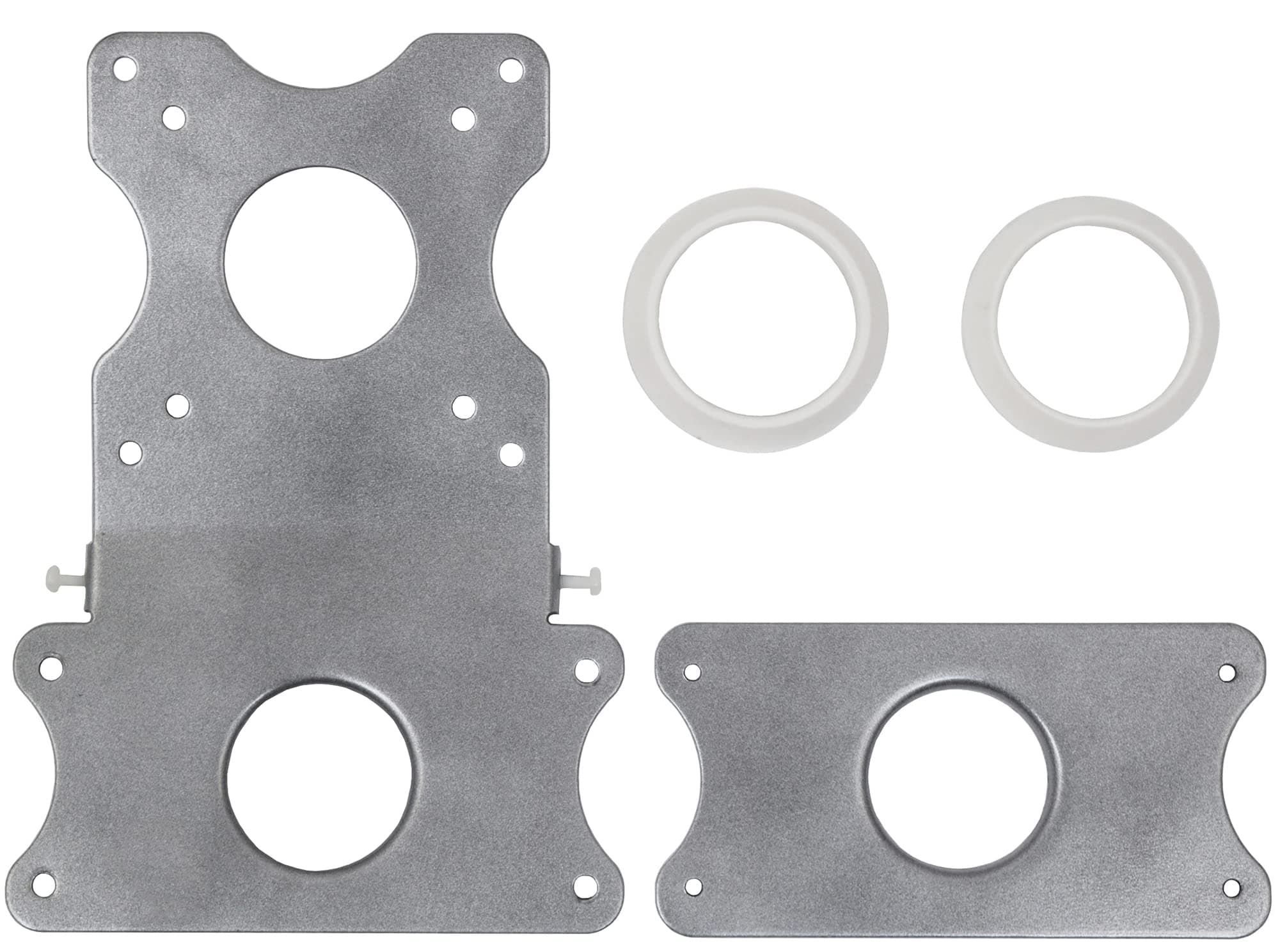
🖥️ Elevate your iMac game—mount, move, and master your workspace like a pro!
The VIVO Adapter VESA Mount Kit is a precision-engineered bracket set designed exclusively for Apple 21.5" and 27" iMacs from late 2009 through 2020, including 5K Retina models. Made from lightweight yet durable steel alloy, it supports standard VESA mounting patterns (75x75mm & 100x100mm) and features a patented adapter ring system for quick, hassle-free installation. This kit empowers professionals to upgrade their ergonomic setup by enabling compatibility with a wide range of monitor arms and stands, enhancing workspace flexibility and comfort.


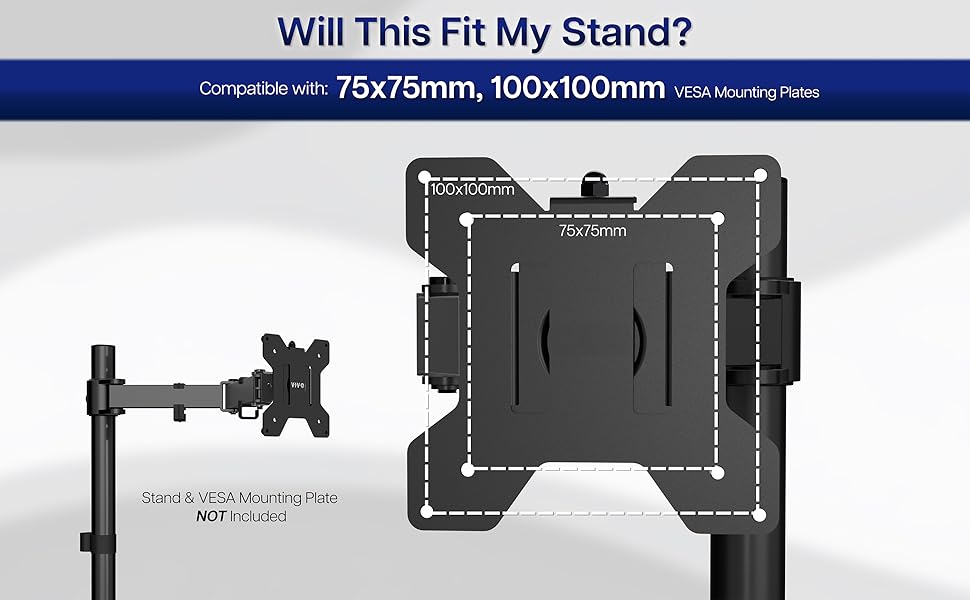

| ASIN | B00RW9F336 |
| Best Sellers Rank | #202 in Computer Monitor Stands |
| Brand Name | VIVO |
| Color | Silver |
| Customer Reviews | 4.5 4.5 out of 5 stars (1,559) |
| Finish Types | Metallic |
| Global Trade Identification Number | 00641020644654 |
| Item Depth | 9.49 inches |
| Item Dimensions | 9.49 x 6.61 x 1.5 inches |
| Item Weight | 1.6 Pounds |
| Manufacturer | VIVO |
| Manufacturer Part Number | STAND-MACB |
| Manufacturer Warranty Description | 3 Year Warranty |
| Material Type | Alloy Steel |
| Model Number | STAND-MACB |
| Mounting Type | Wall Mount |
| UPC | 641020644654 |
P**Y
It works great!
I need to turn my 27" imac 90 degrees to portrait orientation and back to landscape quickly and easily. Just as other reviews have mentioned, the bolts do not fit. You will need to buy your own. The stand I use is this one: Single Monitor Stand Freestanding 27-43 Inch Monitor Arm Curved Screen Monitor Mount Tempered Glass Base Adjustable Motion Tilt -15° to 10° Swivel ±45° Rotation 360° Weight Capacity 77lbs HT05B-003. The slots that work perfectly on this stand are six and seven from the top. Even though the bolts did not fit I am giving it a 5 star rating because the price was low.
S**N
Great solution! Well put together
GREAT! GET ONE! This a great solution to the ergonomics of a monitor arm that we Mac users are pretty much denied. This device is well-made and nicely priced. It's rock-solid, and fit my 21,5" Mac like a glove after a five-minute, just-me install. Came with every bit of metric hardware needed, and then some! Don't be left out of all the benefits of a monitor arm. This is a quick and easy fix for those of us whose monitor height decisions are limited by Apple's wisdom and whether or not we can still find a phone book lying around. (Kids, ask your parents.) There are lots of great monitor arms out there (my choice: Jarvis arm by Fully.com, $99. Great range of motion, smooth movement, and solid feel). You'll see in the photos that I added a couple of adhesive foam dots to the back of the monitor where, in certain positions that you'd likely never use, the screws from the clamp could contact the back of the Mac. Maybe they could have included some nylon cap nuts? I still rate this Five Stars and 100%, on suitability for purpose, relative ease of installation, and build quality. Side by side with my factory VESA Mac, you see the lift point is about the same, so monitor arms work fine with this. A few years back, I had the forethought to special order a Mac with a VESA mount. But I've since upgraded that machine, which meant I had a more powerful Mac that was less ergonomic. Now I have the best of both worlds. Soooo worth the money! I did consider building something myself. For $20, this was a better solution. Just buy it.
S**.
Makes up for Apple's glaring omission on the iMac
There was a time when Apple made a VESA mounting kit for the iMac. Installing it involved removing the front glass bezel, removing the screen, removing the screws that held the aluminum stand in place and then attaching a mounting plate, all from the inside of the case. It was a job best left to an authorized Apple service center, yet that didn't stop me from doing it myself and worrying that I'd end up breaking my iMac. Perhaps some people did end up damaging their iMacs, as Apple discontinued the mounting kit and removed the option on all subsequent models until, as it turned out, just after I bought my current one. Even still, it's a build-to-order option and existing iMacs can't be retrofit with the requisite hardware. I love Apple's sense of aesthetics but as an engineer, recognize that aesthetics should never compromise function and I strongly believe Apple should have provided what every other computer manufacturer has - a simple means of removing the existing stand and attaching a VESA mount to the iMac. Fortunately, although the stand can't be removed, VIVO has provided the next best thing. It literally took me less than five minutes to attach this mounting bracket to my iMac using the included hardware, and to attach it to a VESA arm. The mounting plate is sturdy, secure and integrates seamlessly with the existing stand without compromising function. I've seen many iterations of VESA mounting attachments for the iMac and most of them look pretty flimsy, or difficult to attach. The VIVO kit is neither, and goes a long way to make up for one of Apple's shortcomings.
N**L
Works really great! Sturdy and Strong!
I bought this to put my 27 inch iMac on the wall and it honestly worked really great, there was a bit of process to connecting it to the wall mount, just a note if you are using a tv mount make sure that the mounting plate is not larger than 200mm in size or it won't fit on the back because of the angle that the mount attaches to the iMac. Other than that its a very simple and easy install, directions are kind of crap however its not too difficult to figure out. The trickiest part ws using the nylon leveling screws which I suggest installing first as they gave me a it of trouble, my holes were a bit threaded wrong so I used one of the other metal screws and kind of retapped the holes then pulled those out and installed the nylon screws which went it really easy after that.
B**L
Great Product!
This product solves an issue that Apple should have dealt with,namely VESA wall mounting ANY iMac easily. My iMac is 2012 and removing the stand in order to install a VESA mount is not trivial for this model according to my local Apple authorized service center. Apparently, newer models are better. Rather than spend a great deal of time and money to disassemble the iMac to install a VESA mount (available at Monoprice, check Amazon too), I opted for this product. The bracket solves this problem perfectly. In addition, with the iMac off the desk, the stand bottom can be used to hold something. I have used the stand bottom to attach a USB hub. You must, of course, use a VESA arm of adequate weight rating and compatible with the bracket. Cable management can be done using TV wall mounting products. I purchased mine from a local retailer but suspect Amazon carries this as well. How refreshing to find a product that does exactly as advertised and is well made.
S**C
2dehands echter 2 dezelfde adapter ringen erbij. Niet echt handig, blijkbaar wordt hier niet op gecontroleerd
I**A
Well engineered
M**Y
Perfect. Just what I needed to mount my 2020 27” iMac to the wall with the stand still attached
I**O
Ho acquisttato questo Kit per sollevare il mio iMac 21,5 del 2009 e collegarlo ad un braccio mobile. il Kit arriva ben confezionato e con tutto l'occorrente che necessita pe il montaggio. Un po laborioso ma ben indicato nelle istruzioni. Ho atteso un po prima di recensirlo per vedere e valurare bene il frizionamento ed eventualmente la sua resistenza al peso e devo dire che non ho dovuto fare alcune regolazione nel tempo. Ottima soluzione per chi ha la necessità di sollevare il proprio iMac.
M**I
This product is well designed for Mac. It is exactly fit to my iMac and I am using it well.
Trustpilot
Hace 1 mes
Hace 2 meses