We remain fully operational. Our teams are working around the clock to ensure your deliveries continue safely.

Descargar la aplicación


Servicios al cliente
Sobre nosotros
Copyright © 2025 Desertcart Holdings Limited
Descargar la aplicación
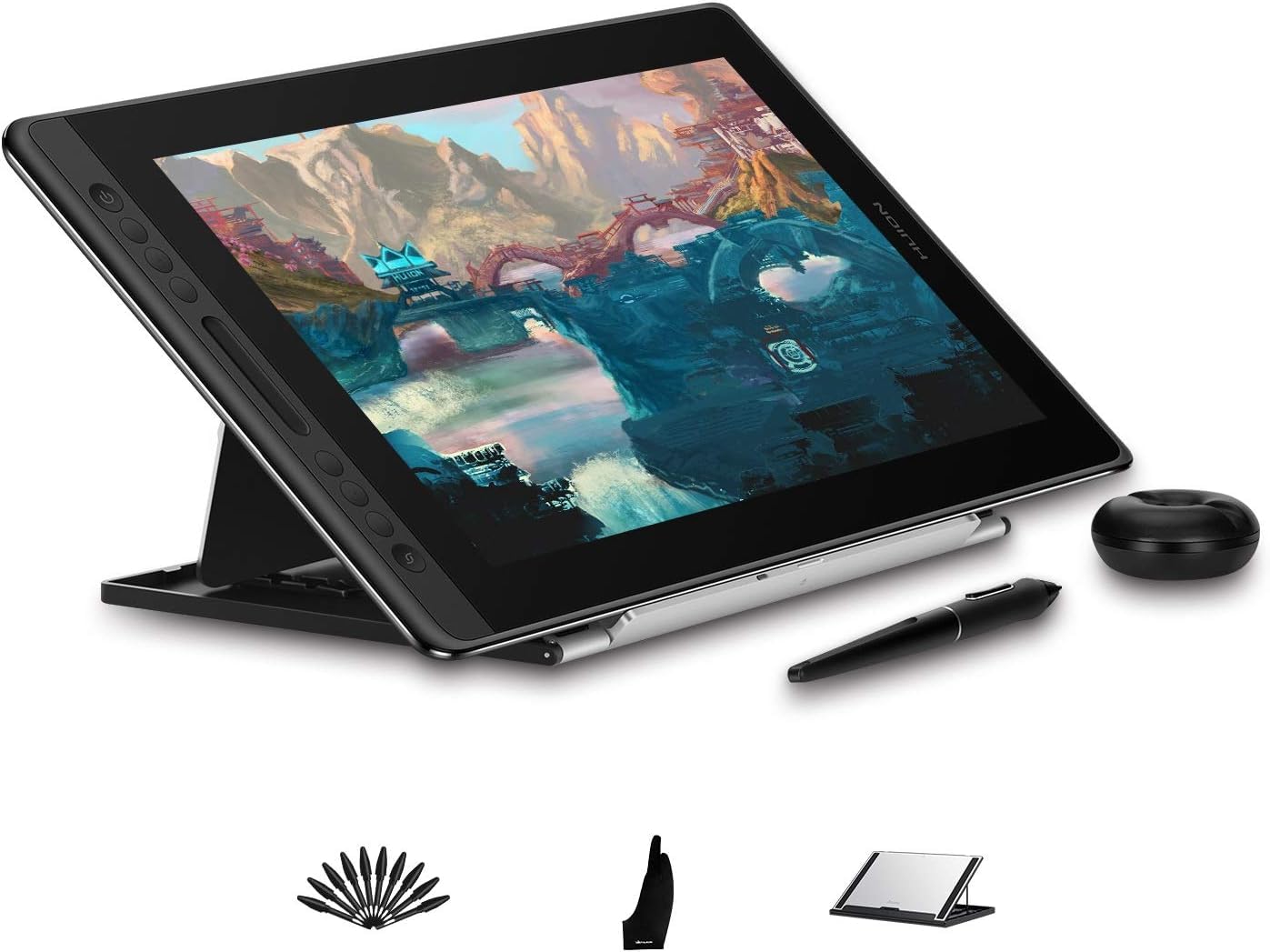
🎨 Elevate your creativity with precision and color that commands attention!
The HUION KAMVAS Pro 16 is a 15.6-inch full-laminated drawing tablet featuring a vibrant 120% sRGB color gamut, 8192-level pressure-sensitive battery-free stylus with tilt support, and customizable express keys with a touch bar. Its anti-glare glass and adjustable stand optimize comfort and visibility, making it a premium yet budget-friendly choice for professional artists and designers seeking high performance and workflow efficiency.


| ASIN | B07RT2X5NR |
| Active Surface Area | 437.8 x 251.2 mm |
| Best Sellers Rank | 13,049 in Computers & Accessories ( See Top 100 in Computers & Accessories ) 43 in Graphic Tablets |
| Box Contents | Pen Nib Clip, USB Cable, Stylus, Pen Holder, Cleaning Cloth, Power Adapter, Glove, Quick Start Guide, Stand, Pen Nibs (10 Points), Point Clip, 3-in-1 Cable, Foldable Stand ST200 |
| Brand | HUION |
| Brand Name | HUION |
| Colour | black |
| Compatible Devices | Desktop, Laptop |
| Connectivity technology | USB |
| Country of Origin | China |
| Customer Reviews | 4.3 out of 5 stars 252 Reviews |
| Item Dimensions L x W | 25.1L x 43.8W centimetres |
| Item Weight | 1.2 Kilograms |
| Manufacturer | HUION |
| Model Name | Kamvas pro 16 |
| Model Number | Kamvas pro 16 |
| Model name | Kamvas pro 16 |
| Native Resolution | 1920x1080 |
| Network Connectivity Technology | USB |
| Operating System | Windows, macOS |
| Operating system | Windows, macOS |
| Pressure Sensitivity | 8192 Levels |
| Pressure sensitivity | 8192 Levels |
| Product Features | Anti-Glare Glass |
| Screen Size | 15.6 Inches |
| Special feature | Anti-Glare Glass |
| Specific Uses For Product | Designing |
| Target Audience | Teacher |
I**A
A High-Quality, Budget-Friendly Alternative to Wacom
I purchased the HUION KAMVAS Pro 16 Drawing Tablet, and I must say, it's an impressive piece of technology. As a previous user of a Wacom tablet, I find the KAMVAS Pro 16 not only holds up in comparison but exceeds expectations in many areas. The full-laminated HD screen is a standout feature, offering vivid colors and a glare-free experience even under bright light. The color accuracy and wide viewing angle make it ideal for detailed artwork. The battery-free stylus with its high pressure sensitivity and tilt function provides a natural and seamless drawing experience, comparable to much more expensive models. The build quality is solid, with a sleek and sturdy design that feels premium. The tablet is lightweight yet durable, and the express keys and touch bar are incredibly useful for streamlining my workflow. Setting up the tablet was straightforward, though ensuring no other brand's drivers were installed was crucial for smooth operation. It's compatible with my Windows setup, and the driver installation was hassle-free. In terms of value for money, the KAMVAS Pro 16 is a steal. It offers features and performance on par with high-end models at a fraction of the price. The only minor drawback I've noticed is the need for a specific setup to use it without the monitor turned on, but this is a small issue in the grand scheme. Overall, I highly recommend the HUION KAMVAS Pro 16 to both professional artists and hobbyists. It's an excellent, budget-friendly alternative to more expensive brands, without compromising on quality or performance.
M**S
So far, so good.
Having used an old Wacom 12" Cintiq for years, with it's clunky psu, junction box and leads, this is much nicer. One detachable cable, bright screen, easy to set up, and decent quality. Also, this is actually only about an inch wider than the Wacom and considerably slimmer. The separate stand is handy, and folds completely flat, and can still be used thst way to save desk space, although the tablet does have wide grippy pads on the rear for uding flat. The pen is lighter than a Wacom pen, with no eraser button, and flatter buttons. It seems to function just as well regardless, and I note that a replacement pen is way cheaper than the Wacom pens. I see no downsides to this tablet so far, an the only thing I would like to see changed, is a switch to use it without having the monitor turned on. At present, you must unplug theHDMI cable, or disable the monitor in Windows. You could just plug in a USBC lead in rather than the 3-way cable, but the tablet end is recessed, and you need a cable with a slim plastic surround in order to fit it into the slot in the tablet.
J**E
Nicer than the Pro Pen 2 from Wacom
10 years ago, I never would have imagined writing a positive review for a non-wacom graphics tablet. But Huion have made a dammed nice product that's makes you question wacoms prices. My previous tablet was an intuos 5 small, which I never upgraded as wacom never refreshed the hardware until last year. And I hated their new pen - it felt like they purposely designed the nibs to wear down with minimal use and the buttons on the side feel really weak when pressed. Huion, despite being a cheaper brand, has made a MUCH nicer pen for their kamvas pro. The clicks of the side buttons seem overly loud at first but feel responsive. And the much thicker nib feels like they aren't trying to rip me off with nib replacements like wacom. The screen itself feels lovely to draw on, it's not glassy like the iPad or surface pros I've also drawn on. For the most part, clicks register in all the right places. For me, this feels great to work on. However it's important to note this device has trouble with tracking the pen right at the edges of the screen, but I rarely go THAT far out that it's too much of an issue. I also don't like the slide at the side as much as wacoms wheel, but I'll get used to that. So... Good job, Huion. You've converted a wacom user of near 20 years. I look forward to spending more time with this device. As a disclaimer, as of writing this review I've only had it a short time. I can't comment on the longevity of the device or its nibs (just they certainly look stronger than wacoms pro pen 2 nibs...). But so far it looks promising, and will save you a tonne of money if you're looking for a pen display on a budget. This kind of device is not for people new to digital art, and id recommend a much cheaper kind of graphics tablet first.
L**L
Great device, reasonably cheap, just hope reliability is OK.
Daughter very happy with this. Initially thought I'd download drivers from UK huion site so theybwere the latest ones, took an age to install and pen didn't work. After another age uninstalling I went to the huion global site and downloaded different drivers, totally different (newer) version number, installed rapidly and all good. Previously had a Huion GT-190, the backlight failed after 18 months, support was useless but using TV backlight repair videos I repaired it for very little (about £15.) Just hope this lasts longer before developing a fault.
T**S
Fantastic
I'll keep this review short! Whilst I can't compare this with a Cintiq (which I've never used), I bought this as an upgrade to my Wacom Intuos, and I don't think I'll look back. Value : I bought this with a 24% discount, but even at full price it's a steal compared to Wacom products which are still aimed at people who can write off the cost against tax. The screen is lovely with rich colours. The longest part of the setup was fiddling around with extend display settings to ensure that the Kamvas display was ramped up to the highest resolution. Other than that, it was plug and play, though allow up to an hour to tinker with settings. I'm using this with a medium spec laptop that's a refurb older lenovo business model with no HDMI port. However the Kamvas works perfectly with either a display port adapter or vga adapter (both tested - using an official lenovo mini displayport adapter). Performance is great. The stylus measures up to the one on my Intuos, though I found I needed to adjust pressure sensitivity to compensate how I was holding it at an angle. I'm a lefty, and the display and smart buttons are all cusomisable if you're flipping the tablet. I'm using this with PhotoShop, Krita and Rebelle3 with no problems. Build quality is lovely. It's lightweight but feels solid. It's more metal and glass than plastic and feels like a high spec device. I'm using it on my lap rather than on a desktop and it's really comfortable for long deawing sessions. Overall I really can't fault it for the price.
D**E
Really super impressed!
Simply impressed by the overall quality of this product. I've owned various types of Wacom Cintiq in the past (both 13hd and 22hd) and this Huion one is really on par if not better! No parallax at all between the pen tip and the drawing surface. Great response and the tablet is incredibly light and sturdy at the same time, way less clunky than the Cintiq counterpart! And all of this at a fraction of the price. I don't think I'll buy a Cintiq anymore, Huion has been making huge progress in their technology in the last few years, I'm really excited to see what they will do next!
C**R
Sadly, it didn't work
I recieved the tablet on time, as expected from amazon's delivery service. The tablet was packaged in a big box inside a cardboard box for protection. The actual Huion box is okay, not that attractive, but nothing to say 'no' to. The tablet itself looks good quality, it's big, sturdy and feels nice to hold. The accessories, however, have a much cheaper feel to them. Immedietly, when I saw the stand, pen and pen holder, I was no so impressed. The stand is made of aluminium with a plastic flat part at the bottom. The plastic part is really thin and the adjustable part of the stand feels quite flimsy. There is a part that you can pull out to hold the tablet in place and when I pulled it out and placed the tablet on top I noticed the tablets edge is too big for it. It's not that bad, but if you lean on it, the tablet can easily fall off the stand. The pen itself feels 'okay'. Iv'e seen better pens. The pen holder - donut - is made of cheap plastic which is quite thin and doesn't have a premium feel to it. There are some extra pen nibs and a nib remover inside which is the nicest part of it. There is a 3 in one cable. The usb-c goes into the tablet, then there is an HDMI and usb that go into your device and the last one into your wall socket. Not that good for portability as it does not take power from your device at all unlike some other brands like xp-pen where you can chose to plug it into the wall socket or for your tablet to take power from your laptop or computer. When I tried to plug the cables in and use the tablet, the tablet turned on to show the Huion logo and that's it. It simply showed a 'no signal' sign. I tried to re-connect the cables, use extenders etc, and it turned fully on for no more than one minute where I managed to test the pen for a few seconds and then turned off. I can't really say how the pen was, all I can say it that is that the curser was directly beneath the pen, which is something good. (If the tablet works, of course) Since the display did not work, it seems like the tablet I recieved was defective so I returned it. UPDATE: Still waiting for a refund. It's been two weeks already.
C**G
NIce Tablet
This does seem like a nice tablet, I stupidly thought this was the 2.5K version I was getting silly me. Due to when I went to Huion website, there is no mention of there ever being a HD version, the only one in there of the 16inch size is the 2.5k version. Also when I looked for video reviews the only ones that came up were the 2.5k version. So I was a little upset with myself It was the 1920 version and not the 2.5K version. That was my fault, however, the device is lovely, and I am still pleased with it. Just would have preferred the higher res version, for the money. But these are expensive things I am finding. It's a great device and good value for money still i guess, I will stick with it and see how I go.
Trustpilot
Hace 2 meses
Hace 4 días