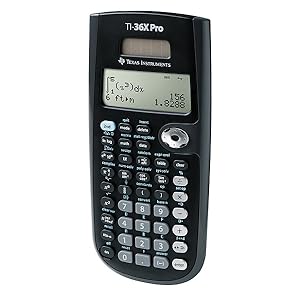
⚡ Master complex math with the TI-36X Pro — your sleek, exam-proof STEM sidekick!
The Texas Instruments TI-36X Pro is a high-performance, non-graphing scientific calculator featuring a MultiView display and MathPrint technology for clear, textbook-style math expressions. Ideal for high school through college STEM courses, it supports a wide range of functions including algebra, calculus, trigonometry, statistics, and unit conversions. Solar-powered with battery backup, it’s exam-approved where graphing calculators are prohibited, making it a reliable, versatile tool for students and professionals alike.
| ASIN | B004NBZB2Y |
| Best Sellers Rank | #405 in Office Products ( See Top 100 in Office Products ) #3 in Scientific Calculators |
| Brand | Texas Instruments |
| Calculator Type | Engineering/Scientific |
| Color | Black |
| Compatible Devices | TI 36X Pro |
| Customer Reviews | 4.8 out of 5 stars 22,548 Reviews |
| Display Type | LED |
| Enclosure Material | Plastic |
| Global Trade Identification Number | 00033317029860, 03243480103572, 03243480104739 |
| Item Dimensions L x W | 7.22"L x 3.27"W |
| Item Height | 0.1 inches |
| Item Weight | 0.12 Kilograms |
| Manufacturer | Texas Instruments |
| Model Name | TI-30X |
| Number of Batteries | 1 Lithium Metal batteries required. (included) |
| Power Source | Battery Powered |
| Screen Size | 3 |
| UPC | 197274678803 012303264850 527645823516 763615999007 778888085951 999997114824 791583761272 033317203666 734911329478 666672977165 640206706346 803982780126 806293526162 033317070251 872182668381 080175314317 033317029860 641438187811 523160308910 809302183899 999997491543 172302617702 012951710266 168141372360 067224971325 809385664070 702658636043 801593400624 638458801209 809186269108 1631207457… |
| Unit Count | 1.0 Count |
| Warranty Description | Contact Manufacturer |
R**J
Reliable, Powerful, and Perfect for STEM Students!
The TI-36X Pro is hands-down one of the best non-graphing calculators out there. I’ve been using it for engineering coursework, and it handles complex math, statistics, and scientific functions like a champ. The display is super clear, and I love the multi-line screen that lets you see inputs and results at the same time — way better than older models. It's intuitive once you get used to the layout, and the functionality is top-notch for everything from calculus to matrix operations. Also love that it’s permitted in exams where graphing calculators aren’t allowed — huge bonus! Solid build, sleek design, and definitely worth the investment if you're in any technical field.
G**I
Helpful school tool
My son uses it everyday at school. It is very helpful to him and has so many great features. His teacher even told him it was a great device. Excellent price.
C**H
Excellent for work!
I use this calculator every day in my field of work (surveying) and I don't think I will use another model or brand for quite a while. While I dont utilize every aspect of the calculator, I find that the value storage and four-line screen make a lot of what I do very convenient. The calculator has a pretty decent memory bank if you ever need to go back through your calculation history. My calculator has been exposed to rain, sweat, dust, cold, and heat and is still trucking. I leave it on my dash in the middle of summer under a hot Texas sun and have yet to run into any issues. The calculator is large enough that I'm not fat-fingering keys, but small and slim enough to throw in any pocket comfortably. Great tool!
S**G
Great calculator. Switched from using a TI-84 to this (TI-36X)
This calculator packs a punch, and I love it. I used to primarily use a TI-84 as a physics major, but I had to purchase this calculator (TI-36X) for an engineering course. I was surprised to discover how useful it is, so I now use this primarily for both lab and lecture courses. It is easily portable and does not require a charging cord, so I never have to worry about not having a charged calculator for an exam. There are several useful functions I use often--the definite integral function being one of them. This calculator can also solve simple systems of equations. These are great for double checking hand calculations during an exam or lab. The rational number function is also great, and it will provide answers as fractions that can be turned into decimals. I am also able to switch back and forth between scientific and engineering mode, which is also very convenient for expressing answers in SI units with prefixes. Although it may seem like a "downgrade" from my TI-84, I really do not see it that way. I like having a simple calculator for exams and daily use. Compared to my TI-84, I am able to crunch numbers more quickly, in my opinion. Of course, I still use both calculators, but this one is my favorite of the two for these reasons. The only problem I have really ever experienced with this calculator is that there is a limit to the number of "entries" that you can type at once. I ran into this problem while computing several exponentials at once, but things can always be broken down into separate calculations.
D**G
Solid middle school and early high school calculator before moving to graphing calculators
This is an easy-to-use calculator with plenty of functionality. Quite feature-packed, including a pretty print Fractions display. However, the arrow keys would have been more useful if they were independent buttons, and the LCD could be higher contrast to make it easier to read in dimmer lighting. This is a good calculator before moving on to something more advanced like a graphing calculator. With this calculator, you can perform basic levels algebra, including functionality for solving multiple linear equations and root finding for polynomials.
T**R
Texas Instruments Quality, Light Weight, Reasonable Price
I bought this calculator when my old machine shop calculator died from being dropped too many times. There are a few things to note about this calculator for this type of calculation. And since I'm a retired mathematics teacher, I know a thing or two about calculators in education. First, this seems like a great choice for use in a machine shop. I need a high quality and durable calculator with trigonometric functions. This calculator is all that and more. The multi-line display is also convenient for seeing a record of previous keystrokes. Its quite a bit lighter than the old graphing calculator I was using, and I'm hoping that will make it more durable--lighter objects hit the floor with less force than heavier ones. This calculator has enough capability for educational use IF you don't need (or are not allowed to use) graphing or computer algebra functions. It is not a graphing calculator. And it won't do computer algebra operations such as solving equations, computing derivatives, etc. It's probably not the best choice for linear algebra (matrices, vectors, ...) or for advanced statistics. But it does have all the numerical functions you would expect to find in a classic scientific calculator. Last note is that this calculator has a snap-on lid instead of the old slide-on style I'm accustomed to (like on the TI-84). It's too early to say whether I like it more or less. Its definitely faster: just clip it on or off. But will it hang-on or survive as well as the old slide-on style if you occasionally drop it on a concrete floor?
T**P
Civil Engineering Student
I love this calculator!!! I've had it since Sept/2011. Before this calculator I had the TI-89 and loved how it could do anything I could want it to do. With knowing that I would be unable to use this calculator on the FE, I decided to buy one that they would allow so I would be use to it before the exam. I originally took the advice of a friend and went with a the Casio 115es. Being that I have had Ti products my whole life this was a huge learning curve. The calculator was nice but was not that user friendly! (almost felt like I needed a minor in programming to work it!) I was told that it would solve for variables but never could actually learn how to get it to do it. One day a friend in class showed me his Ti-36x pro and I was amazed at how easy it was to use! It did alot more then the Casio and was almost like having my Ti-89 back!! To be honest its easier then the 89 to operate and still solves for variables (along with alot of the other same functions). I have showed mine to my fellow classmates and they also fell in love with it. They always end up having me order them one. So far I have ordered 15 of these calculators and have not had one complaint out of any of them. I have tried almost all calculators allowed on the FE and this one is far ahead of the pack!!! Some Pros: The Biggest Pro is: Its pretty user friendly after you get sometime on it The ability to scroll through old computations See math expressions, symbols and stacked fractions exactly the way they appear in textbooks. Has nine physical constants programmed into it (like:Gravity, Speed of Light, Avogadro's number, Ideal Gas Constant..) Has 18 Metric/English conversions Does integration and derivatives Gives you answers in decimals by default (unlike the Casio) but will convert to fractions If you turn it off and back on it still has your old calculations! (the Casio erases when it turns off!) If you are a TI user, you can easily adapt to this calculator. For the price you can't beat it!! I noticed one person gave it 2 stars. Let me just say, out of the 15 I've ordered for people, I have yet to have one complaint!!! Cons NONE!!! If you are not allow to use a graphing calculator in your classes or you will be taking the FE one day, I recommend this calculator. It blows any other Scientific Calculator out the water!!!
T**D
Excellent FE Exam approved option
I love this calculator. I grew up with a TI-83 Plus and believe the TI-36x Pro is the best one for the FE Exam. I tried the Casio fx-115ES Plus for 9 months, per the advice of an excellent prof (mechanical and civil background), and while it has certain advantages I find the 4 line display on the TI-36x Pro alone is reason enough to use it instead. I can complete complex problems more efficiently and with less errors than with the Casio - it is easier to backtrack, check what was entered before, and select equations/numbers from previous lines to be carried into new calculations. With the Casio I would often accidentally clear the screen with the "on" button, out of habit, which deletes the previous entries from memory; even when this was not the case I found it difficult (impossible?) to paste prior entries into current calculations. Also, the Casio's list of less-common scientific constants must be referenced to a numerical list of symbols (no names given) on the cover, while the TI-36x Pro lists constants with symbols/names spelled out in the menu itself - much more convenient. This calculator can accept up to 3x3 matrices and can solve systems of linear equations with three unknowns using the entry [A]^(-1)[B]. The way it handles complex numbers is also very convenient, allowing for easy conversion between rectangular and polar form. The only major downside I've discovered so far is, in matrix mode, the TI-36x Pro cannot accept imaginary numbers as inputs. This is true of many other calculators as well (including the Casio fx-115ES Plus). It's problematic when analyzing AC electrical circuits using mesh (KVL) or nodal analysis (KCL). [Update: The TI-89 Titanium can handle these complex systems with cSolve (but is not FE approved).] One annoying aspect: there is only one button for storing answers as variables, so if you want your entry to be stored as anything other than "x," you have to press the variable button repeatedly until the desired letter shows up (for example, for "b," you have to press the button 6 times, which cycles "x > y > z > t > a > b"). [Update: Discovered 2nd -> Recall lists all variables - much faster for recalling them than cycling is. As far as I can tell, however, first-time storage (###->var) does require cycling as stated above.] This is only a minor qualm though; the overall benefits of this calculator easily outweigh the few negative aspects.
Trustpilot
Hace 3 días
Hace 1 mes